


%20(1).avif)
.avif)
iPlum is the best secure texting app for healthcare, with a free client (patients) account that enables them to engage in bidirectional texting via a secure channel, separate from standard SMS or MMS.
More iPlum’s HIPAA-compliant texting in the sections below.
Other options include Klara, OhMD, TigerConnect, and Nextiva.
In this article, we’ll zero in on what these apps offer for patient texting, protecting health information, meeting compliance requirements, and meeting the day-to-day communication needs of healthcare practices.
Let’s dive in.
Table of Contents
1. Best secure texting app for healthcare
2. What should you consider before choosing a healthcare messaging app?
3. Best secure messaging healthcare app—frequently asked questions (FAQs)
Best secure texting app for healthcare
Not all HIPAA-compliant messaging apps are worth your attention. That said, the five options listed below offer secure messaging solutions for healthcare organizations. However, how they do it is different.
In this section, we’ll go over each option to determine which offers the best protection to sensitive patient data and, by extension, value for your money.
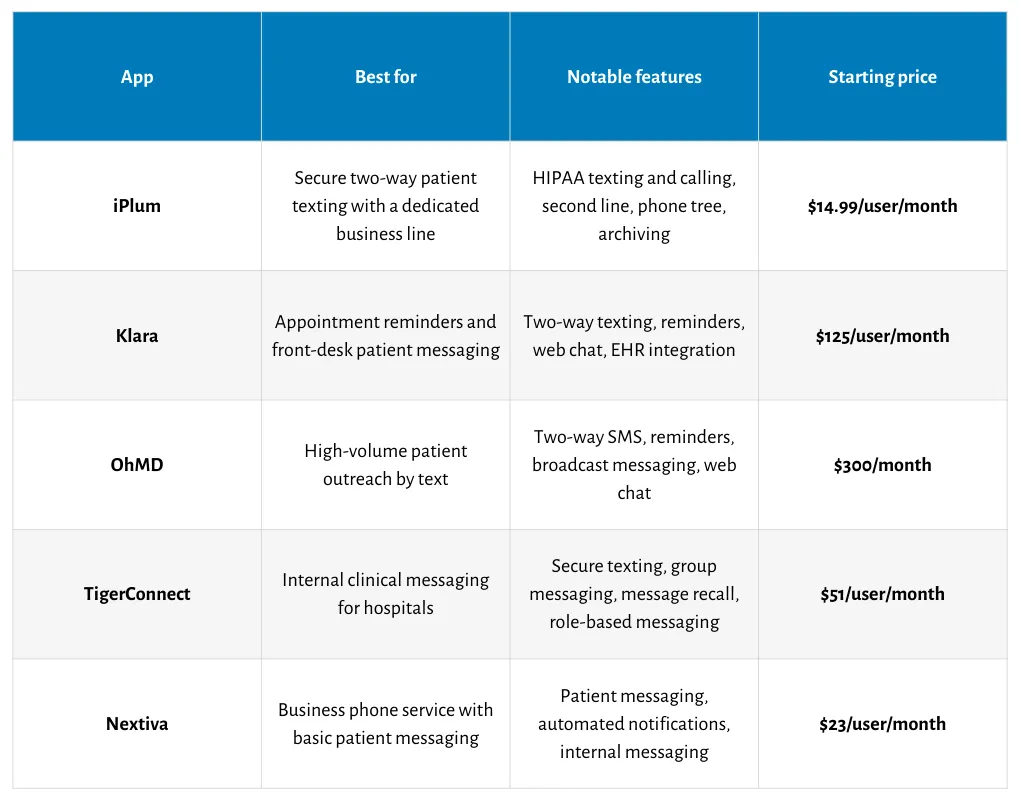
Here’s a quick comparison to get us started.
iPlum
iPlum boasts a capability you won’t get in most patient communication apps—a free client account for secure, bidirectional patient texting.
With this account, patients can confidently share PHI, knowing their data is safe. The account gives healthcare professionals a protected way to communicate with patients. In addition, it reduces the risk that sensitive data ends up in regular SMS or MMS messages. It also makes it easier to continue patient conversations in a HIPAA-conscious setting.
Beyond texting, iPlum gives healthcare practices a HIPAA-compliant phone system with calling, voicemail, shared number, Do Not Disturb mode, a signed BAA, an advanced phone tree, business hours, administrative controls for business use, and a host of other features.
It also gives providers a dedicated business number on their existing mobile device, which helps separate work communication from personal communication.
What’s more, practices can port existing numbers, set up multiple users, and use archiving and logs for recordkeeping.
- Free client account: Patients can text through a secure channel instead of standard SMS or MMS.
- HIPAA-compliant calling and texting: iPlum offers secure texting, calling, and voicemail for healthcare communication.
- Second mobile line: Providers get a dedicated business number on their existing mobile phone.
- BAA and encryption: HIPAA mode provides BAA availability and encryption for protected data.
- Advanced phone tree and unlimited extensions: Practices can set up call routing, greetings, and extensions for front-desk and provider workflows.
- Archiving and compliance records: Up to 1 year of text backup, archiving, logs, and voicemail transcription are available.
- Group messaging: Lets practices message multiple staff members at once for coordination, scheduling updates, and operational communication tied to patient care.
Pricing
iPlum secure texting is available with the Professional plan, priced at $14.99 per user per month.
.webp)
Klara
Klara is a patient messaging platform built around texting, appointment reminders, web chat, call-to-text, and EHR integration.
It allows healthcare providers to convert their existing number into a textable number. That way, patients can text the practice instead of a staff member’s personal phone. It also gives patients a way to confirm, cancel, or reschedule appointments by text, which can reduce phone volume and missed visits.
For messages containing PHI, Klara sends the patient an SMS with a link to Klara’s secure platform, where the message content remains encrypted.
However, Klara is expensive considering you can get similar features for less with an alternative iPlum.
Key features
- Two-way texting: Lets patients start and continue conversations with your practice.
- Appointment reminders: Sends reminders and allows patients to confirm, cancel, or reschedule by text.
- Web chat: Lets patients message your practice from your website.
- Call-to-text: Allows callers to move a phone call to a text conversation.
- EHR integration: Sends relevant patient messages into the EHR and reduces manual entry.
Pricing
Klara’s pricing starts at $125 per user per month.

OhMD
OhMD's texting features include appointment reminders, follow-ups, broadcast messages, web chat, and two-way SMS.
It enables healthcare providers to text patients from their existing numbers, making it easier to manage routine patient communication from the front desk.
OhMD aims to help users reduce phone volume by moving routine patient conversations to text. With OhMD, patients can use texting for scheduling, reminders, and general questions. In addition, OhMD connects with EHR systems, so staff can add patient conversations to the chart when needed.
That said, OhMD is one of the most expensive HIPAA-compliant texting phone services. OhMD alternatives like iPlum offer a more reasonable price while providing all the essential features for secure patient texting.
Key features
- Two-way SMS: Lets practices send and receive patient text messages.
- Appointment reminders: Sends reminder texts for upcoming visits.
- Broadcast messaging: Allows practices to send a single message to multiple patients.
- Web chat: Lets patients start a conversation from the practice website.
- EHR integration: Allows staff to save patient conversations to the chart.
Pricing
OhMD pricing starts at $300 per month.

TigerConnect
TigerConnect offers HIPAA-compliant messaging software for healthcare organizations that need secure texting for internal communication and patient outreach.
It provides healthcare facilities with end-to-end encryption, PIN locks, admin controls, and auto-deletion of messages. You can also attach photos, videos, voice notes, and files to your texts.
In addition, TigerConnect allows staff to text patients one-to-one or in groups. Notably, patients don't need an app or a login to join the conversation. Other capabilities include priority messaging, delivery confirmation, role-based communication, and patient context tied to the EHR.
That said, TigerConnect places greater emphasis on clinical communication within hospitals. It may not get the job done very well if you’re in for an app that supports a dedicated number with a separate, secure channel for bidirectional patient engagement.
Key features
- Secure texting: Sends HIPAA-compliant messages for clinical and patient communication.
- Group messaging: Allows you to send messages to multiple staff members in one conversation.
- Delivery confirmation: Enables you to see when messages are sent, delivered, and read.
- Message recall: Lets you remove a message or attachment after sending it.
- Role-based communication: Allows you to find and message clinicians by role.
Pricing
TigerConnect plans follow a fixed-price, fixed-quantity subscription model starting at $51 per user per month.
Nextiva
Nextiva offers voice, SMS, and internal messaging for medical facilities. You can use it for appointment reminders, patient updates, prescription-related notices, and other routine communication.
For medical providers, Nextiva’s appeal lies in its extensive feature set, which can be ideal for large healthcare facilities. On the flip side, for smaller providers or solo practitioners, a bloated tool suite could mean paying for features you may never use.
Plus, as with the other options in this comparison, Nextiva doesn’t offer a dedicated, secure channel for two-way texting with clients that is not SMS or MMS.
Key features
- Patient messaging: Can be used for appointment reminders, updates, and care-related texts.
- Business phone system: Provides healthcare organizations with a broader communication platform beyond texting.
- Automated notifications: Supports routine outbound messages such as reminders and status updates.
- Internal messaging: Lets staff communicate within the same platform used for patient outreach.
Pricing
Nextiva pricing starts at $23 per user per month.
What should you consider before choosing a healthcare messaging app?
There’s more to choosing a secure texting app for patient communication than comparing prices.
You need a platform that protects records, supports daily clinical work, and enables staff and patients to communicate efficiently and securely.
Here’s what you need to look for:
HIPAA readiness
Confirm that the vendor signs Business Associate Agreements and explains how the service aligns with HIPAA regulations.
The provider should also state how its HIPAA-compliant messaging protects clinical exchanges.
Knowing what you’re paying for reduces legal risk, sets expectations early, and provides administrators with a firmer basis for procurement reviews, policy decisions, internal approvals, and vendor comparisons.
Encryption
Review how the app protects patient information during transit and storage.
End-to-end encryption adds a stronger barrier against interception when clinicians discuss treatment, scheduling, or follow-up needs.
That said, encryption details should appear in vendor materials, admin settings, and contract language so you can verify what data receives protection at every stage, every day.
Access controls
Look for role-based access controls that limit rights to authorized users.
Robust permissions reduce accidental data exposure, especially in busy offices where several staff members share communication duties.
Audit logs also matter because they record message activity, user actions, and account changes, providing compliance reviews with a factual record to examine later during audits.
File exchange
Ask whether the platform offers secure file sharing for forms, images, lab documents, or insurance paperwork.
Clinical staff frequently need more than plain chat. Secure exchange reduces risky workarounds, curtails attachment sprawl in email inboxes, and provides providers with a safer way to move sensitive records between staff, patients, partner organizations, and specialists.
Patient texting
Check how the app handles text messages used in appointment reminders, follow-ups, billing notices, and routine updates.
Most apps can send texts, but fewer provide patients with a secure channel for replying.
A well-structured design reduces exposure during external communication and provides practices with a safer path for two-way exchanges involving scheduling, referrals, or clinical details.
Calling tools
In addition, review how the platform manages phone calls alongside messaging.
Medical offices still handle urgent callbacks, referral inquiries, and voicemail.
Calling tools reduce phone tag, route inquiries to the right staff member, and make it easier to continue a conversation after a missed message or an unanswered appointment reminder.
Automation
Ask about workflow automation for reminders, missed-call responses, intake follow-ups, and after-hours routing.
Automation reduces repetitive tasks at the front desk and creates a steadier communication process. Some apps also connect with answering services, which can extend patient access after closing hours and route urgent inquiries to the right on-call contact sooner every day.
Integration
Confirm whether the platform connects with existing systems such as scheduling software, EHR tools, or contact databases.
Integration reduces duplicate data entry and gives staff a better context during healthcare communication.
Connected systems also reduce delays, as staff can review appointment details, caller identity, and message history before confidently responding to a patient request.
Internal coordination
Consider how the app supports the care team during shift changes, handoffs, and internal updates. Healthcare settings need oversight, solid permissions, and dependable delivery.
You want a messaging app built for clinical use that can help reduce missed updates and give staff a safer channel for time-sensitive coordination throughout the day, especially when multiple roles share patient responsibilities daily.
Usability
Compare ease of use on mobile and desktop, setup speed, and training needs.
Some HIPAA-compliant messaging apps look impressive in demos but create confusion once staff start real work.
Good messaging apps reduce adoption challenges, reduce training burden, and make daily communication more consistent across reception, nursing, billing, and administration from day one.
iPlum meets these requirements well.
First, its free patient account creates a protected two-way channel for sensitive exchanges. Meanwhile, the signed BAA, encryption, archiving, secure voicemail, second-line service, phone tree, group messaging, and admin controls offer a strong foundation for clinical messaging.
Number porting also eases rollout, and multi-user accounts suit growing offices that need reliable communication for front-desk staff, providers, and on-call workflows.
Best secure messaging healthcare app—frequently asked questions (FAQs)
What makes a texting app HIPAA compliant?
A HIPAA-compliant texting app is one that allows users to send and receive protected health information through a secure channel with encryption, access controls, audit logs, and a signed Business Associate Agreement.
Can healthcare providers text patients legally?
Yes, healthcare providers can text patients legally when they use compliant tools, follow privacy policies, limit sensitive content, and obtain consent when required under applicable HIPAA guidance.
Is regular SMS secure enough for healthcare communication?
No. Regular SMS does not provide healthcare organizations with the security safeguards needed to protect protected health information. Standard texting lacks the safeguards required for regulated clinical communication involving patient data.
Do small practices need a secure texting app?
Yes. Small practices handle protected health information just as larger organizations do. A secure texting app reduces privacy risks, improves patient communication, and provides staff with a safer way to manage messages.
What is the best secure texting app for healthcare teams?
iPlum is the best secure texting app for healthcare because it offers a free patient account for secure two-way messaging, plus HIPAA-compliant calling, voicemail, archiving, and administrative controls.
What is the difference between secure texting and standard business texting?
Secure texting protects sensitive health data through protected channels, encryption, and access controls. Standard business texting uses regular SMS or MMS, which does not provide the same level of protection.
Is WhatsApp secure for healthcare?
No. While WhatsApp uses encryption, healthcare organizations should not treat it as a HIPAA-compliant texting solution by default. Healthcare use requires formal compliance review, policy controls, and legal agreements.
The bottom line
Choosing the right secure texting app for healthcare comes down to patient safety, compliance, and day-to-day usability.
While the solutions in this roundup are solid options, iPlum gives providers a unique advantage—a free patient account for secure, bidirectional texting outside standard SMS or MMS.
In addition, it offers HIPAA-compliant calling, voicemail, archiving, a second line, and admin tools that fit medical workflows.
Sure, Klara, TigerConnect, OhMD, and Nextiva can serve healthcare organizations in different ways. Even so, none matches iPlum’s patient texting model. Even so, none matches iPlum’s patient texting model.
Click the link below to get started with iPlum secure texting for healthcare.
Disclaimer: This article is intended for general informational purposes and may not reflect the most current features or capabilities of the products or companies mentioned. For the most accurate and up-to-date information, please refer to the official sources of each company.

