


%20(1).avif)
.avif)
Choosing the right phone system can make or break your business communications.
And if you're considering Google Voice, you're probably wondering if it can adequately handle day-to-day calls and texts. Or if you’ll eventually outgrow it.
In this in-depth guide, we’ll zero in on Google Voice pros and cons. We’ve derived these facts from Google Voice reviews by users, features, and pricing.
By the end, you’ll learn:
- The upsides of using Google Voice
- The downsides of Google Voice
- Why iPlum is the best Google Voice for business texting and calling
Let’s start with pricing. …because affordability is usually one of the first things users consider when looking for an alternative to Google.
Table of Contents
1. Google Voice pricing—Is the service really affordable?
4. Best Google Voice alternative—How does iPlum stack up?
5. Google Voice Pros and Cons—Frequently Asked Questions (FAQs)
6. Switch to iPlum—It’s powerful, affordable, and feature-rich
Google Voice pricing—Is the service really affordable?
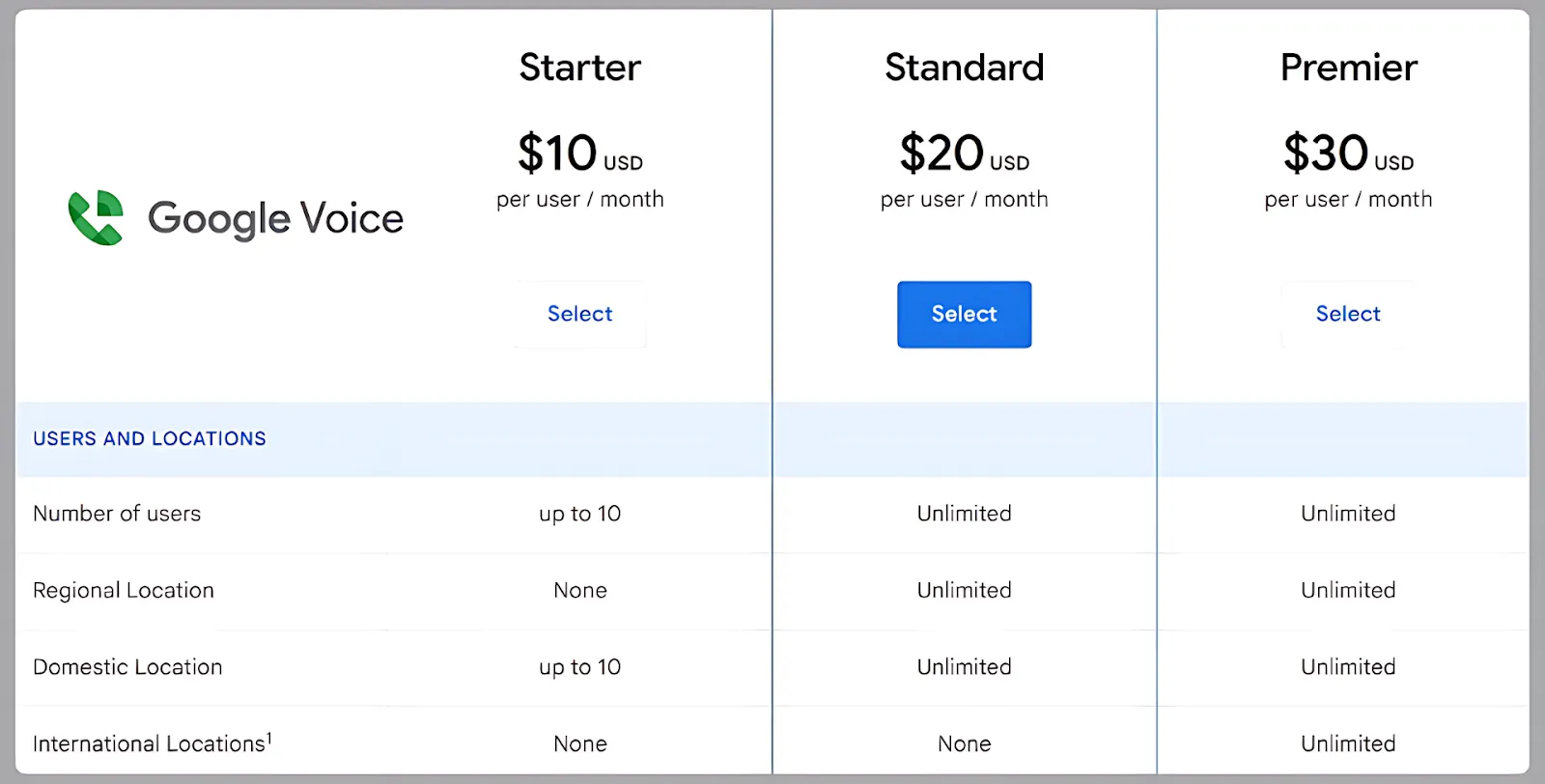
At first glance, Google Voice looks like a budget-friendly phone service. The Starter plan is $10 per user per month, which sounds appealing, especially if you’re a small business owner trying to manage costs.
But there’s a catch.
For a single user, the Starter plan offers voice calling only. To access a basic feature, such as the ability to send text messages, you also need a Google Workspace subscription, which is sold separately.
Workspace pricing starts at $6 per user per month and goes up from there depending on your needs. So realistically, you're looking at $16 or more per user, before you even consider any additional tools or integrations you might need.
Here's a quick breakdown of Google Voice pricing.
- Starter plan – $10/user/month: Available for up to 10 users. Offers basic call forwarding, voicemail, and usage within the U.S.
- Standard plan – $20/user/month: Includes call forwarding rules, ad-hoc call recording, multi-level auto attendants, and ring groups. The plan is ideal for teams, but still basic in scope.
- Premier plan – $30/user/month: Comes with reporting and usage across international locations. Nothing much changes from Standard unless you need global routing.
The important thing to note here is that even on the highest plan, Google Voice doesn’t have features like text scheduling, contact management tools, templates, or toll-free numbers. These are core needs for many growing businesses.
In reality, Google Voice makes the most sense for personal use or ultra-small operations where texting volume is low and workflows are simple.
If you’re in for more structure or features that go beyond calling and basic texting, it quickly falls short.
Google Voice Pros
Google Voice offers several features that work well under the right circumstances. That said, here are some advantages of Google Voice
1. It supports texting and calling for personal use
For individuals, Google Voice can serve as a second number for calls and texts. You can use the line for informal conversations without giving out your personal number or buying another device.
The same number can also come in handy for occasional business calls, responding to quick texts, or screening unknown numbers.
If you’re managing a growing list of clients or trying to coordinate with a team, though, Google Voice’s free phone number may not be sufficient.
2. You can use it anywhere with a Wi-Fi connection
Google Voice doesn’t require cellular service to function. As long as you’re connected to Wi-Fi, you can send texts or make calls from a browser or mobile app. This can be convenient if you're traveling, working from home, or in a spot with limited cell coverage.
It also gives remote workers a way to stay connected without paying for an extra phone line.
That said, Wi-Fi calling depends heavily on the strength and stability of your internet connection.
3. It’s integrated into the Google ecosystem
You can use Google Voice with the same account if you’re already using Gmail, Google Calendar, Google Meet, or Google Contacts.
The integration makes it easy to streamline communication if you’re using Google’s suite of tools. With this setup, you can access your call history, voicemails, and messages right from the Google Voice interface.
That advantage, however, doesn’t come with much depth. You can’t, for instance, create workflows or automation around these tools.
4. It’s easy to get started
Signing up for Google Voice takes just a few minutes. You choose a cell number, link it to your Google account, and start calling or texting right away.
But that ease comes with trade-offs. The simplicity you get upfront limits your options later, especially when you need more structured communication features such as business-grade texting and calling.
Google Voice Cons
Sure, Google Voice can be adequate for casual or personal use. However, it’s missing many features for business.
Here are 19 disadvantages of Google Voice you should know.
1. It’s not HIPAA compliant
Google Voice isn’t natively built for HIPAA compliance. It doesn’t come with a signed Google Business Associate Agreement (BAA) for Voice as well.
As a result, you can’t use it to communicate with patients or store any information that falls under compliance rules. And while the service can be HIPAA compliant, you’ll need to sign up for a Google Workspace account.
Still, Workspace Voice doesn’t follow the same standards for email or storage.
So if you’re in healthcare or handle sensitive information, you may want to consider a HIPAA-compliant Google Voice alternative.
2. It doesn’t offer the best voice quality
Voice quality depends heavily on your internet connection. So, when your Wi-Fi is spotty, you’ll likely experience echo, audio lag, and dropped calls. In fact, these are some of the common complaints across multiple Google Voice reviews.
And, for business calls, these minor interruptions can make you look unprofessional. Plus, if you’re trying to close a deal or resolve an issue, you don’t want to ask the caller to repeat themselves every few seconds.
3. It doesn’t offer message templates
If you send a lot of repeat messages, such as appointment reminders, scheduling details, and follow-ups, you’ll have to retype them every time. Google Voice doesn’t offer a built-in function to save or reuse message templates.
The design creates more manual work, especially if you’re managing multiple client conversations. You’ll therefore want a cloud phone service that offers templates for business texting because it saves time and improves consistency.
4. You cannot pin conversations
Google Voice doesn’t allow you to pin or prioritize conversations within the inbox.
As new messages come in, older ones get pushed down. You’ll, therefore, need to scroll or search manually to find what you need, which leads to time wasting, especially if you’re looking for important threads.
5. It doesn’t offer toll-free numbers
Google Voice doesn’t give you the option to choose toll-free numbers.
That’s a dealbreaker if you’re keen on projecting a professional image or need a line that allows customers to make phone calls without being charged.
For starters, toll-free numbers also help national or remote-first businesses appear more established.
With a Google Voice number, you’re limited to standard local lines, which might not be ideal if you want to build credibility outside your area of operation.
6. It's difficult to manage contacts
The Google Voice app doesn’t offer a dedicated system for organizing contacts.
You can't group clients, add notes, or flag important details. The application pulls data from your Google Contacts account, which isn’t built for business texting.
If you’re working with dozens of clients or contacts, this can quickly become problematic.
7. It doesn’t offer a desktop app
Google Voice doesn’t have a downloadable desktop app. You’re limited to using it in a browser, which isn’t always convenient if you’re juggling other tools or want notifications to appear outside of Gmail.
Furthermore, this limitation can make multitasking harder. You’ll have to keep a browser tab open and manually check for updates.
8. Its international availability is limited
Google Voice coverage area is limited. The service is only available in select countries, with bottleneck restrictions for business.
For example, you can only sign up with a U.S. or Canadian number, and calls outside North America require credits or separate billing.
If you work with international clients or run a remote team across time zones, this can become a problem.
9. It isn’t built for large teams
We wouldn’t recommend Google Voice support teams or multiple users working together. First, you manage shared inboxes and assign messages. On top of that, you can’t monitor communication among team members from a central dashboard.
The design makes it hard to use Google Voice to coordinate users if you have a team handling customer conversations.
10. It doesn’t allow number sharing
Google Voice doesn’t allow multiple users to share the same phone number. Therefore, your team can’t respond to texts or calls from a shared line.
You’ll need to get multiple Google Voice numbers, which isn’t ideal if you want to centralize communications or have different staff members follow up with customers.
11. It doesn’t offer organizational tools
Google Voice doesn’t give you tools to organize your inbox or manage your message flow. You won’t find folders, labels, tags, or ways to mark conversations based on urgency or type.
As a result, your inbox becomes one long feed of messages. The more people you text with, the harder it gets to keep things in order.
12. It offers limited call recording functionality
Call recording is only available in Google Voice’s Starter plan and the Premier tier.
On the free plan, you have to activate recording on each call manually. And can’t start recording until all participants have joined.
Furthermore, once the call ends, you get the recording in your email as an audio file. The setup isn’t practical if you need to review calls later or keep records in one place.
In addition, you’ll need to pay $20 per user per month for ad-hoc recording, and $30 per user per month if you want to record calls automatically. That’s expensive compared to Google Voice competitors like iPlum.
13. It doesn't offer time-saving texting
Google Voice’s native functionality doesn’t allow for fast, time-saving text messaging. For instance, it doesn’t support text forwarding to multiple email addresses or third-party apps.
It also lacks auto replies, a feature that lets you send instant, pre-written responses when someone texts you. The function is especially useful if you’re busy, outside business hours, or just want to confirm receipt without typing out a message every time.
14. It doesn’t offer long-term text and call recording archiving
Google Voice doesn’t allow you to archive your texts or call recordings long-term. Once your inbox fills up, you’ll need to delete messages manually.
The lack of long-term text and call recording means that you shouldn’t choose Google Voice if you’re in the finance or insurance sector, where extended data storage is a regulatory requirement.
15. It doesn’t support text signatures
You can’t add a custom signature to the end of your messages on Google Voice. Sure, this may not sound like a big issue, but it becomes crucial when you want to maintain consistent branding or include contact details in every text.
With Google Voice, you’ll have to type out your name, title, or business info every time, or leave it out entirely.
16. It doesn’t allow text scheduling
Google Voice doesn’t allow you to schedule texts for later. So, if you want a message to go out at a specific time, say, appointment reminders or follow-ups, you’ll need to be available to send it manually.
The lack of text scheduling can become inconvenient if you're trying to reach clients across different time zones or plan outreach in advance.
17. Sending MMS is limited
Indeed, Google Voice supports MMS. You can send and receive common media file formats like JPGs, PNGs, and GIFs.
However, it doesn’t offer other useful formats, including music files, videos, PDFs, Word documents, or spreadsheets. These file types are often a requirement for tasks like booking appointments, sending invoices, or sharing forms.
So, if you plan to send anything beyond simple images or GIFs, you’ll need to use a different phone system.
18. You can’t update your caller ID or fix spam labeling easily
Google Voice doesn’t give you the option to customize your caller ID.
And if your number gets flagged as spam, there’s no simple or built-in way to correct it. This can hurt your credibility, especially if clients stop answering your calls because they don’t recognize or trust the number.
19. It doesn’t offer an advanced phone tree
Google Voice’s phone tree is only available on the paid business plans. And even then, it’s pretty basic. The free version of Google Voice doesn’t offer a phone tree at all.
iPlum is the best alternative to Google Voice if you're looking for an advanced phone tree setup. With iPlum, you can build multi-level menus, create extensions for users or departments, set routing based on business hours, and more.
Best Google Voice alternative—How does iPlum stack up?
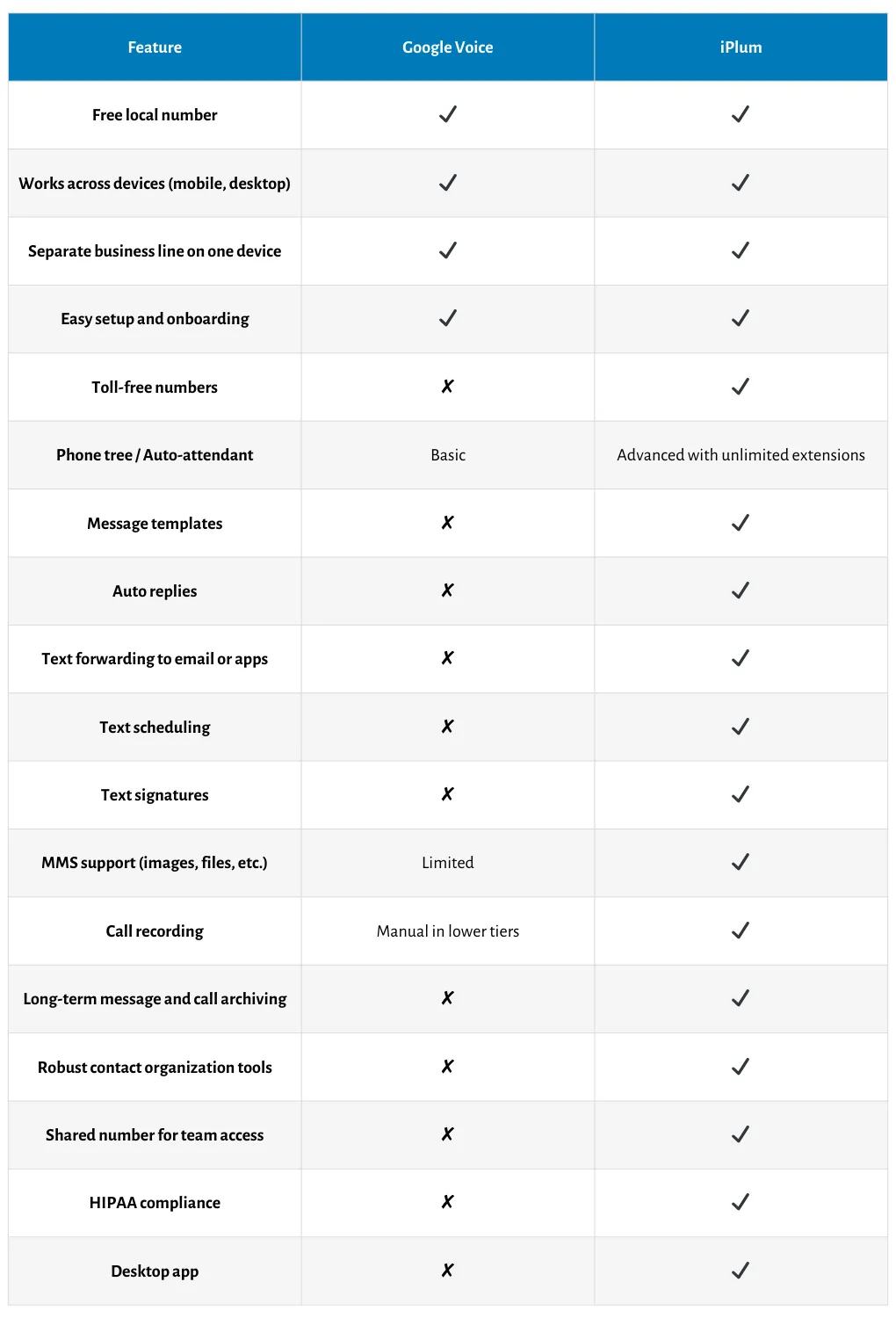
Google Voice and iPlum share several features.
You can get a local number, send texts, and make calls. But once you need business-grade features like automation, compliance, or shared phone lines, the differences are easy to spot.
The table below summarizes a comparison between the two in key areas.
Also read—Google Voice vs iPlum
Google Voice Pros and Cons—Frequently Asked Questions (FAQs)
Is Google Voice good for personal use?
Yes, Google Voice works fine for personal use or very small-scale business communication.
It gives you a free number, and you can make calls or send texts from your phone or browser. But it lacks the structure and features most businesses need to operate efficiently.
Is there a monthly fee for Google Voice?
There’s no monthly fee if you’re using the free version for personal calls and texts.
However, if you need more features, you’ll need to pay for a Google Voice plan, starting at $10 per user per month, and also subscribe to Google Workspace, which starts at $6 per user.
Can I make international calls with Google Voice?
Yes, but international calling isn’t included in the standard monthly plans.
You’ll need to add credits to your account and pay per minute, based on the country you're calling. Rates vary, and coverage outside the U.S. and Canada is limited on business plans.
Is Google Voice good for business texting?
It depends on what you need.
If you're only sending the occasional text and don’t need templates, message routing, or automation, it can work. But if texting is a major part of your business communication, you’ll quickly run into its limitations.
Switch to iPlum—It’s powerful, affordable, and feature-rich
Google Voice can be adequate for personal use or the occasional business call.
However, its limitations are hard to ignore once your communication needs grow.
You’ll quickly run into missing features, like message templates, number sharing, or a basic feature such as text scheduling.
iPlum is the best Google Voice alternative if you need a reliable, compliant phone system built for business.
It boasts powerful technology and affordable pricing, giving you the communication setup you need to run and scale your operations.
Click the link below to get started with iPlum
Disclaimer: This article is intended for general informational purposes and may not reflect the most current features or capabilities of the products or companies mentioned. For the most accurate and up-to-date information, please refer to the official sources of each company.

