



Secure messaging gives healthcare providers and patients a protected channel to ask questions, exchange updates, and discuss care.
This guide zeros in on secure texting for healthcare teams, from how to implement it in your facility to the factors to consider when choosing a platform, and everything in between.
In the end, you should be able to:
- Understand the difference between secure healthcare messaging and standard texting
- Leverage secure messaging to enhance patient communication
- Understand what to look for in a HIPAA-compliant messaging system
- Learn about some widely used HIPAA-compliant texting apps, and more.
Let’s get started.
Table of Contents
1. Secure texting vs standard texting
2. What are the different types of HIPAA-compliant texting solutions?
3. When should healthcare teams use secure messaging?
4. MIs secure messaging HIPAA compliant?
5. Can you use secure messaging for everyone involved in a patient’s care?
6. Can you use secure messaging to replace the EHR?
7. How can healthcare facilities implement secure messaging successfully?
8. What should you look for in a secure messaging platform?
9. Why use iPlum for HIPAA-compliant texting?
10. Secure texting for healthcare: FAQs
11. Text your patients securely with a platform designed for healthcare teams
Secure texting vs standard texting
Secure text messaging is different from standard texting. The table below breaks down the most critical differences.
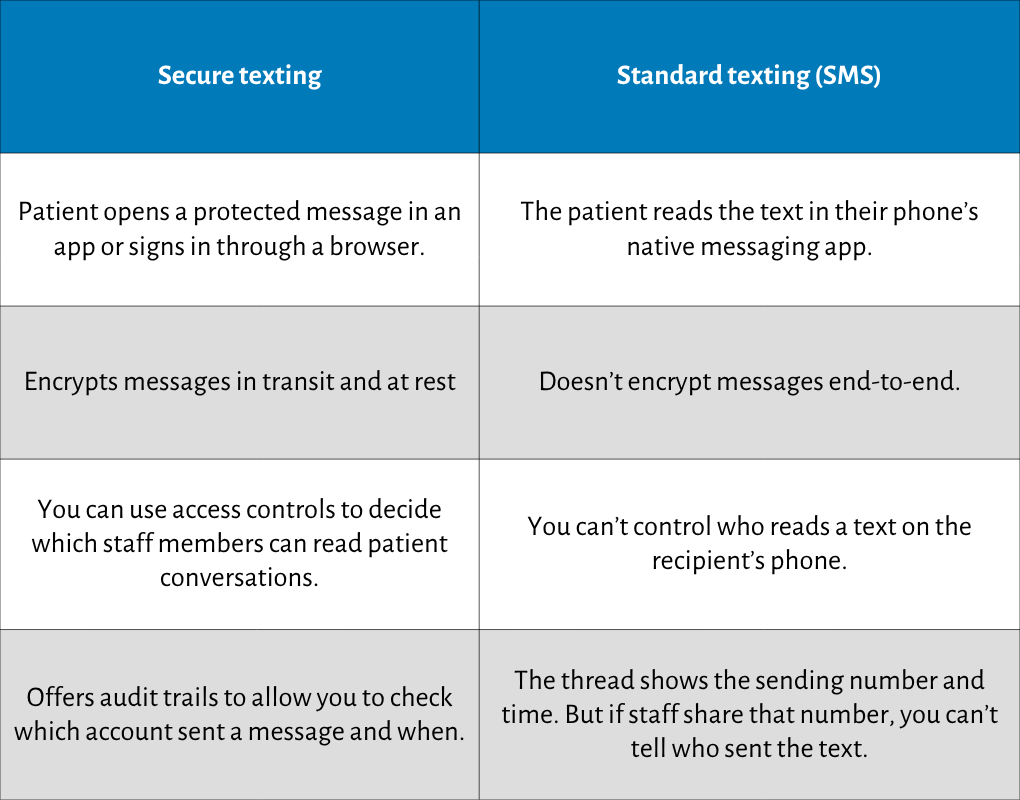
Standard texting isn’t ideal for patient engagement. In fact, native apps like iMessage or WhatsApp aren’t HIPAA-compliant, so you can’t use them to exchange protected health information (PHI).
What are the different types of HIPAA-compliant texting solutions?
HIPAA-compliant messaging platforms generally fall into three categories.
Each model handles patient access, clinical workflows, and pricing differently. Therefore, understanding how they work makes it easier to choose one that fits your practice.
Dedicated business phone apps with secure messaging
These platforms add a separate, HIPAA-compliant phone number to the smartphones and computers your team already uses.
Patients call or text one familiar practice number for routine scheduling. When a conversation involves protected health information, you invite the patient into an encrypted mobile app or browser portal, usually at no cost.
With a dedicated business line, clinicians can respond from their own phone without exposing their personal cell number or carrying a second device.
Best for: Solo practitioners, behavioral health providers, home health teams, and growing practices that want centralized calling, texting, and voicemail.
EHR-tethered patient portals
Some electronic health record systems include built-in messaging modules.
When a clinician sends an update, the patient receives an email or standard text telling them to log into their portal to read the message. The replies automatically remain in the patient’s clinical chart.
All-in-one front-desk communication suites
These platforms bundle patient texting with automated appointment reminders, digital intake packets, review requests, and text-to-pay billing tools.
Staff manage incoming threads from a shared desktop inbox designed to automate high-volume front-office tasks.
While helpful for busy reception desks, all-in-one suites often lock basic secure texting behind steep monthly minimums and multi-user contracts. Smaller practices frequently end up paying for marketing and billing features they rarely use.
Best for: High-volume outpatient clinics looking to overhaul their entire front-desk communication stack at once.
Pro tip: Before choosing a category, look at how your team actually works. If clinicians need to text and call patients from mobile devices as well as office computers—without forcing patients through clunky portal logins—a dedicated business number with an encrypted messaging channel usually offers the best balance of security, simplicity, and cost.
When should healthcare teams use secure messaging?
Sure, clinicians can use standard SMS to text patients. However, HIPAA compliance is non-negotiable in some cases.
These are primarily conversations that involve protected patient information, and the person receiving the message needs to securely reply later, such as:
- Automated appointment reminders
- Medication reminders
- Follow-up messages
- Referral updates
- Shift handoffs
- Payment reminders
Pro tip: Before you send a clinical text, consider how long the patient can wait for a response. If a delay could affect their care, call and follow your facility’s escalation procedure.
Is secure messaging HIPAA compliant?
Yes, secure messaging can be HIPAA compliant. However, your practice must choose a HIPAA-compliant texting platform with the required safeguards and use it in accordance with HIPAA rules.
That said, even with a solution that supports HIPAA-compliant texting, your practice needs to consider who’s asking for patient information and why.
Take a patient who texts your office to confirm a follow-up visit, for instance.
You can reply with the date and time through the secure channel you’ve agreed to use. And because the HIPAA Privacy Rule treats appointment reminders as part of treatment, you don’t need a separate HIPAA authorization to send one.
Now suppose the patient’s employer texts your office the following morning.
They want to know if the patient attended the visit so they can approve sick leave. In such a scenario, confirming the patient came in would disclose protected health information. For a routine sick leave request, you generally need the patient’s written authorization before you answer the employer.
In addition, if the patient has agreed to receive texts from your office, check what they agreed to.
Permission to text the patient about an appointment doesn’t allow you to discuss it with their employer. You can offer the patient a note to share.
Can you use secure messaging for everyone involved in a patient’s care?
Yes, you can use secure messaging with clinicians and family caregivers. However, what you can share depends on the recipient’s role.
Let’s say a patient is going home after surgery.
Their surgeon can send the discharge summary to the primary care clinician who’ll manage the follow-up visit. HIPAA generally allows healthcare providers to share protected health information with another provider for treatment.
Now, assume the patient’s daughter will change the dressing at home.
If the patient agrees or has an opportunity to object and doesn’t, you can send her the wound care instructions. Meanwhile, her brother is picking up the patient. With the patient’s agreement, he can receive the pickup time and location in a separate message.
That said, before you start a group conversation, check who can read the replies.
And if the patient can’t express a preference, use your professional judgment to decide what’s in their best interest. Share only details relevant to the family member’s role.
Can you use secure messaging to replace the EHR?
No. Secure messaging can complement your electronic health record (EHR), but it can’t replace it.
A text thread tells you what the patient and clinician said to one another. Electronic health records, on the other hand, give the next clinician the patient’s history, current medications, test results, and treatment plan.
Let's say the daughter in the example above sends a photo of her father’s surgical wound.
After reviewing it, the surgeon asks the patient to come in that afternoon. The daughter replies, “We’ll be there.”
If you only update the appointment calendar, the nurse who sees the patient will know when he’s coming in. But will they know why? The EHR allows you to document what the daughter reported, what the surgeon observed, and why the visit moved up. Follow your facility’s policy for adding the photo to the chart.
Even then, some messaging tools can automatically send a conversation to the EHR. If yours does, check what appears in the chart. And that’s because a copy of the exchange can still leave the surgeon’s reason for changing the plan unstated.
How can healthcare facilities implement secure messaging successfully?
Healthcare organizations can roll out secure text messaging by following a well-defined process as outlined below. Start with one type of patient message, such as a request to reschedule an appointment.
- Step 1: Determine who answers the text messages. Here, assign scheduling requests to reception and clinical questions to a nurse. Also, identify a backup for each shift so a patient’s reply reaches the right person when the usual contact is away.
- Step 2: Set expectations with patients. When you invite a patient to use secure messaging, confirm their preferred contact number. Then, explain when staff typically read messages, how soon patients can expect a reply, and which number to call after hours.
- Step 3: Rehearse a handoff. Use a fictional appointment request that mentions a new symptom. Ask the receptionist to pass it to the nurse, then check who takes responsibility for contacting the patient.
- Step 4: Try it with a small group. Invite a few patients to send scheduling requests. At the end of the week, check for missed replies, unanswered invitations, and messages staff sent to the wrong inbox.
Pro tip: Use what you learn to revise staff instructions. Once patients receive replies within the promised time, introduce another use for secure texting, such as referral updates.
What should you look for in a secure messaging platform?
Not every business phone system that offers secure messaging is worth your attention. When looking for one, be sure to consider the following.
A signed business associate agreement
Check if the vendor will sign a business associate agreement (BAA) for the plan you’re considering.
If the vendor stores protected health information on your practice’s behalf, you need that agreement before you share patient details.
Also, check which services the BAA names. And if your staff plans to text photos or forward messages by email, confirm with the vendor where those features fall under the agreement.
Encryption for messages and attachments
Confirm how the vendor treats messages in transit and at rest.
Where does the patient read the text? If the platform advertises end-to-end encryption, find out which conversations qualify and what happens when a staff member selects standard SMS.
Also, check how the vendor protects stored messages and attachments. After all, a photo of a prescription label contains patient information even after the conversation ends.
Individual logins and access controls
While your receptionist and clinician can answer texts from the same business number, they have different responsibilities.
Therefore, look for a phone system whose access controls allow you to decide who can read clinical conversations, download attachments, or change account settings. That way, you can give each staff member access only to the conversations and settings they need for their role.
Audit trails you can review
Let’s say a patient calls to ask who sent a message from your office yesterday.
Can an administrator trace it to a particular staff member? Your messaging platform should, therefore, offer audit trails for a sample conversation.
So, confirm which actions the platform records, whose name appears beside them, and how far back you can search. If two nurses use the same business number, can you tell which nurse wrote the reply?
A record you can retrieve
Before you commit, check how long the vendor retains conversations and what happens to them if you cancel.
You can, for instance, try exporting a sample exchange that contains a photo and a reply. You can also open the exported file. Can you tell which message the patient answered, who received the photo, and when?
You’ll want those details if you ever need to reconstruct a conversation after your account closes.
A secure channel patients can use
Try the secure messaging app from the patient’s side.
Send yourself an invitation, open it, and reply. Does the patient need to download an app or create an account? What appears on the lock screen when a message arrives? If the preview displays the first line, check whether you can change it before staff start sending sensitive patient information.
Shared access when a clinician is away
If a patient replies on a clinician’s day off, who sees the message?
Check if the system allows another clinician with permission to read the conversation and respond from the practice number. Also, check whether staff can tell a colleague has already replied before they send a second, possibly conflicting answer.
The cost for your whole practice
Compare plans using the number of staff who’ll need accounts and the number of patients you expect to message. Consider fees for archiving, additional users, and exporting records. Then request a written quote for that setup.
Remember, an “affordable” secure texting messaging platform isn’t necessarily the best option and vice versa. The idea is to make sure you’re getting value for your money with the plan you choose.
Why use iPlum for HIPAA-compliant texting?
iPlum offers a powerful HIPAA-compliant messaging solution that lets your practice discuss care securely and privately. Standout features include:
- A business number on your existing phone: iPlum gives you a separate number for patient communication. That way, patients can reach your office using that number, and you can return their calls or texts from the same phone you already carry.
- A private channel patients can use for free: You can invite a patient to create a free iPlum account for secure texting. They can read and reply through the mobile app or sign in through a browser.
- A signed agreement for your practice: The Professional and Enterprise plans offer secure messaging and a business associate agreement (BAA). Your account administrator can complete the agreement through the iPlum portal and download a copy for your records.
- Private notes beside patient messages: Think of a patient who asks when to expect a callback. iPlum allows you to attach an internal note to that message explaining which clinician agreed to call and when. That way, your staff can also reply to a specific text, so if a patient asks two questions in succession, they can see which question the clinician answered.
- Access to earlier conversations: With text archiving, the Professional plan stores messages for one year on a rolling basis. That way, if a patient calls months later about instructions they received, authorized users can look up the original wording in the portal.
- Business texts through Slack: If every line on your account uses the Enterprise plan, an administrator can configure the Slack integration so an assigned staff member can send and reply to SMS or MMS from one iPlum line. You can use this for routine business texts, such as sharing office hours. For sensitive patient information, however, use iPlum’s secure channel.
- Send the same notice to patients privately: If your office closes early, you can use broadcast texting to notify the patients whose appointments you need to reschedule. With this function, a patient receives a separate message and can reply only to your office. Plus, recipients can’t see their phone number or their reply. Again, choose the secure messaging option if the notice contains details about a patient’s visit.
Other technical safeguards to ensure HIPAA-compliant text messaging include:
- End-to-end encryption for texts exchanged between the clinician’s and patient’s iPlum apps.
- Two-factor authentication that prompts staff to enter a verification code when they sign in.
- An app passcode that staff must enter whenever they open iPlum, even if they’ve already unlocked their phone.
- Practice-wide password settings that let your administrator set password complexity requirements for all staff accounts.
- Account locking that lets your administrator block a staff member’s access when they leave the practice.
You can start with a Professional plan for your practice, complete your BAA, and invite a patient to exchange a secure message. Or, choose the Enterprise plan if your office also needs the Slack integration.
Secure texting for healthcare: FAQs
What are some secure messaging systems available for healthcare?
Some secure messaging systems available for healthcare include iPlum, OhMD, Klara, and Spruce Health. These solutions differ in features, so choose one that meets your needs.
What are the benefits of secure messaging in healthcare?
Secure messaging gives patients a private channel to ask questions, share documents, and revisit instructions. In addition, clinicians can coordinate referrals, confirm who’ll follow up, and review what they previously told patients.
What are the HIPAA guidelines for texting messages?
HIPAA requires safeguards for electronic protected health information. These allow you to limit access to authorized users, record and review system activity, and safeguard message transmission. You also need to sign a BAA with a vendor acting as a business associate.
What is the most secure form of texting?
For message privacy, choose texting with end-to-end encryption. That way, only the participants’ devices can decrypt the conversation, so verify the intended recipient and protect any device or backup storing those messages.
How can I secure my text messages?
Use an encrypted messaging app, enable an app passcode, and hide message previews on your lock screen. Before sending patient information, verify the recipient and use your practice’s approved channel.
What is safer, SMS or WhatsApp?
WhatsApp is safer for personal chats because it uses end-to-end encryption by default. SMS lacks that protection. However, WhatsApp and SMS are not HIPAA-compliant, so you cannot use them for patient communication.
Text your patients securely with a platform designed for healthcare teams
An appointment reminder can turn into a clinical conversation with a single reply.
If a patient asks about a prescription, you’ll want them to have a private place to text and a familiar number to call if they need to speak with you.
With iPlum, you can use a separate business number on your existing cell phone. Plus, your patients get a free account and exchange secure messages with your practice through the app or a browser.
Sign up for iPlum, choose Professional or Enterprise, complete your business associate agreement, and invite your first patient.

