


%20(1).avif)
.avif)

Potential clients expect a law firm to answer quickly. If their call goes unanswered, they can contact another attorney.
However, lawyers cannot remain at their desks all day. Client meetings, court appearances, research, and case preparation frequently take them outside the office.
A law firm phone system makes business calls easier to manage. It can route incoming calls, record conversations, transcribe voicemail, protect confidential information, and allow attorneys to answer calls through a mobile app.
Modern systems use Voice over Internet Protocol (VoIP) to make calls over the internet. Therefore, a lawyer can use a business phone number on a computer, desk phone, or smartphone.
Below, we compare five of the top-rated law office phone systems and what sets them apart.
Table of Contents
1. Best phone system for law office: a quick overview
2. How to choose the best phone system for attorneys
3. Top law office phone systems
4. Best law office phone systems: frequently asked questions (FAQs)
Best phone system for law office: a quick overview
The table below provides a quick overview of the top phone systems for attorneys.
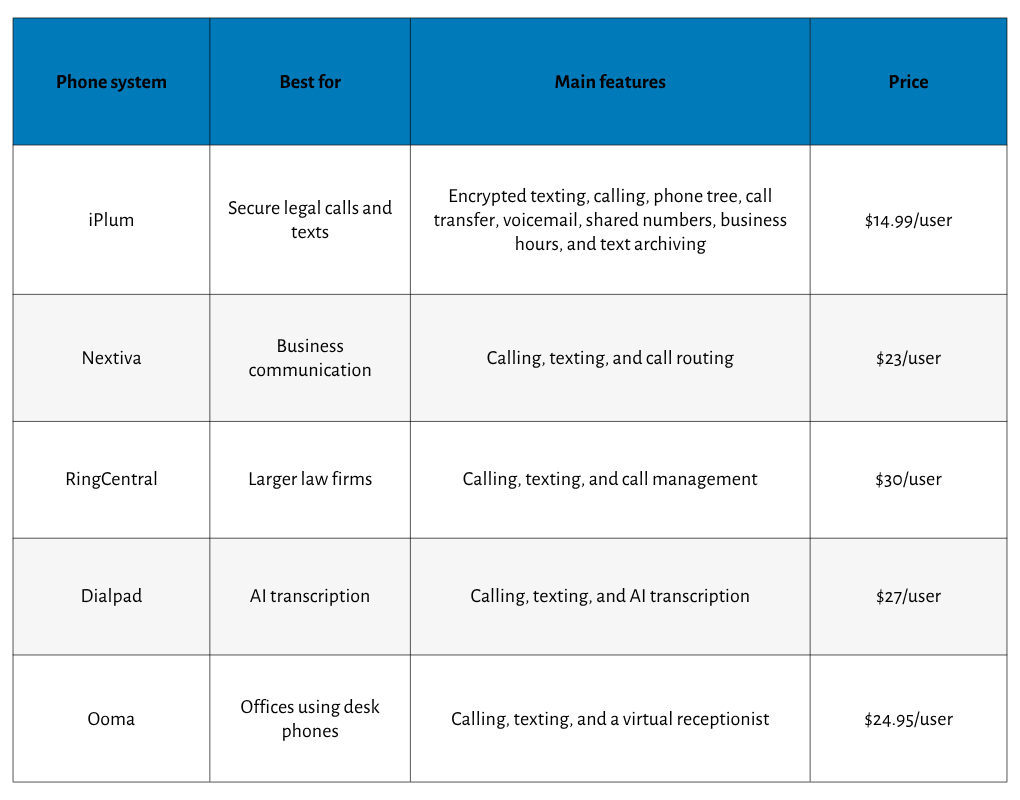
Note: Pricing can change. Firms should confirm plan limits, taxes, add-ons, and contract terms before purchasing.
How to choose the best phone system for attorneys
Telephone systems for law firms need more than basic calling.
And that's because client communication can contain legal advice, settlement instructions, financial details, medical information, and litigation strategy.
Consider the following areas before choosing a provider.
Match the system to your firm's size
A small law firm might need one phone number, custom greetings, visual voicemail, and call forwarding. Larger firms need call queues, ring groups, department extensions, detailed call logs, and routing features.
Estimate how many users, numbers, extensions, and concurrent calls you need now. Then consider how easily the system can accommodate new attorneys or locations.
Examine mobility
Practicing attorneys frequently use VoIP systems for better mobility and call management. A good mobile app lets an attorney answer client calls from a cell phone using the firm’s business identity.
Mobile applications also separate personal and professional calls. Clients see the law firm's phone number rather than an attorney's private number.
Virtual phone systems use VoIP technology for communication. Therefore, users can make and receive calls from existing devices that have internet access. Setup is generally quicker than installing traditional phone systems.
Review call routing and intake
Advanced call routing can improve legal client intake. An auto attendant can greet callers, present menu options, and direct them to the right person.
Useful phone capabilities include:
- Business-hours routing
- After-hours call forwarding
- Call queues
- Ring groups
- Department extensions
- Custom greetings
- Voicemail to email
- A virtual receptionist
- An external answering service option
A firm should test what happens when nobody answers. The phone system should forward calls, offer voicemail, or route callers to an approved answering service.
Assess recording and confidentiality
Call recording can document verbal instructions, consultation details, and client approvals. It can also assist with dispute resolution when the parties disagree about what they discussed.
However, recording laws differ by jurisdiction. Some states require consent from every participant. Therefore, firms should consult counsel and tailor recording announcements in accordance with applicable law.
Compliance-grade recording is especially important for attorney-client discussions. Look for encryption, administrator permissions, retention settings, access histories, and secure archives. Enterprise-grade security also protects client confidentiality when attorneys work remotely.
Check transcription and automation
Legal phone systems can record and transcribe conversations. Voicemail transcription lets an attorney review a client message during a hearing break or between meetings.
AI features can also create call summaries and identify action items. Such tools can reduce manual note-taking, although attorneys should review generated text for errors before adding it to a client file.
Automation has gained wider business interest, with 50% of business leaders reportedly prioritizing workplace automation. Even so, legal offices must examine confidentiality, retention, accuracy, and vendor access before using AI with client calls.
Compare integrations and reliability
Integrations with case management software can improve workflow efficiency. For example, an integration might associate calls, notes, or messages with the correct client record.
Ask each provider which legal software integrations it offers and what data moves between systems. Also, review authentication, encryption, administrator permissions, and audit records.
Reliability deserves equal attention. A 99.9% uptime commitment is a reasonable starting point, but 99.99% uptime is preferable for a busy law office phone system. Higher availability reduces the period in which clients cannot reach the firm.
Calculate the full cost
Virtual phone systems can cost considerably less than landlines because firms can use current computers and smartphones. However, the advertised price does not always represent the final bill.
Check charges for:
- Automatic call recording
- Additional phone numbers
- Text messages
- International calls
- Desk phone equipment
- Number porting
- Extended recording storage
- Premium routing
- Contract cancellation
Unlimited domestic calling can lower unpredictable call costs. Still, review fair-use terms and confirm which countries count toward unlimited calling.
Top law office phone systems
Below is a rundown of the best phone systems for lawyers, along with what to expect.
iPlum
iPlum is the best phone system for a law office that needs a secure business line on attorneys' current smartphones.
It separates law firm calls and texts from personal communications, so attorneys do not need to carry a separate mobile phone.
A user can make and answer calls through the iPlum app while displaying the firm's business phone number. Incoming calls can follow business hours, extensions, ring groups, and call forwarding rules.
Therefore, a solo practice can begin with one line, and small law offices can add users as the practice grows.
The Professional plan costs $14.99 per user per month.
The Enterprise plan costs $25.99 per user per month and adds automatic call recording, consent announcements, and ten-year archiving.
Security gives iPlum a distinct position among the best law office phone systems.
The platform records incoming and outgoing calls and places recordings in an encrypted archive. Firms can also archive text messages sent through the business line.
A secure recording captures client instructions, consultation details, and agreed actions. Administrators can manage users centrally instead of asking attorneys to preserve records from personal cell phone accounts.
iPlum also lets a firm configure an announcement that informs callers about the recording.
Meanwhile, the iPlum phone tree can act as a virtual receptionist. It can greet potential clients and route them according to the options they select. For example:
- Press 1 for new matters
- Press 2 for current cases
- Press 3 for billing
- Press 4 for office directions
- Press 0 for reception
Such routing can reduce interruptions and send prospective clients to the intake function. After-hours rules can forward calls to another user or direct callers to a professional voicemail.
iPlum also provides business texting from the same legal phone number.
Attorneys can send appointment reminders, request documents, and confirm meeting details through an authorized business line. Secure texting is available when a conversation requires added protection.
Detailed call logs give account administrators access to communication records. Meanwhile, custom greetings help small firms project a professional image even when attorneys answer phones from different locations.
The service works on existing devices and does not require a conventional desk phone installation. That way, it suits attorneys who divide their work among the office, home, client sites, and court appearances.
Key features
- Separate business number on an existing smartphone
- Automatic incoming and outgoing call recording
- Configurable recording consent announcements
- Encrypted recording and message archives
- Up to ten years of archiving
- Business texting and secure messaging
- Auto attendant and phone tree
- Extensions, ring groups, and forwarding
- Custom greetings and professional voicemail
- Central account and user administration
- Searchable call logs
- Number porting
Pros
- Built for regulated communication
- Separates personal and business calls
- Records both call directions
- Long-term encrypted archives
- Works on current smartphones
Cons
- Limited video meeting tools

Nextiva
Nextiva is a cloud phone system for firms that want calling, texting, video meetings, and team messaging under one subscription.
Nextiva Core costs $23 per user per month on a month-to-month plan. The plan provides business calling, texting, and call routing.
The plan provides inbound and outbound voice, business SMS, video meetings, screen sharing, call routing, team chat, and a mobile app. The Engage plan adds automatic call recording and other client-engagement tools
Nextiva offers unlimited calling in the United States, Canada, and Puerto Rico. Its call queues, auto-attendant, voicemail transcription, and voicemail-to-email tools can serve growing law firms that handle many calls.
However, firms should determine which plan contains each required feature. They should also review how long Nextiva stores recordings and how its data security settings apply to privileged legal conversations.
Key features
- Unlimited domestic calling
- Business SMS and video meetings
- Call routing and auto attendant
- Call queues and voicemail transcription
- Mobile and desktop applications
- Automatic recording on higher plans
Pros
- Broad communication feature set
- Affordable Core plan
- Good routing capabilities
- Video meetings available
- Mobile app access
Cons
- Does not support video yet
Also read: iPlum vs Nextiva

RingCentral
RingCentral serves firms that need extensive communication tools, administrative controls, and high availability.
RingEX provides voice, SMS, video calling, team messaging, call queues, call logs, an auto attendant, and integrations. Its routing editor lets administrators create menus that direct callers to an attorney, department, or intake group.
On-demand call recording comes with RingEX plans. Automatic call recording comes with the Advanced and Ultra plans.
RingCentral stores up to 100,000 recordings for up to 90 days, so firms requiring longer retention should plan for an approved export or archiving process.
Speaking of which, RingCentral RingEX Core costs $30 per user per month on a month-to-month plan.
Key features
- Automatic and on-demand recording
- Call queues and IVR
- SMS, video, and messaging
- Extensive business integrations
- Detailed call logs
Pros
- Excellent uptime commitment
- Extensive routing features
- Broad integration catalog
- Scales for larger firms
- Custom recording announcements
Cons
- Higher plan for automation
- Ninety-day recording storage
- Can overwhelm small firms
Also read: iPlum vs RingCentral
Dialpad
Dialpad is a good option for a law firm that values AI transcription, call summaries, and searchable conversations.
Dialpad Connect Standard costs $27 per user per month on a month-to-month plan. It provides business calling, texting, and AI transcription.
Available capabilities include unlimited calling in the United States and Canada, SMS, MMS, team messaging, video meetings, call forwarding, call recording, and voicemail transcription.
Dialpad can transcribe calls and meetings in real time. Attorneys can search written conversations and review discussion points after client calls.
However, an AI transcript should not serve as the final legal record until an attorney checks its accuracy.
The service also offers automatic recording notifications, which can assist with consent procedures. Still, firms must configure the feature correctly and assess retention, access, and encryption before recording privileged communication.
Key features
- Real-time AI transcription
- Call and voicemail summaries
- Unlimited calling
- Business SMS and MMS
- Video and conference calls
- Mobile and desktop apps
Pros
- Useful AI transcription
- Searchable call records
- Affordable entry plan
- Modern user-friendly interface
- Strong mobile capabilities
Cons
- Some integrations cost more
- Requires careful security review
Also read: iPlum vs Dialpad
Ooma
Ooma Office suits a small law practice that wants VoIP features but still prefers physical desk phone equipment.
The Essential plan starts at $19.95 per user per month. Ooma also offers Office Pro at $24.95 per user per month, which adds call recording, video conferencing, and further communication tools.
Ooma Office offers compatible desk phones and equipment for firms seeking a traditional office setup. Users can also place calls through its mobile app.
A virtual receptionist can answer calls, play menu choices, and route callers to extensions. Ring groups let several users receive calls, which can improve intake when reception is unavailable.
Key features
- Virtual receptionist
- Desk phone options
- Mobile app calling
- Ring groups and extensions
- Call recording with Pro
- Call forwarding and transfers
Pros
- Works well with desk phones
- Good for small firms
- Easy virtual receptionist
- No long-term contract
- Mobile and office calling
Cons
- Recording costs more
- Fewer AI capabilities
- Basic integration selection
Also read: iPlum vs Ooma
Best law office phone systems: frequently asked questions (FAQs)
What phone features does a law firm need?
Basic phone features should include professional voicemail, call routing, business texting, call logs, an auto attendant, mobile access, voicemail transcription, and secure recording where permitted.
Is a VoIP phone system suitable for attorneys?
Yes. A VoIP phone system lets attorneys call from approved computers, smartphones, or desk phones. Encryption, access controls, reliable internet, and secure administration remain essential.
Can a legal phone system record client calls?
Yes. Legal phone systems can record calls and archive verbal instructions. However, firms must examine consent laws, notify callers when required, restrict access, and set retention rules.
Can attorneys use personal phones for business calls?
Yes, if an approved business app provides a separate law firm phone number. Using a personal number can expose private contact details and place records outside firm administration.
What uptime should a law office require?
A 99.9% SLA is a baseline. However, 99.99% or 99.999% provides better availability for firms that cannot afford missed calls from current or potential clients.
Why choose iPlum?
iPlum gives attorneys a dedicated business line on their existing mobile phone.
Calls and texts remain separate from personal communication, yet clients still see the firm’s professional phone number.
More importantly, iPlum addresses the security and documentation needs surrounding legal communication.
The Enterprise plan offers automatic call recording, consent announcements, encrypted storage, text archiving, account administration, and up to ten years of retention.
Routing rules, extensions, ring groups, custom greetings, and a virtual receptionist direct client calls to the right person.
Meanwhile, attorneys can communicate during client meetings, remote work, and court appearances through an authorized firm identity.
For a small law firm seeking secure mobility, documented client communication, and centralized administration, iPlum offers the most relevant combination in this comparison.
Click the link below to get started with iPlum.
Disclaimer: This article is intended for general informational purposes and may not reflect the most current features or capabilities of the products or companies mentioned. For the most accurate and up-to-date information, please refer to each company's official sources

