


%20(1).avif)
.avif)

The last thing you want as a business owner is a client not showing up for a scheduled appointment.
First, when a no-show happens, you lose revenue.
On top of that, missed appointments waste your time. A few no-shows each week, and they quietly drain your bottom line.
But it doesn't have to be that way.
Not when you have iPlum, a mobile-first phone system built for team management, security, and scale, working for you.
For starters, iPlum offers scheduled text messaging, allowing you to set up your appointment reminders ahead of time.
The feature works more or less like appointment reminder software built right into your phone. You write the message once, decide when it goes out, and iPlum sends it for you, even while you're with a patient or stuck on a call.
Better yet, you can use iPlum alongside your calendar.
All you need to do is check what's on your Google Calendar or Outlook Calendar, then set up your automatic appointment reminders on iPlum as per your schedule.
Once they're scheduled, iPlum becomes your reminder system and sends each one on time. The benefit is that you reduce no-shows, improve appointment attendance, and send timely reminders on autopilot.
And, iPlum doesn't stop at reminders.
You also get secure texting, calling, voicemail, business hours, auto-replies, and HIPAA-compliant messaging, all running off one business number.
In this article, we'll walk you through how iPlum makes appointment reminders easier for healthcare practices, service businesses, and anyone working in a regulated field.
Table of Contents
1. How do iPlum appointment reminders work?
2. Why iPlum is better than texting from a personal phone
3. iPlum appointment reminder features
4. iPlum appointment reminder workflows
5. Appointment reminder message examples
6. Why choose iPlum for automated appointment reminders?
7. Automated appointment reminders: frequently asked questions (FAQs)
8. Send appointment reminders with iPlum
How do iPlum appointment reminders work?
iPlum allows your office to send reminder texts from a dedicated business number.
You can send reminders ahead of time, reuse templates, and respond to every reply from the same line. And, you can use it alongside your practice management software, so everything runs together.
Let's unpack that.
It allows you to send reminders from a business number
iPlum gives you a US or Canada business number on your existing mobile phone.
When clients book appointments, you can fire off text reminders and SMS reminders to their phone so they only see your business identity, not a personal cell.
And, with iPlum, you don't need a second device.
It allows you to easily schedule reminder texts before appointments
Scheduled texting allows staff to write a reminder now and send it later.
They only need to pick the optimal timing — a day before the visit, or a few hours out. And, every automated message carries the appointment details, like the date, time, and location, so clients know exactly what's coming up.
With iPlum text reminders, messages still go out on time even when your staff is with patients.
It lets you reuse reminder templates
Text templates — or message templates — save your staff from retyping the same message all day. You only need to build templates for reminders, follow-ups, confirmations, and reschedule notices. That way, you can pick one template, customize it with the name and time, and send it.
You can manage replies in iPlum
With iPlum, clients can easily reply to reminders.
They can also confirm the appointment, ask a question, or request a new time. You get instant appointment confirmations, and patients confirm with one tap. Better yet, your staff can read and answer every reply from the iPlum line, so nothing slips through.
Why iPlum is better than texting from a personal phone
Sure, you could text clients from your own cell. Plenty of business owners do. But it gets disorganized fast, and doesn't look great either.
Here's why iPlum beats reaching for your personal phone.
iPlum separates business and personal communication
With iPlum, your staff can use a single phone while sending appointment reminders from a separate business number. That way, work-related texts land in iPlum while personal messages come through the personal app. The two never mix.
iPlum protects your privacy
Clients should never see a staff member's personal cell number. iPlum shows your business number on every reminder, call, and reply. So clients never see your employees' personal cell numbers, even after they leave the office.
iPlum creates a more professional reminder process
With iPlum, calls, texts, voicemail, and replies all run through the business line. As a result, clients reach one consistent number for every appointment. And the best part is that your office reads as professional, and clients trust the number reaching them.
iPlum appointment reminder features
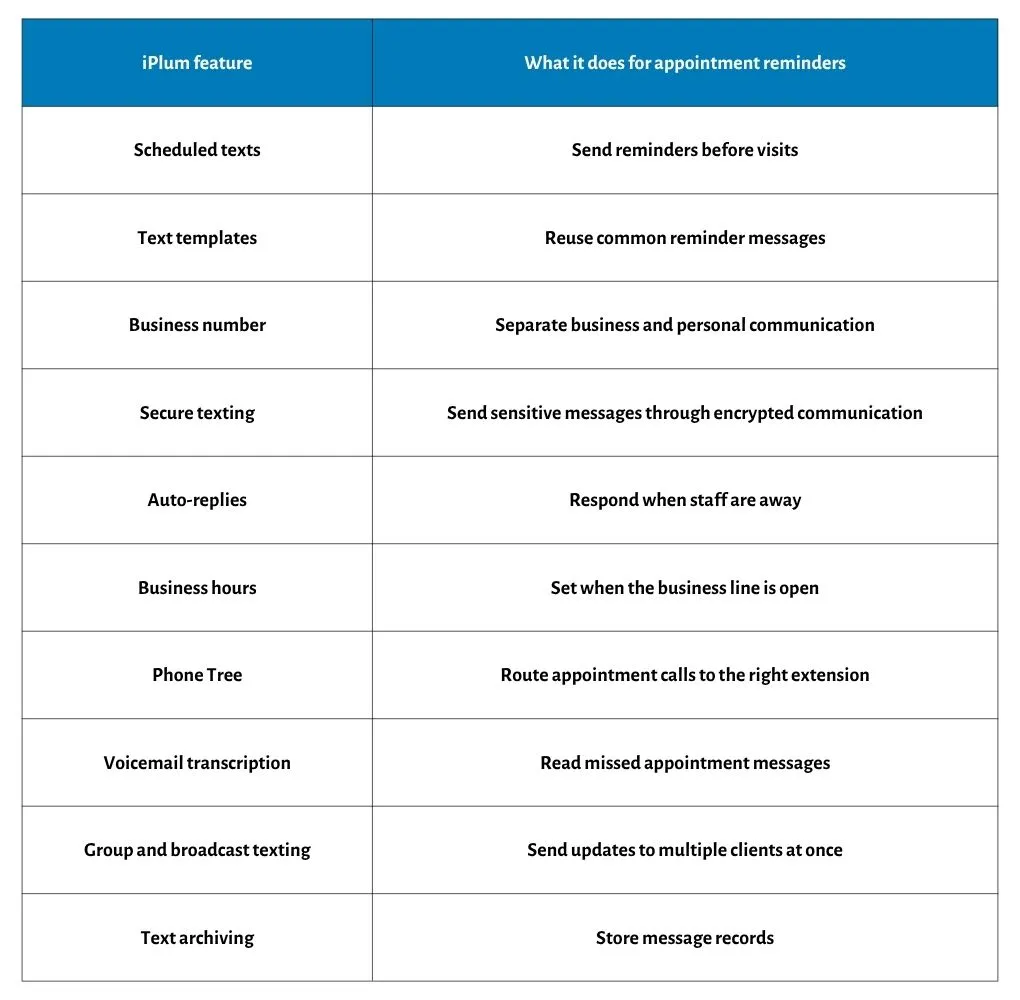
You must be thinking: what do I get with iPlum when it comes to automated appointment reminders?
Here's what you get with iPlum, and what it does for your reminders.
iPlum for healthcare appointment reminders
iPlum automated appointment reminders are a good fit for clinics, private practices, dental offices, therapists, and other healthcare providers.
Remember, in most cases, patient reminders contain private health details, so you need protection that a regular texting app can't offer.
Here's a breakdown of what iPlum offers for healthcare.
HIPAA-compliant texting
iPlum encrypts your texts and signs a BAA with your practice. That way, your patient names, appointment times, and care notes are always safe.
iPlum protects patient data with bank-grade security and encryption, so you never worry about a reminder exposing private information. In addition, iPlum ensures that every reminder you send meets HIPAA requirements.
Secure app-less patient communication
Not every patient wants to download another app, and you shouldn't lose a confirmation over it.
With iPlum, they don't have to.
Patients read and reply through a secure portal even when they skip the app download. They click a link, open the message, and respond right there.
Follow-up reminders for patient care
Care doesn't end when the patient walks out the door, and neither does iPlum.
iPlum carries the patient journey past the visit.
You can send follow-ups, medication check-ins, lab visit reminders, and care updates from the same number they already know. All of this improves the patient experience and makes your follow-ups feel personal.
Besides, it allows your patients to hear from you at the moments that count for their health.
Voicemail transcription for missed patient calls
A missed call shouldn't turn into a missed patient.
iPlum converts every voicemail into text, so your staff can read it at a glance and reply right from the iPlum line. With the service, there's no replaying messages over and over, so no callbacks will slip through the cracks.
iPlum for service-based appointment reminders
iPlum works for legal offices, financial advisors, insurance agents, consultants, real estate professionals, wellness providers, and home service providers. Here's what you get.
Consultation reminders
You can send reminders for discovery calls, paid consultations, client check-ins, and scheduled meetings. Of course, a reminder a day before improves your show rate and protects billable time.
Reschedule messages
Because plans change, iPlum lets you send a scheduled reminder and reply from the same iPlum number when a client asks to reschedule or cancel.
Reschedule messages turn would-be cancellations into satisfied customers. In short, one number carries the whole back and forth, and one number carries every contact.
After-hours appointment replies
Clients can send you texts at any time, which can interfere with your personal privacy.
iPlum auto-replies to messages that arrive after your business hours close. That way, the client knows you received the note, and your staff will answer the next morning.
iPlum appointment reminder workflows
How does iPlum's automated appointment reminder fit into your workflow?
Here's how the setup can fit day-to-day office routines:
New appointment reminder workflow
- Client books an appointment
- Staff sends a confirmation from iPlum
- Staff schedules a reminder text for the upcoming appointment
- Client replies to confirm
- Staff calls or texts from the iPlum number if the client needs to reschedule
Missed appointment follow-up workflow
- Client misses an appointment
- Staff sends a follow-up text from iPlum
- Client replies with a new time
- Staff calls back from the iPlum business number
After-hours appointment workflow
- Client texts after hours
- iPlum sends an auto-reply
- Staff reviews the message during business hours
- Staff replies from the iPlum number
Appointment reminder message examples
Below are a few appointment reminder text message examples you can start using right away with iPlum.
These reminder messages fit clinics, service businesses, and consultants alike.
Standard appointment reminders examples
"Hi [Name], reminder: your appointment with [Business Name] is scheduled for [Date] at [Time]. Reply C to confirm or R to reschedule."
"Hi [Name], you're booked with [Business Name] on [Date] at [Time]. See you then! Reply C to confirm or R to reschedule."
"Hi [Name], just a heads-up that your appointment with [Business Name] is tomorrow at [Time]. Reply to C to confirm or R if you need a new time."
"Hi [Name], your [Date] appointment at [Time] with [Business Name] is coming up. Reply C to confirm or R to reschedule."
"Hi [Name], we've got you down for [Date] at [Time] with [Business Name]. Reply C to confirm or R to pick another time."
Patient appointment reminder examples
Here are patient appointment reminders you can copy.
"Hi [Name], your appointment with [Clinic Name] is scheduled for [Date] at [Time]. Please call or text this number if you need to reschedule."
"Hi [Name], this is a reminder of your visit with [Clinic Name] on [Date] at [Time]. Text or call this number with any questions."
"Hi [Name], you're scheduled at [Clinic Name] for [Date] at [Time]. Please arrive 10 minutes early. Reply or call this number to reschedule."
"Hi [Name], reminder: your appointment with Dr. [Last Name] at [Clinic Name] is on [Date] at [Time]. Reply here if anything's changed on your end."
"Hi [Name], your follow-up with [Clinic Name] is set for [Date] at [Time]. Please bring your insurance card and any current medications. Call or text to reschedule."
Consultation automatic appointment reminder examples
"Hi [Name], reminder: your consultation with [Business Name] is scheduled for [Date] at [Time]. Reply here with any questions before the call."
"Hi [Name], looking forward to our consultation on [Date] at [Time]. Reply here if there's anything you'd like to cover."
"Hi [Name], your call with [Business Name] is booked for [Date] at [Time]. Have your documents handy, and reply here if you need to move it."
"Hi [Name], quick reminder about your consultation on [Date] at [Time]. Reply to C to confirm so I can hold the slot for you."
"Hi [Name], we're set for your consultation on [Date] at [Time]. I'll call this number then. Reply here if a different time works better."
Missed appointment follow-up text message examples
"Hi [Name], we missed you today. Please reply with a good time to reschedule your appointment."
"Hi [Name], looks like we missed each other today. Reply here, and we'll get you booked for a new time."
"Hi [Name], sorry we didn't see you at your [Time] appointment. Just reply with a day that works, and we'll set it up again."
"Hi [Name], we had you down for today but didn't hear from you. No worries — reply here whenever you're ready to reschedule."
"Hi [Name], we held your spot today, but you weren't able to make it. Reply with a good time, and we'll get you back on the calendar."
Why choose iPlum for automated appointment reminders?
There are several reasons to choose iPlum as your automated appointment reminder solution, including:
iPlum combines reminders with business calling and texting
iPlum gives you scheduled texts, calling, voicemail, business hours, and auto-replies under one business number.
That way, your reminders connect to your full client communication, rather than being a stand-alone reminder tool. The biggest benefit? iPlum's automated reminders make sure you no longer have to worry about no-shows.
iPlum works on your existing mobile phone
Your staff runs iPlum on the phones they already own through the mobile app. You don't need to buy new hardware or desk phones.
iPlum works for regulated industries
iPlum offers HIPAA-compliant texting, a BAA, archiving, and call recording for users in healthcare, finance, legal, and insurance. As a result, your reminders meet the compliance rules your field demands.
iPlum has openly published pricing
With iPlum, there are no hidden fees or surcharges. The amount you see on the pricing page is what you pay, with no surprise payments later.
Here's a quick snapshot of iPlum pricing.
- Standard: $8.99 per user per month
- Professional: $14.99 per user per month
- Enterprise: $25.99 per user per month
iPlum is straightforward to use. And if you ever get stuck, iPlum support can answer your questions. Run iPlum for several months, and the saved revenue from fewer no-shows pays for itself.
Automated appointment reminders: frequently asked questions (FAQs)
Can iPlum send appointment reminders?
Yes. iPlum allows you to send scheduled texts, use templates, and manage client replies from a dedicated business number.
Can healthcare practices use iPlum for appointment reminders?
Yes. iPlum offers HIPAA-compliant texting, secure communication, a BAA, and archiving for healthcare appointment messages.
Can clients reply to iPlum reminders?
Yes. Clients reply to reminder texts, confirm appointments, ask questions, or request a new time.
Does iPlum protect my personal number?
Yes. iPlum gives you a separate business number, so clients never see your personal cell.
Can iPlum route appointment calls?
Yes. The iPlum Phone Tree routes calls to scheduling, billing, refills, or specific staff extensions.
Send appointment reminders with iPlum
Automated appointment reminders work best when they connect to your calling, texting, voicemail, and reply process.
For that, iPlum gives your office a dedicated number, scheduled texts, templates, secure texting, business hours, auto-replies, voicemail transcription, and phone tree routing.
For healthcare and other regulated fields, iPlum adds HIPAA-compliant texting, a BAA, call recording, and archiving.
Ready to start sending appointment reminders and turn missed appointments into confirmed visits?
Click the link below to get started with iPlum.

