
How to Import Google Contacts into iPlum?
iPlum's Google Contacts integration lets you connect your Google account and import your Google contacts directly into iPlum Contacts.
This eliminates the need to manually create contacts or export and upload contact files. Once your Google account is connected, you can choose which contact information to import, decide how matching contacts should be handled, and refresh your contacts when needed.
How Do I Connect Google Contacts to iPlum?
Follow these steps to connect your Google account and import your contacts into iPlum.
Step 1: Log in to the iPlum Portal
Log in to your iPlum account and open the iPlum web portal.
Step 2: Open Integrations
From the iPlum portal, go to:
Integrations → Contacts
Select Google Contacts to begin setting up the integration.
Step 3: Connect Your Google Account
Click the option to connect Google Contacts.
You will be redirected to Google, where you can select the Google account containing the contacts you want to import into iPlum.
Step 4: Authorize iPlum to Access Your Google Contacts
Google will display an authorization screen showing the permission requested by iPlum.
Review the request and approve access to continue.
iPlum uses read-only access to retrieve contact information from the Google account you choose to connect. The integration does not require permission to create, modify, or delete contacts in your Google account.
Step 5: Return to iPlum
After completing the Google authorization, you will be returned to the iPlum portal.
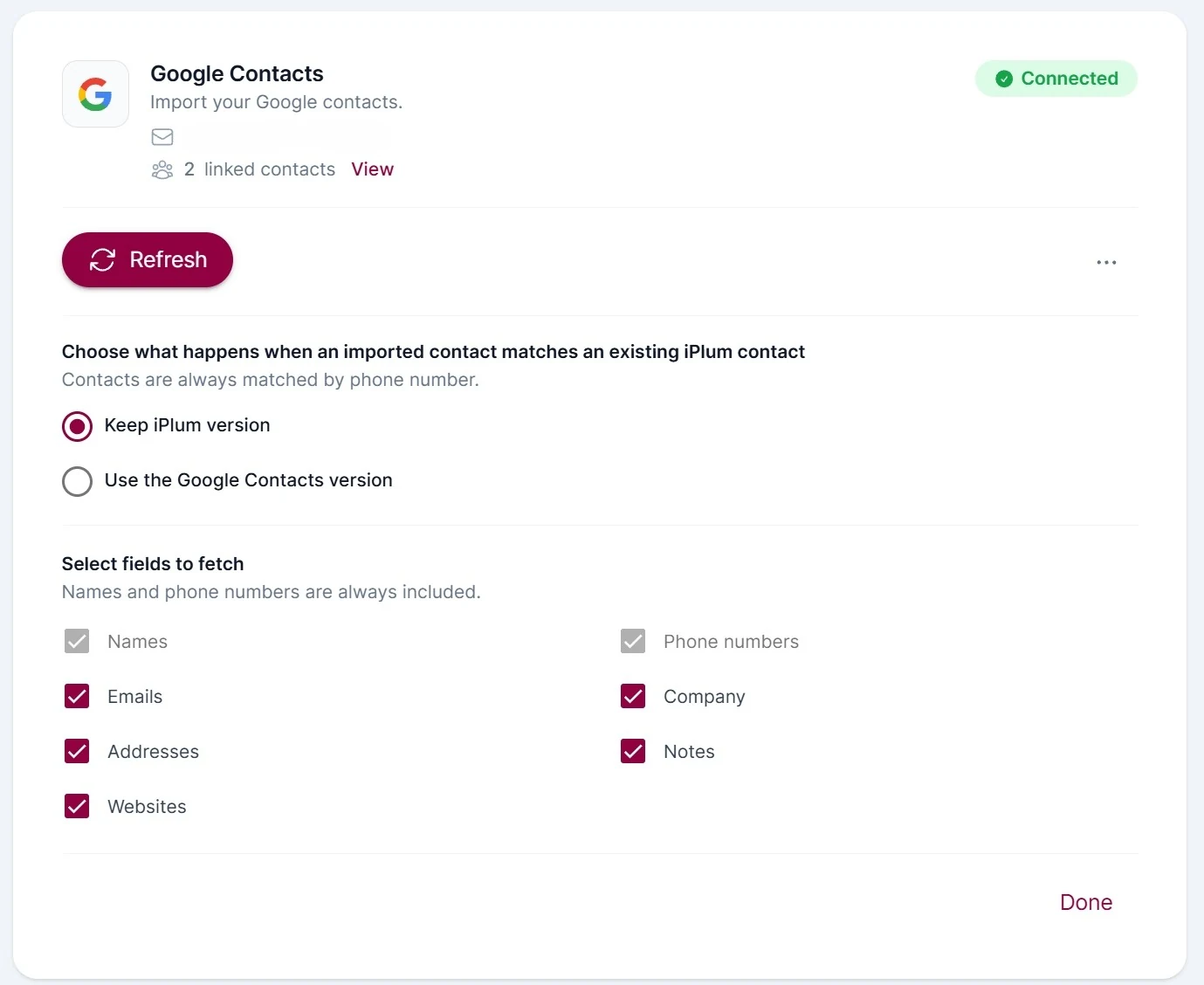
The Google Contacts integration will now show:
Connected
You will also see the email address of the Google account you connected and the number of linked contacts.
How Does iPlum Handle Contacts That Already Exist?
Contacts are matched using their phone number.
When an imported Google contact matches an existing iPlum contact, you can choose how iPlum should handle the matching contact.
Keep iPlum Version
Select Keep iPlum version if you want the information already stored in your iPlum contact to take priority.
Use the Google Contacts Version
Select Use the Google Contacts version if you want the information from your Google contact to take priority.
This helps prevent duplicate contacts while giving you control over which version of the contact information is used.
Which Google Contact Fields Can I Import into iPlum?
Names and phone numbers are always included when importing Google Contacts.
You can also choose to import the following information:
- Emails
- Addresses
- Websites
- Company
- Notes
Select the fields you want iPlum to retrieve from Google Contacts and click Done.
How Do I Refresh My Google Contacts in iPlum?
After your Google account is connected, click Refresh in the Google Contacts integration.
iPlum will retrieve updated contact information from your connected Google account based on your selected settings.
You can use Refresh whenever you want to bring updated Google Contact information into iPlum.
How Do I View My Linked Google Contacts?
The Google Contacts integration displays the number of contacts linked to your connected Google account.
Click View next to the linked contacts count to review your linked contacts.
Can I Change My Google Contacts Import Settings?
Yes.
You can return to the Google Contacts integration to change:
- How matching contacts are handled
- Which optional contact fields are imported
After changing your selections, click Done and use Refresh when you want iPlum to retrieve updated contact information.
Can I Disconnect My Google Account from iPlum?
Yes.
Open the Google Contacts integration and use the three-dot menu (...) to access the available options for your connected Google account.
You can disconnect the Google account when you no longer want iPlum to retrieve contact information from it.
Does iPlum Change or Delete Contacts in My Google Account?
No. The Google Contacts integration uses read-only access to retrieve contact information from your Google account.
iPlum does not use this integration to create, edit, or delete contacts in your Google account.
Changes made to imported contacts inside iPlum do not modify the original contacts stored in Google Contacts.
Which iPlum Plans Include Google Contacts Integration?
Google Contacts integration is available with iPlum Professional and Enterprise plans.
Users on these plans can connect their Google account and import Google Contacts directly into iPlum Contacts.
Why Use Google Contacts Integration with iPlum?
Google Contacts integration makes it easier to bring your existing contacts into your iPlum business communication environment.
Instead of manually recreating contacts or transferring them using contact files, you can connect your Google account directly to iPlum, choose the contact information you want to import, and refresh the integration when your Google Contacts change.
Your Google Contacts remain in Google while the imported contact information becomes available in iPlum for your business communications.
%20(1).avif)
.avif)