



A patient sends an urgent message about a sudden fever at 6:00 PM on a Friday.
However, the clinician signed off twenty minutes earlier. The message remains unattended until Monday morning. And because one other staff member sees the incoming text, the patient waits through the weekend with no response.
Communications across healthcare practices have shifted toward text messaging. But patient conversations remain tucked away inside isolated provider accounts.
Medical teams face massive bottlenecks when clinical notes, text threads, and voice messages land on a single phone or private account.
Transitioning your practice to shared, multi-user channels removes these communication barriers while keeping staff connected.
iPlum offers a HIPAA-compliant business phone system for healthcare teams built specifically to help medical groups manage patient conversations collectively.
Table of Contents
1. The reality of single-clinician message silos
2. 4 major risks of single-provider communication channels
3. Single-user apps vs. multi-user team platforms
4. How shared communication solves the bottleneck
5. How iPlum eliminates single-clinician message silos
6. Practical checklist to upgrade your practice’s communication workflow
7. Take control of your practice messaging
The reality of single-clinician message silos
Patient texting gained traction because patients prefer quick, digital responses over sitting on hold.
Understandably, practices rushed to adopt messaging tools, often letting individual providers set up standalone apps or personal phone numbers.
But isolated channels create instant blind spots across your practice. Notably, staff cannot monitor incoming updates, track patient inquiries, or step in when someone takes time off.
Why practices suffer from isolated channels
The main reasons healthcare providers struggle with isolated messaging channels include:
- Informal adoption: Practices started texting patients without establishing shared administrative controls.
- Personal devices: Providers text patients using individual cell numbers, separating those messages from the practice record.
- Legacy systems: Older phone setups lack multi-user extension routing, forcing staff onto standalone apps.
4 major risks of single-provider communication channels
Single-provider communication channels come with a fair share of risks, including the following:
1. Patient safety hazards and care bottlenecks
Critical medical updates sit unread when a doctor steps into surgery, meets with patients, or takes sick leave. Emergency inquiries demand prompt attention, but isolated accounts delay triage.
As a result, covering providers end up operating blind. And without visibility into previous text threads, staff miss crucial context needed for safe medical decisions.
2. Provider burnout and exhaustion
Clinicians who receive patient texts on personal numbers struggle to transition to other options. Be that as it may, urgent alerts interrupt evenings, weekends, and personal time, fueling daily exhaustion.
Furthermore, constantly checking personal devices off-duty damages morale. Indeed, healthcare providers deserve clear boundaries, which requires routing patient texts through dedicated practice channels.
3. HIPAA non-compliance and unmonitored data risk
Single-user texting setups create severe regulatory risks. On one hand, practice administrators cannot review private text history, audit data safety, or revoke access when an employee resigns.
On the other, leaving patient conversations on personal cell phones exposes practices to regulatory fines. Compliant care demands centralized management, audit logs, and a signed Business Associate Agreement (BAA).
4. Disjointed care coordination and EHR gaps
Information shared inside private text threads rarely reaches the patient's primary record. Medical assistants re-ask clinical questions because previous conversation histories remain invisible.
Valuable notes stay trapped inside personal accounts instead of moving to clinical files. Aligning mobile communication tools with specialized EHR solutions ensures thorough, unified documentation across every patient touchpoint.
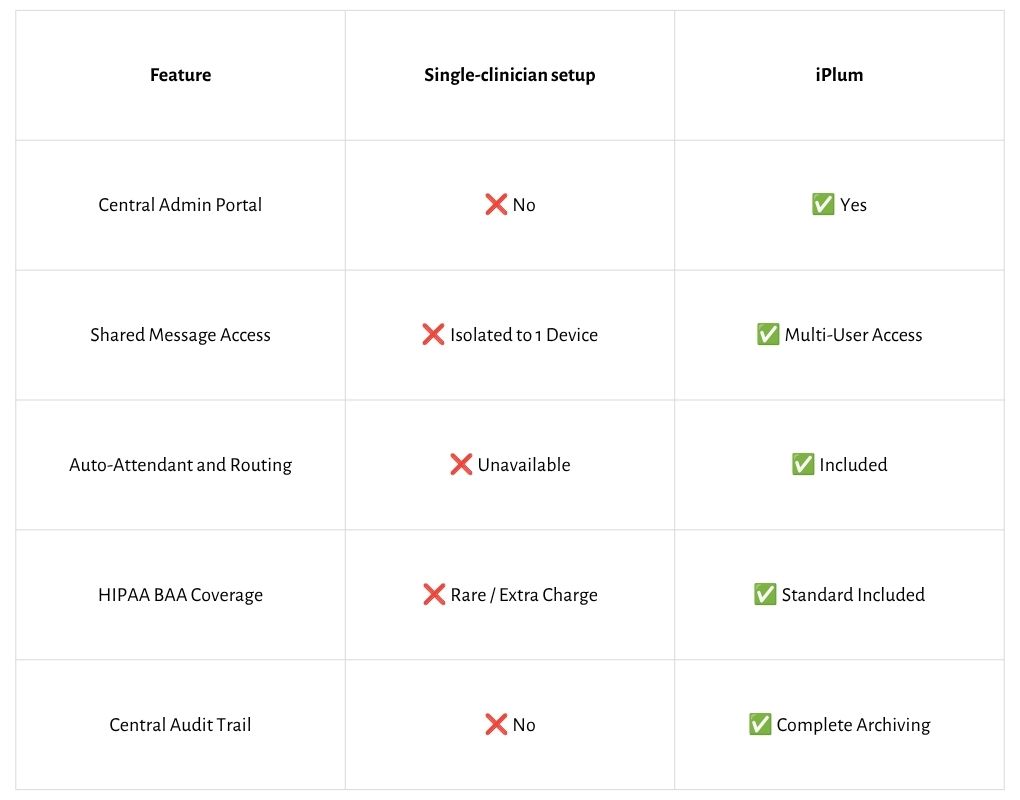
Single-user apps vs. multi-user team platforms
How shared communication solves the bottleneck
Shared communication comes in handy in a number of ways, including:
Centralized triage and extension routing
Shared inboxes give front-office staff, medical assistants, and covering clinicians immediate access to patient inquiries. Administrative staff handle scheduling requests, leaving complex clinical questions for the treating provider.
In addition, distributing incoming messages across extensions reduces overall wait times. Meanwhile, setting up an auto-attendant phone system allows you to route calls and texts directly to available personnel.
Smooth Coverage Transitions for Off-Hours
Care coordination improves when clinicians hand off messaging duties at shift changes. On-call providers monitor incoming patient texts without asking patients to save a new phone number.
Also, automated responses set clear expectations during off-hours while forwarding urgent concerns to duty personnel.
How iPlum eliminates single-clinician message silos
Single-user texting setups lock patient messages onto one person’s phone. Here’s how iPlum helps change that.
1. Multi-user access and role-based permissions
iPlum allows you to turn phone numbers into shared communication assets. That way, multiple staff members view, manage, and answer incoming texts from a centralized web dashboard or mobile app.
In addition, iPlum lets providers maintain separate lines for business and personal calls on the same mobile device.
2. Central administrative control and security
iPlum’s administrative console lets practice leaders add lines, update routing, and adjust permissions instantly. When an employee leaves, administrators revoke access with one click to protect practice data.
3. Built-in HIPAA compliance
iPlum offers a signed Business Associate Agreement (BAA), ensuring regulatory protection right out of the gate. It also encrypts data during transit and storage.
Furthermore, practice administrators gain access to detailed usage logs and secure message archiving.
4. Cost-effective scaling for modern practices
Expanding communication infrastructure with iPlum requires no extra hardware, landlines, or expensive smartphones. Practices can create new user accounts and virtual lines in minutes.
Better yet, flexible subscription tiers accommodate solo practices, growing speciality groups, and multi-location clinics.
Practical checklist to upgrade your practice’s communication workflow
Moving away from isolated message accounts requires a well-thought-out plan. Here's how to transition your care team to a secure, shared communication setup step by step:
- Audit current texting channels: Track down personal numbers or standalone apps currently used to text patients across your practice.
- Define triage roles: Assign front-desk staff and medical assistants to triage general patient inquiries before escalating to clinicians.
- Secure BAA documentation: Verify that your texting software vendor signs a valid Business Associate Agreement.
- Deploy iPlum line: Move your practice to iPlum’s central platform to unify calling, texting, and voicemail management.
Take control of your practice messaging
Isolated message channels delay patient care, increase administrative stress, and expose practices to compliance penalties. Shared communication tools keep staff connected while protecting clinical response times.
Upgrading to iPlum gives your care group secure, multi-user texting and calling capabilities without complex hardware setup.
Sign up for iPlum today to streamline patient messaging across your entire care team.

