


%20(1).avif)
.avif)

Medical answering services can be expensive.
Industry benchmarks place basic medical answering at $0.90–$1.50 per minute, and appointment scheduling or after-hours triage can reach $1.75–$3.00 per minute. At 500 monthly minutes, a practice could spend $450–$1,500.
However, you don't have to use a medical answering service, especially if you're trying to cut down costs. There are other effective medical answering service alternatives that don’t eat into your budget.
Below, we zero in on seven of those.
Table of Contents
1. Medical answering services alternatives: a quick comparison
2. What does a medical answering service do?
3. Best medical answering service alternatives for practices
5. Choose iPlum as your medical answering service alternative
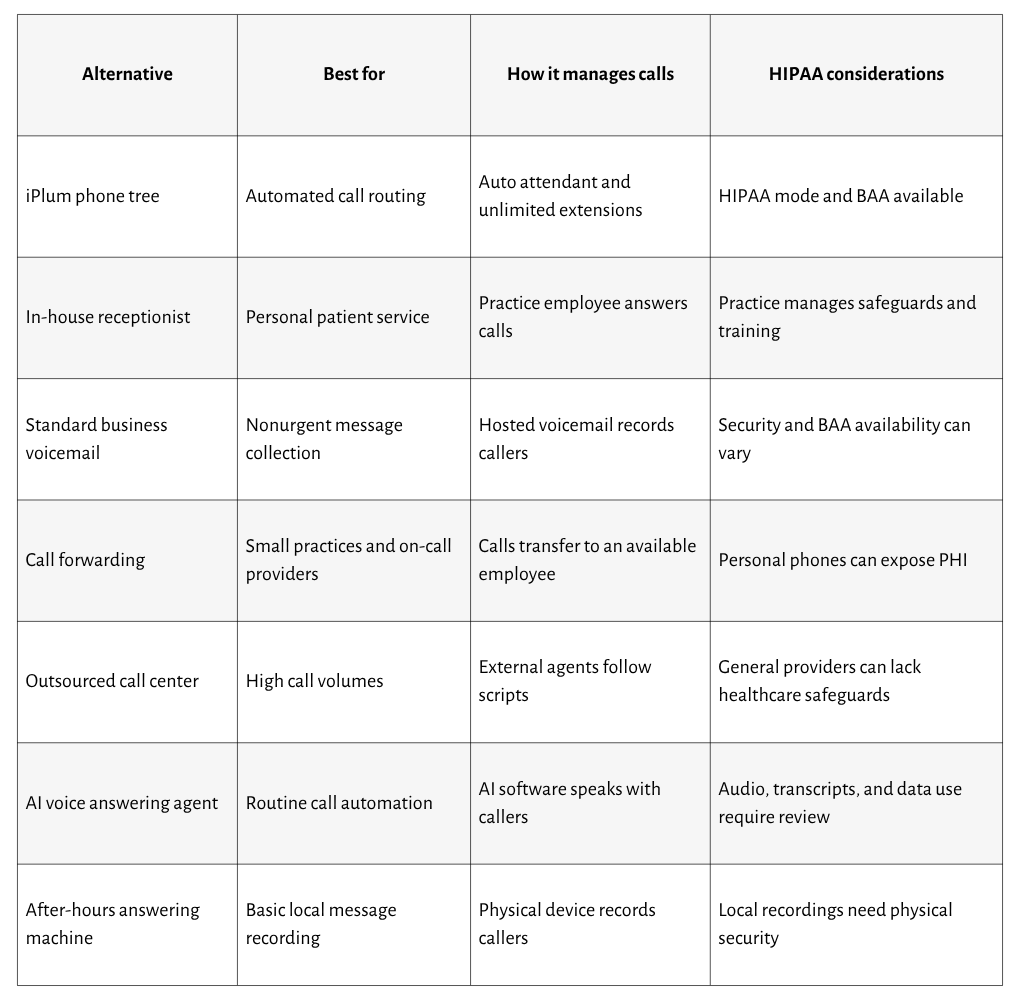
Medical answering services alternatives: a quick comparison
Let’s start by comparing the seven options at a glance:
What does a medical answering service do?
A medical answering service receives calls for a physician, clinic, therapist, dental office, or another healthcare provider.
It can answer during office hours, after hours, or around the clock. Depending on the agreement, its agents can:
- Greet patients using the practice’s name
- Schedule or change appointments
- Take prescription refill requests
- Record messages for providers
- Transfer calls to specific departments
- Contact an on-call clinician
- Explain office hours and locations
- Escalate urgent calls under an approved script
An answering provider can receive names, symptoms, diagnoses, treatment details, insurance information, and other protected health information (PHI).
A vendor that creates, receives, maintains, or transmits PHI on behalf of a covered entity generally acts as a business associate. In that situation, the parties generally need a Business Associate Agreement (BAA).
Best medical answering service alternatives for practices
Medical practices can answer and route patient calls through several systems.
The seven alternatives below differ in cost, availability, automation, personal service, and HIPAA safeguards for protecting sensitive patient information.
1. iPlum phone tree with unlimited extensions
First, iPlum provides medical practices with a HIPAA-compliant business phone solution that can replace or reduce reliance on a traditional answering service.
In addition, it comes with an advanced phone tree with an autoattendant and unlimited extensions.
With iPlum’s phone tree as your medical answering service alternative, you can:
Route calls through a HIPAA-compliant phone tree
A medical practice can create a menu such as:
- Press 1 to schedule or change an appointment
- Press 2 for billing questions
- Press 3 for prescription requests
- Press 4 for office hours and directions
- Press 5 to reach the on-call provider
The phone tree can send each selection to an employee, provider, department, or voicemail box.
iPlum provides unlimited extensions. Therefore, a practice can create separate destinations for multiple providers, offices, and administrative functions.
A clinic with three locations could assign extensions by location. Meanwhile, a therapy practice could create extensions for individual clinicians. A dental office could separate scheduling, billing, and urgent postoperative calls.
Automated routing also gives callers consistent instructions. External agents don't have to remember changing schedules, provider names, or department numbers.
Reduce dependence on external answering agents
A traditional answering agent first asks why the patient called. The agent then records a message or transfers the conversation.
iPlum lets patients select their intended destination from the phone tree. That way, billing callers can reach the billing extension. In addition, patients seeking appointments can reach reception. Also, an urgent caller can receive instructions on how to contact an on-call clinician or emergency services.
The practice decides how each route works during office hours and after the office closes.
Automated routing can also reduce per-minute answering charges. Existing employees and providers receive the calls assigned to them rather than sending every conversation through an external call center.
A practice can still use a receptionist where personal assistance adds value. In that arrangement, the phone tree sorts calls before they reach the receptionist.
Manage patient communication from business numbers
iPlum provides a separate business phone number that works through a mobile app, web browser, or existing device.
Its main capabilities include:
- Business calling
- Secure patient texting
- HIPAA-compliant voicemail
- Mobile and web access
- Call and text logs
- Account administration
- User permissions
- Optional call recording
- A BAA with eligible HIPAA plans
A patient can call the practice number and choose an extension. The assigned provider can answer through iPlum on a mobile device.
Patient communication remains associated with the practice's business account rather than the provider's private phone service.
Administrators can also add or remove users as employment changes. Therefore, the practice retains ownership of its phone numbers and communication accounts.
It is worth noting that a BAA doesn't complete HIPAA compliance by itself. The practice must properly configure the account, train users, restrict access, and establish communication policies.
However, the agreement addresses an important contractual requirement when iPlum acts as a business associate.
Protect personal phone numbers
Providers can use iPlum to call and text patients from a business number on their existing phones.
A returned call displays the business number rather than the clinician’s private number. Likewise, patient voicemail and text conversations remain separate from personal communication.
Such separation becomes important when a provider leaves the organization. The administrator can remove access and reassign the business number. Patients can continue calling the same practice-owned contact.
Where iPlum works best
iPlum can work for:
- Independent physicians
- Therapists and counselors
- Dental offices
- Home healthcare providers
- Multi-location clinics
- Specialty practices
- Clinicians working from different locations
Practices seeking automated routing can use iPlum instead of paying external agents to answer every call. Larger organizations can also combine the phone tree with receptionists or department employees.
2. In-house medical receptionist
An in-house medical receptionist answers calls from inside the practice.
The receptionist can schedule appointments, record messages, route clinical questions, process general requests, and contact on-call providers.
Advantages
- Knows the practice’s providers and procedures
- Gives patients a personal response
- Accesses approved scheduling systems
- Communicates with clinicians inside the office
- Learns common appointment and referral questions
Familiarity can improve accuracy. A receptionist who knows the clinicians and services can identify where a message belongs and recognize requests that require escalation.
Limitations
An in-house receptionist brings salary, benefits, training, equipment, and workspace costs.
Besides, one receptionist can answer only one call at a time. Other callers can reach voicemail during busy periods, breaks, meetings, and absences.
Office hours create another limitation. Evening, weekend, holiday, and emergency calls require a separate arrangement or additional employees.
Heavy workloads can also lead to errors. A receptionist can record an incorrect callback number, miss part of a message, or send information to the wrong provider.
HIPAA considerations
Receptionists can access appointment details, insurance information, treatment requests, and other PHI. Practices should, therefore, train them on HIPAA policies and grant system access according to their duties.
Reception areas should prevent visitors from overhearing sensitive conversations. Employees should avoid writing PHI on loose paper, leaving records visible, or sending patient details through consumer messaging apps.
Policies should address caller verification, message recording, written-note disposal, workstation access, urgent-call escalation, and misdirected information.
3. Standard business voicemail
Standard business voicemail records a message when nobody answers.
A practice can use one general mailbox or create separate mailboxes for providers and departments. Its greeting can state business hours, expected callback periods, emergency instructions, and the information callers should leave.
Advantages
- Costs less than live answering
- Gives patients a familiar option
- Works during and after business hours
- Records nonurgent appointment requests
- Allows different greetings for departments
Voicemail can work for routine scheduling questions, billing callbacks, and general inquiries that don't require an immediate conversation.
Limitations
Voicemail doesn't give patients an immediate response. Furthermore, callers can leave unclear names, incorrect phone numbers, or incomplete messages.
Patients can also disclose more PHI than is requested in the greeting. A simple appointment message, for instance, can mention symptoms, medications, diagnoses, or insurance information.
Urgent messages can remain unheard until an employee checks the mailbox. Shared voicemail can also create uncertainty about who should respond.
Full storage, accidental deletion, or missed notifications can result in lost messages.
HIPAA considerations
HIPAA doesn't prohibit voicemail. However, medical practices must apply reasonable safeguards.
HHS states that providers can leave messages on a patient's answering machine. However, they should limit the information disclosed. A provider can leave its name, telephone number, basic appointment information, or a request for the patient to call back.
Incoming voicemail requires further review because patients can leave detailed PHI. The practice should examine storage, user access, notification previews, retention, deletion, and the vendor’s BAA status.
4. Call forwarding to available employees
Call forwarding transfers a practice call to another telephone number.
A small office can send calls to a receptionist, office manager, physician, or on-call clinician. The patient calls the published practice number, but the selected employee’s device rings.
Advantages
- Gives callers access to a live employee
- Uses existing employees
- Works during temporary office closures
- Routes after-hours calls to on-call providers
- Requires little patient instruction
Call forwarding can work during lunch breaks, remote-work periods, and temporary changes in office availability.
Limitations
Basic call forwarding can route too many calls to a single employee. In addition, repeated calls can interrupt patient appointments, administrative work, and personal time.
Missed forwarded calls can be routed to a personal voicemail account. A personal greeting can confuse patients or reveal private information about the employee.
Returning a call from a personal phone can expose the employee’s number. Patient call records and notifications can also mix with private activity on the device.
Routing rules need regular updates. An outdated on-call schedule can send an urgent call to an unavailable clinician.
HIPAA considerations
Practices should define which devices employees can use for patient calls.
Relevant safeguards include screen locks, strong authentication, restricted notification previews, approved voicemail settings, lost-device reporting, and business callback procedures.
A separate business line can prevent exposure of personal numbers and retain patient communication under the practice’s account.
5. Outsourced call center
A general outsourced call center uses external agents to answer calls, follow scripts, collect information, and transfer selected callers.
Unlike a healthcare answering service, a general call center can serve businesses from numerous industries. Its agents can lack medical training.
Advantages
- Provides numerous agents
- Answers calls during extended hours
- Manages large call volumes
- Uses customized greetings
- Transfers calls based on practice instructions
A call center can serve a larger clinic that receives more calls than its internal employees can answer.
Limitations
First, general call center agents may misinterpret provider names, medical terms, medications, or symptoms.
In addition, patients can speak with a different agent each time. Therefore, communication quality can vary between calls.
Scripts also have limits. A script can address office hours and appointment requests, but unusual clinical questions require appropriate escalation.
Call centers generally charge by minutes, calls, or agent activity. Long conversations and higher call volume can increase monthly costs.
HIPAA considerations
A general call center isn't automatically HIPAA compliant. Secure technology and employee confidentiality agreements don't establish full compliance.
A call center that receives or maintains PHI for a medical practice generally acts as a business associate. The practice should verify that the provider will sign a BAA.
Relevant areas include agent training, access restrictions, call recording, secure message transmission, storage periods, subcontractors, incident reporting, authentication, and audit logs.
Patient messages containing PHI shouldn't travel through ordinary email or consumer SMS.
6. AI voice answering agent
An AI voice answering agent uses conversational software to speak with patients.
It can answer routine questions, collect caller information, schedule appointments, and transfer selected conversations.
Advantages
- Answers calls after business hours
- Manages several calls simultaneously
- Repeats approved information consistently
- Automates routine appointment requests
- Transfers defined call types to employees
A practice can use an AI agent for office hours, locations, appointment availability, insurance questions, preparation instructions, and cancellation policies.
Limitations
AI can misunderstand names, accents, medications, symptoms, and medical terminology. Such errors can create incorrect records or route the call improperly.
In addition, unusual requests can also confuse the system. A patient can become frustrated if the agent repeats questions or fails to recognize an answer.
AI shouldn't make clinical decisions or independently assess the seriousness of symptoms. An inadequate escalation process can delay an urgent request.
The service can generate audio recordings, transcripts, summaries, appointment records, and analytics. Therefore, one conversation can create several records containing PHI.
HIPAA considerations
Practices should examine how the AI provider processes audio, transcripts, summaries, and caller metadata.
The review should address:
- BAA availability
- Encryption
- Recording access
- Transcript access
- Data retention
- Model-training policies
- Human review
- Subprocessor access
- User authentication
- Emergency escalation
- Record deletion
Patient conversations containing PHI shouldn't be included in general model-training datasets.
An AI provider that creates, receives, maintains, or transmits PHI for a covered entity generally acts as a business associate.
Be sure to read more about AI and compliance.
7. After-hours answering machine
An after-hours answering machine is a physical device connected to the office telephone line.
It plays a recorded greeting and stores caller messages on the device. Employees listen to the recordings when they return.
Advantages
- Has a low purchase cost
- Requires basic installation
- Records calls after closing
- Stores messages inside the practice
- Avoids recurring agent charges
A physical answering machine can serve a very small office that receives limited after-hours calls.
Limitations
An answering machine can't speak with patients, schedule appointments, route calls, or escalate urgent requests.
Messages remain on the device until an employee checks them. Consequently, an urgent concern can wait overnight or through a weekend.
Storage capacity can be limited. Once the device fills, new callers might not be able to record messages.
Power loss, equipment failure, or accidental deletion can erase recordings. Remote access can also be unavailable or protected only by a basic access code.
HIPAA considerations
Local storage doesn't automatically make an answering machine HIPAA compliant.
Anyone near the device can potentially hear recordings. Playing messages through its speaker can disclose PHI to visitors, contractors, or unauthorized employees.
The practice should place the machine in a restricted area and control who can play or delete messages.
Policies should address:
- Device access codes
- Speaker volume
- Message deletion
- Storage capacity
- Equipment maintenance
- Power failure
- Secure disposal
- Emergency instructions
- Message-checking schedules
Frequently asked questions
What is the best alternative to a medical answering service?
iPlum is the best alternative for practices seeking automated call routing. Its HIPAA phone tree provides an auto attendant, unlimited extensions, business calling, secure texting, voicemail, account administration, and a BAA on eligible plans.
Can a medical practice use a regular voicemail system?
Yes. HIPAA doesn't prohibit voicemail. However, the practice should examine access, storage, notifications, retention, deletion, and vendor responsibilities before allowing patients to leave PHI.
Does every answering service comply with HIPAA?
No. General call centers, voicemail systems, AI agents, and answering machines aren't automatically HIPAA compliant. Practices must assess how each option receives, stores, transmits, and deletes PHI.
Can employees receive forwarded patient calls on personal phones?
They can, but personal numbers, voicemail, call logs, and notification previews can expose patient information. A separate business line creates a safer division between professional and private communication.
Does an AI answering agent need a BAA?
A BAA generally applies when an AI provider creates, receives, maintains, or transmits PHI on behalf of a covered entity. The practice should confirm the vendor's role before sending patient calls through the system.
Choose iPlum as your medical answering service alternative
Medical practices don't always need an external agent to answer every incoming call.
iPlum’s HIPAA phone tree greets patients and routes calls according to provider, department, office, or purpose. Unlimited extensions let the practice create separate destinations for scheduling, billing, prescriptions, clinicians, and locations.
Providers can also use business numbers for calls, secure patient texts, and voicemail through their existing devices. Account administrators can manage users and retain ownership of the practice’s phone numbers.
iPlum provides a BAA, along with secure calling, texting, voicemail, and account controls.
Get started with iPlum to access a HIPAA phone tree for your medical practice.

