


%20(1).avif)
.avif)
Introduction
In an increasingly mobile world, effective communication is paramount for businesses striving to maintain a professional presence. SMS call forwarding emerges as a vital tool, allowing organizations to seamlessly redirect incoming text messages, ensuring that no important communication is missed. This feature enhances accessibility and bolsters customer service, making it essential for both businesses and public sector organizations.
With the right setup and a few troubleshooting tips, anyone can harness the power of SMS forwarding to improve their communication strategy and safeguard sensitive information.
Understand SMS Call Forwarding Basics
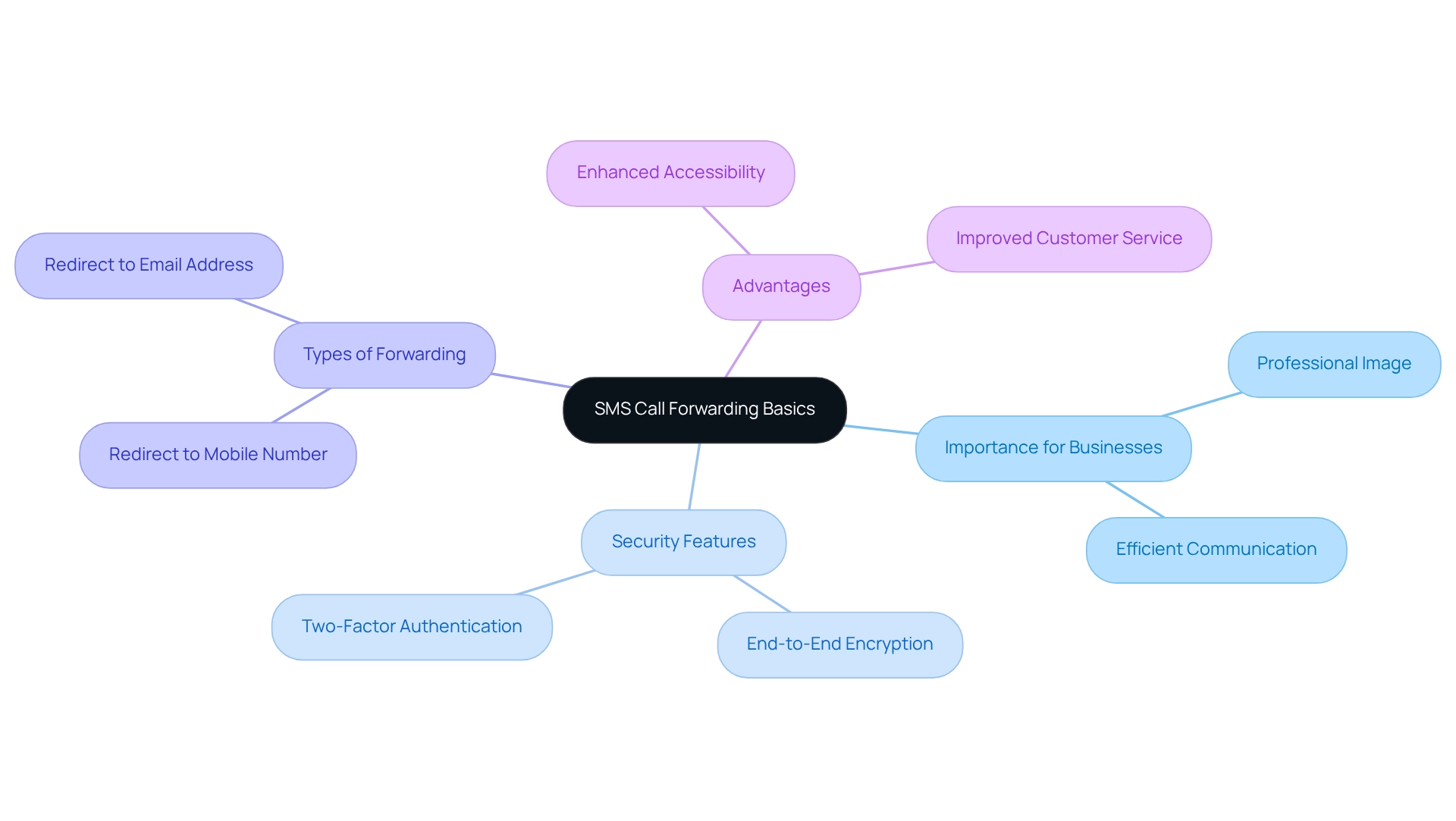
SMS call forwarding is a crucial feature that allows for the seamless rerouting of incoming text messages from one phone number to another. This capability is particularly vital for businesses aiming to uphold a professional image while managing communications efficiently. With iPlum's secure messaging features, which include end-to-end encryption and two-factor authentication, organizations can ensure the protection of sensitive information during SMS transmission.
Unlike conventional call redirection, often supported by carriers, SMS rerouting typically requires third-party applications or specific device settings. Understanding the fundamentals involves recognizing the various types of SMS call forwarding available, such as redirecting messages to another mobile number or an email address. The potential advantages are significant, including enhanced accessibility and improved customer service.
Furthermore, iPlum's virtual receptionist, phone tree, and auto text reply capabilities optimize communication, ensuring that public sector organizations can enhance collaboration and maintain compliance with regulations like HIPAA. Are you ready to elevate your communication strategy? Explore how iPlum can transform your SMS management today.
Set Up SMS Call Forwarding Step-by-Step
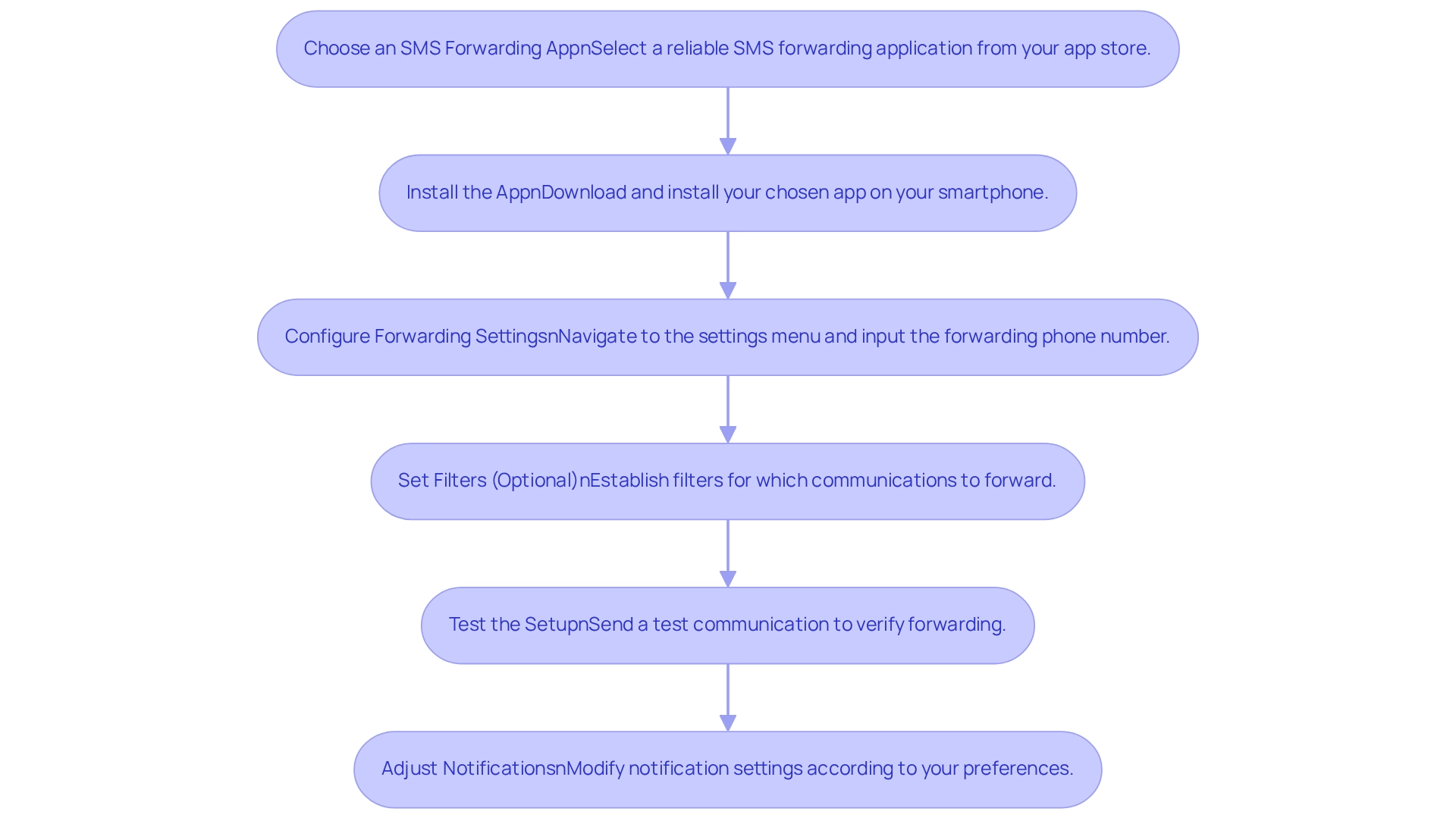
To effectively set up SMS call forwarding, follow these essential steps:
-
Choose an SMS Forwarding App: Select a reliable SMS forwarding application from your app store, tailored to your device. Popular options include 'SMS Forwarder' for Android and 'Text Message Forwarding' for iOS.
-
Install the App: Download and install your chosen app on your smartphone. Ensure you provide the necessary permissions for the app to access your communications.
-
Configure Forwarding Settings: Open the app and navigate to the settings menu. Here, you will typically find options to input the phone number to which you wish to redirect your communications.
-
Set Filters (Optional): Some applications allow you to establish filters for which communications to forward, such as only those from specific contacts. Configure these settings as needed to optimize your forwarding preferences.
-
Test the Setup: Send a test communication to your original number to verify that it forwards correctly to the designated number. Check both the sender and receiver devices to confirm successful transmission.
-
Adjust Notifications: If the app offers notification settings, adjust them according to your preferences to stay informed about forwarded messages.
By following these steps, you can ensure that you never miss important communications through effective SMS call forwarding.
Troubleshoot Common Setup Issues
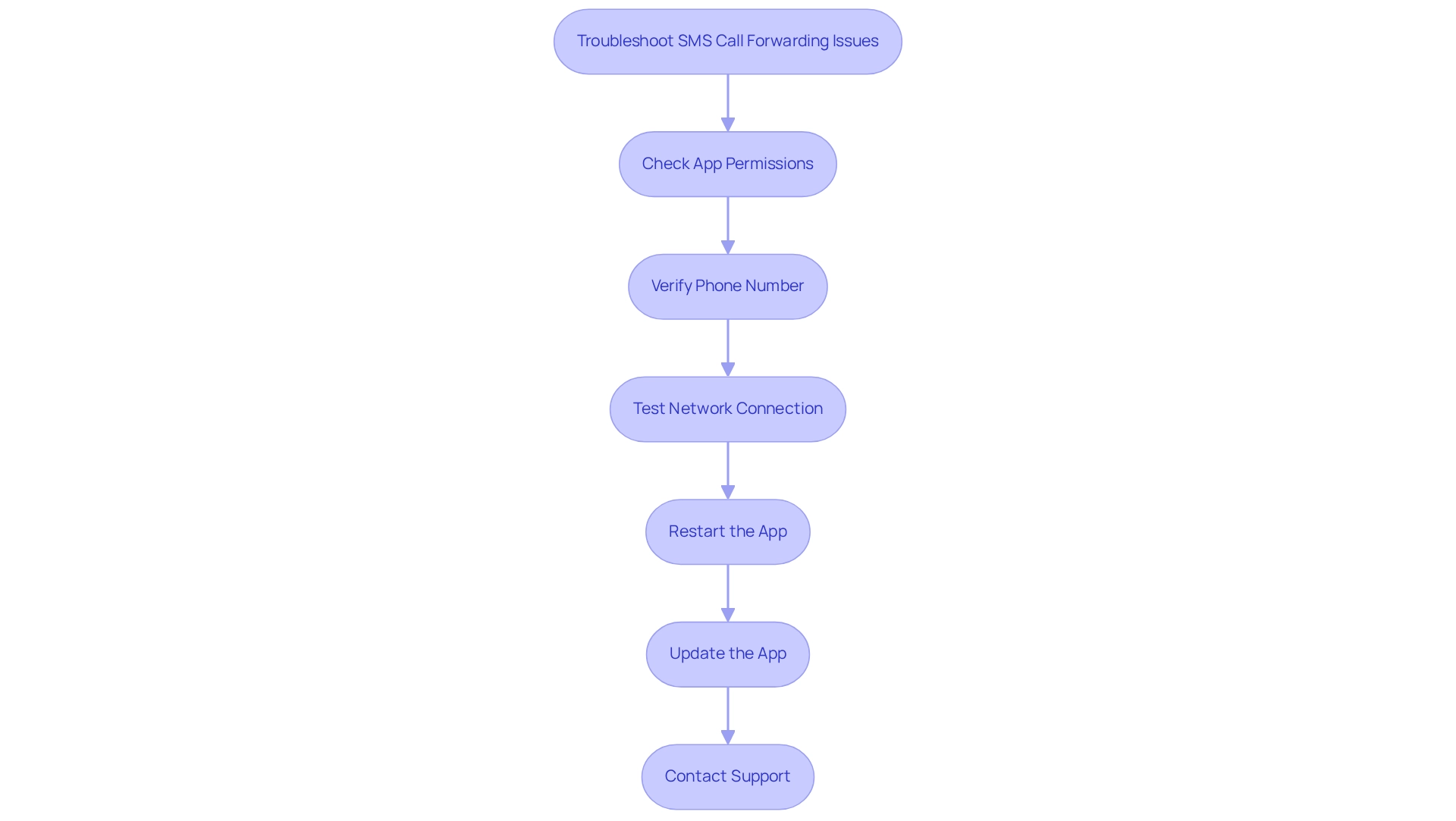
If you encounter issues while setting up the SMS call forwarding feature, it is crucial to address them effectively. Consider the following troubleshooting tips:
-
Check App Permissions: Ensure that the SMS redirecting app has the necessary permissions to access your messages and contacts. Go to your device settings and verify the app permissions.
-
Verify Phone Number: Double-check the contact number you entered in the app. Ensure it is correct and formatted properly, including the country code if necessary.
-
Test Network Connection: A stable internet connection is essential for many SMS redirecting applications. Ensure your device is connected to Wi-Fi or has a strong mobile data signal.
-
Restart the App: Sometimes, simply closing and reopening the app can resolve minor glitches. Restart the SMS redirecting app and try sending a test message again.
-
Update the App: Ensure that you are using the latest version of the SMS redirecting app. Check for updates in your app store and install any available updates.
-
Contact Support: If issues persist, consult the app's support documentation or contact their customer service for assistance. They may provide specific troubleshooting steps tailored to their application, and by following these troubleshooting steps, you can effectively resolve common issues to ensure that your SMS call forwarding functions as intended.
Conclusion
The implementation of SMS call forwarding signifies a pivotal evolution in how businesses can navigate communications within a mobile-first environment. By grasping the fundamentals of SMS forwarding and the key features provided by applications like iPlum, organizations can significantly enhance their accessibility and customer service, ensuring that no crucial messages go unnoticed.
Setting up SMS call forwarding is a straightforward process when approached methodically. From selecting the appropriate app to configuring forwarding settings and testing the setup, each step is vital for ensuring uninterrupted communication. Furthermore, being equipped to troubleshoot common issues can save valuable time and alleviate frustration, allowing businesses to concentrate on their core operations.
In conclusion, SMS call forwarding transcends mere convenience; it serves as an essential tool that empowers organizations to uphold a professional image and facilitate effective communication. As businesses increasingly depend on mobile technology, adopting solutions like SMS forwarding will not only refine customer interactions but also bolster overall operational efficiency. By prioritizing these practices, organizations can remain responsive and accessible amid the ever-evolving digital landscape.
Frequently Asked Questions
What is SMS call forwarding?
SMS call forwarding is a feature that allows incoming text messages to be seamlessly rerouted from one phone number to another, which is particularly useful for businesses to manage communications efficiently.
Why is SMS call forwarding important for businesses?
It helps businesses maintain a professional image while ensuring efficient communication management, enhancing accessibility, and improving customer service.
How does iPlum ensure the security of SMS transmissions?
iPlum offers secure messaging features, including end-to-end encryption and two-factor authentication, to protect sensitive information during SMS transmission.
What types of SMS call forwarding are available?
SMS call forwarding can redirect messages to another mobile number or to an email address.
What additional features does iPlum provide to optimize communication?
iPlum includes features such as a virtual receptionist, phone tree, and auto text reply capabilities, which help enhance collaboration and ensure compliance with regulations like HIPAA.
Do traditional carriers support SMS call forwarding?
Unlike conventional call redirection supported by carriers, SMS rerouting typically requires third-party applications or specific device settings.

