


%20(1).avif)
.avif)

When running a law firm, every client conversation counts.
In fact, missing a call, losing a message, or using an unsecured phone system can damage client relationships and expose your firm to serious consequences.
That said, legal professionals are moving away from traditional phone systems to hosted VoIP, and for good reason. A reliable VoIP phone system provides attorneys with professional communication tools that work on any device, in any office.
Below, we review the best VoIP for law firms and what makes them tick.
Table of Contents
1. How to choose the best VoIP solution for law firms?
2. TL; DR - Quick comparison table
3. Best VoIP solutions for law firms
4. How to roll out VoIP for law firms?
5. VoIP solution for law firms - frequently asked questions (FAQs)
6. Get a VoIP solution for law firms made for compliance
How to choose the best VoIP solution for law firms?
Not every VoIP service is built for legal practices. Here’s what to evaluate before choosing a VoIP provider for your law firm.
Security and compliance
The attorney-client privilege is essential for legal professionals.
Therefore, look for a VoIP system with end-to-end encryption, HIPAA-compliant call recording (if you handle sensitive information), and secure storage for sensitive client information. Your firm’s phone system must meet the ethical standards set by your state bar.
Legal-specific functionality
A general business phone system won’t cut it. Your VoIP phone should, therefore, offer call recording with consent announcements, detailed call logs, and documentation tools that protect privilege and hold up in court.
Client communication features
Look for a solution that offers an auto attendant, intelligent call routing, and mobile access, ensuring clients always reach the right person. The point is, legal professionals working remotely need a cloud phone system that performs just as well outside the office.
Integration with legal tools
The best VoIP systems connect with legal practice management software. That way, you can automatically attach call data and recordings to the right case file.
Scalability
Your VoIP service should work for a solo attorney today and scale as your firm grows without forcing a full system overhaul.
Call quality and reliability
Call quality is essential for client communication. You don’t want dropped calls during critical client interactions. Therefore, prioritize a provider with proven uptime and dual-mode calling on cellular and Wi-Fi.
Pricing and support
Look for transparent pricing that fits your legal budgets. You also want a provider with proven expertise in legal communication needs.
TL; DR - Quick comparison table
Below is a comparison table for a quick overview:
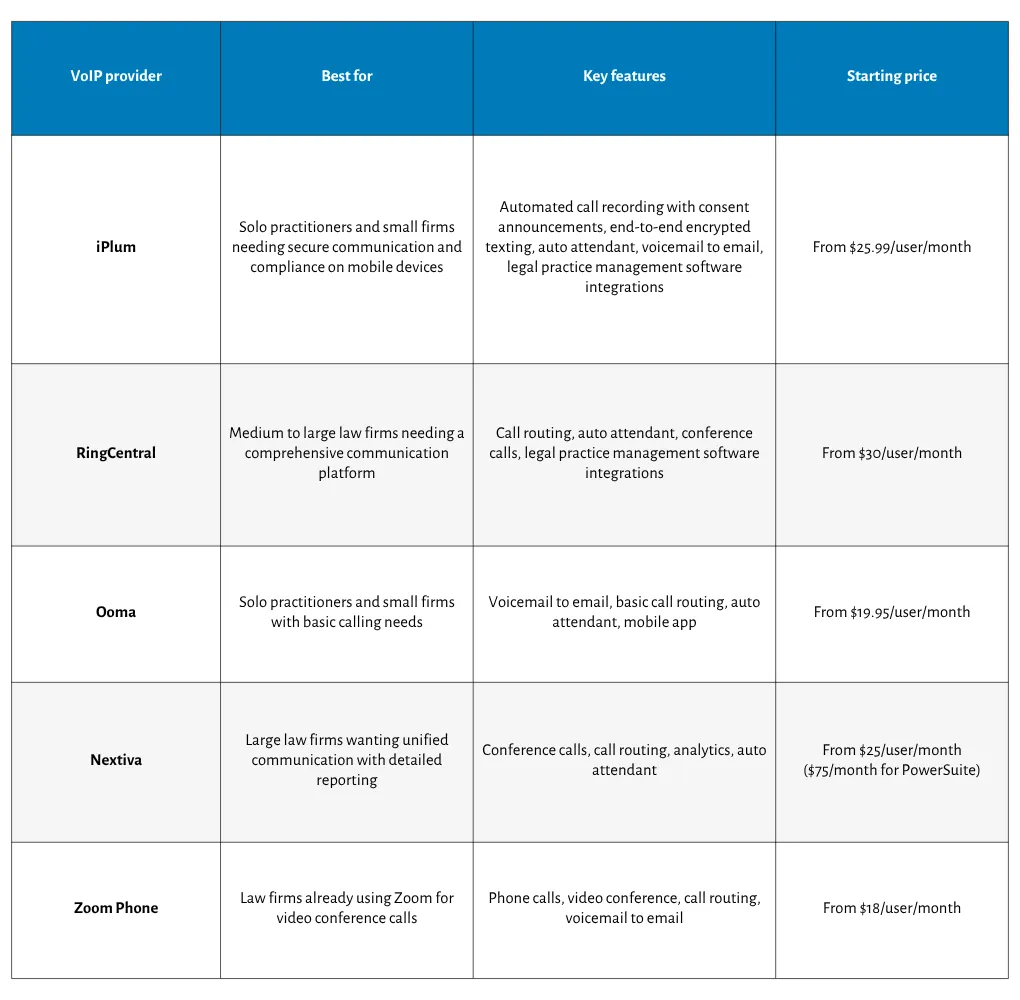
Best VoIP solutions for law firms
We evaluated each VoIP solution on this list on security, legal communication features, call quality, integration with legal practice management software, and overall value for legal practices.
1. iPlum
iPlum is a hosted VoIP solution built specifically for compliance-heavy industries, including legal practices.
It runs on your existing smartphone, giving legal professionals a dedicated business line with enterprise-grade security, HIPAA compliance, and tools to protect attorney-client privilege.
Why iPlum stands out
Legal communication has unique demands, and iPlum is built around them.
First, it offers automated call recording to capture every client call. It also comes with a built-in consent announcement, so attorneys practicing in all-party-consent states can easily remain compliant.
iPlum stores recordings in an encrypted vault, separate from your personal device. That way, sensitive client information never mixes with personal data, protecting privilege and keeping your records court-ready.
iPlum’s secure communication extends to messaging as well.
The platform offers end-to-end encrypted texting, with every message archived for documentation and discovery.
Meanwhile, the auto attendant with extensions gives your law office a professional image, routing client calls to the right person every time.
And then there’s the voicemail-to-email feature to ensure you never miss a time-sensitive message from a client.
What’s more, iPlum connects with legal practice management software like Clio and MyCase so that you can attach call recordings and logs to the correct case file.
And because the cloud phone system works on mobile devices, attorneys can handle client communications from anywhere, whether in the office or in court.
For law firms that need a second business line without having to carry two phones, iPlum is a genuinely cost-effective solution that doesn't compromise compliance.
Best for
Solo practitioners and small firms that need secure, compliant client communications on mobile devices.
iPlum is also ideal for legal professionals who want a dedicated business line with professional features and enterprise-grade security, without having to invest in hardware or desk phones.
Pricing
iPlum legal compliance line pricing starts at $25.99 per month per user in the Enterprise plan.
.webp)
2. RingCentral
RingCentral is an enterprise-grade VoIP platform built for larger organizations. It combines phone calls, video conferencing, and messaging into one communication suite. The solution is a good pick for mid-to-large law firms with complex needs.
Why RingCentral stands out
RingCentral offers a broad set of communication tools, including call routing, auto attendant, and conference calls.
It also connects with several business platforms and some legal practice management software. The system is built for scale, which makes it appealing to larger firms.
However, the platform includes many features that smaller legal practices will never use, adding unnecessary costs. Besides, setup and administration can also be time-consuming for smaller law offices.
Best for
Medium- to large-sized law firms looking for a comprehensive communication platform with extensive integration options and room to scale.
Pricing
RingCentral plans start at $30 per user per month, with features like IVR call routing available as add-ons for up to $40 monthly, pushing costs higher compared to iPlum.

3. Ooma
Ooma is a business-focused VoIP service. It provides legal practices with essential phone system features without significant technical overhead. That said, Ooma is more of a phone system for general small businesses than it is a law firm VoIP solution.
Why Ooma stands out
While Ooma is easy to use, it offers standard features for attorneys, such as voicemail-to-email, call routing, and a basic auto attendant. Still, attorneys can use the mobile app to handle calls away from the office.
On the flip side, it drops the ball for legal practices seeking to secure sensitive client information and protect privilege. It is not, for instance, HIPAA compliant out of the box. Besides, features such as call recording and consent are only available in higher-tier plans.
Best for
Solo practitioners and small firms are looking for a reasonably reliable cloud phone system.
Pricing
Ooma Office plans start at $19.95 per user per month. However, advanced features like call recording and advanced communication tools are only available in the Pro and Pro Plus plans.

4. Nextiva
Nextiva is a hosted VoIP provider that offers scalable phone system options for law firms at different stages of growth. It is a solid pick for legal practices looking for a VoIP system to unify communication across the board.
Why Nextiva stands out
Nextiva's VoIP system covers conference calls, call routing, and detailed reporting. Meanwhile, the auto attendant allows you to route client calls. In addition, legal teams get useful visibility into communication patterns through built-in analytics.
That said, Nextiva lacks legal communication-specific compliance features compared to an alternative like iPlum. For instance, attorneys handling sensitive information may need to disable some features to meet ethical obligations.
Best for
Large law firms want a unified business communication platform with detailed reporting on client communications.
Pricing
Nextiva plans start at $25 per user per month. However, to access advanced reporting, integration, and essential features for law firms such as voice and routing, you’ll need to sign up for the PowerSuite plan, which costs $75 per month.

5. Zoom Phone
Zoom Phone is the VoIP service extension of the Zoom platform. It adds a cloud phone system to the familiar Zoom environment, making it a convenient option for law firms already using Zoom for video conference calls.
Why Zoom Phone stands out
For firms already on Zoom, adding Zoom Phone significantly reduces onboarding time. It brings phone calls, video conferencing, and messaging under one login. Additionally, you can get call routing and voicemail-to-email in standard plans.
Nevertheless, Zoom Phone offers limited call-management features compared to dedicated VoIP systems like iPlum. In addition, legal-communication compliance tools are notably absent from most plans.
Best for
Zoom Phone is ideal for law firms already invested in the Zoom ecosystem, looking to consolidate their communication tools under one provider.
Pricing
Zoom Phone plans start at $18 per user per month. However, to derive value, you’re better off bundling your plan with Zoom Meetings, which can significantly increase costs.
How to roll out VoIP for law firms?
Switching your law firm to a VoIP phone system does not have to be complicated.
Follow these steps to move from traditional phone lines or your current setup to a VoIP service for lawyers without disrupting client communications.
Step 1 - Audit your current phone system
List every phone line, device, and communication tool your firm currently uses. Then, identify what works, what doesn’t, and what features your legal practice genuinely needs in a new system.
Step 2 - Define your compliance requirements
Before evaluating any VoIP provider, document your ethical obligations. Consider call recording consent laws in your state, HIPAA requirements if relevant, and any obligations around sensitive client information and privilege protection.
Step 3 - Choose the right VoIP provider
Evaluate VoIP systems against your compliance checklist, integration needs, and budget. Prioritize providers built for legal communication over generic business phone systems that require costly add-ons to meet basic requirements.
Step 4 - Port your existing numbers
Most VoIP providers allow you to port your existing phone number to their system. Confirm portability before signing up to avoid disrupting client interactions during the transition.
Step 5 - Integrate with your legal tools
Connect your new VoIP phone to your legal practice management software. Attaching call logs and recordings to case files from day one saves significant administrative time later.
Step 6 - Train your staff
Walk your administrative staff and attorneys through the new system. Cover call routing, voicemail-to-email, auto-attendant settings, and call-recording procedures to ensure everyone uses the service correctly from the start.
Step 7 - Test before going live
Run test calls, check recording quality, and confirm all client communications routes correctly. Resolve any issues before switching your firm fully to the new VoIP system.
VoIP solution for law firms - frequently asked questions (FAQs)
Is VoIP secure enough for attorney-client communications?
Yes, as long as you choose a VoIP provider with end-to-end encryption, secure call recording, and HIPAA compliance. Generic VoIP systems lack these protections, making purpose-built solutions like iPlum a better fit for legal practices.
Can I use my existing phone number with a VoIP service?
Yes. Most VoIP providers allow you to port your existing phone number to their system. Confirm portability with your chosen provider before signing up to avoid any disruption to client communications.
Do I need desk phones to use VoIP in my law firm?
No. Most modern VoIP phone solutions, including iPlum, run on mobile devices you already own. Attorneys can handle client calls, messaging, and call routing from a smartphone, eliminating the need for hardware or desk phones.
Get a VoIP solution for law firms made for compliance
Indeed, all five VoIP phone systems for law firms on this list bring something to the table. RingCentral scales well; Nextiva offers a unified communication platform; and Zoom Phone works for existing Zoom users.
But for legal professionals who need purpose-built secure communication, automated call recording compliance, and privilege protection on mobile devices, iPlum stands above the rest.
And iPlum also supports number porting, so your clients can reach you on the same phone number they already know. And with responsive-based customer support, you’ll always get help when you need it.
Ready to protect your practice? Sign up for iPlum today.
Disclaimer: This article is intended for general informational purposes and may not reflect the most current features or capabilities of the products or companies mentioned. For the most accurate and up-to-date information, please refer to the official sources of each company.

