


%20(1).avif)
.avif)
A lot of solo attorneys and small law firms pay $300 to $600 per month for a virtual legal receptionist service.
In fact, premium legal answering services cost well over $1,000 per month. And there’s a reason firms pay these fees.
They assume there's no other way to answer calls professionally, route potential clients to the right attorney, and protect billable hours from constant interruptions.
But what if a phone tree could do 90% of what a virtual legal receptionist does for under $30 a month?
iPlum's phone tree is built into every subscription at no extra cost.
It greets every caller with a professional voice, routes client calls to the right attorney, plays directions and hours, sends after-hours coverage to voicemail with email alerts, and protects attorney-client privilege through end-to-end encryption.
The rest of this article shows solo attorneys and small firms how to replace a virtual legal receptionist service with iPlum's phone tree and save thousands of dollars a year.
Table of Contents
1. What is a virtual legal receptionist, and how much does it cost?
2. How iPlum's phone tree replaces a virtual legal receptionist
3. Virtual legal receptionist service vs iPlum phone tree at a glance
4. Setting up iPlum's phone tree for your law firm
What is a virtual legal receptionist, and how much does it cost?
Before swapping your legal answering service for a phone tree, it pays to map out what virtual receptionists actually do and what you're paying for.
Here’s a quick breakdown:
What does a virtual legal receptionist do?
A virtual legal receptionist does the following primary tasks:
- Answers calls with a branded greeting
- Routes callers to the right attorney or department
- Collects basic new client intake information
- Provides after-hours coverage for missed calls
Some services also schedule appointments and qualify leads during the first call.
How much do virtual receptionist services charge?
Legal virtual receptionist pricing falls into three models as follows:
- Per-minute plans at $1.50 to $3.50 per minute.
- Per-call plans for $4 to $10 per call.
- Flat monthly plans for legal practice clients at $300 to $1,500.
And then there are the setup fees, which typically cost $50 to $500. That said, overage charges on every plan can double your monthly bill during busy weeks.
Where do virtual receptionists fall short?
Sure, trained receptionists at legal answering services can juggle dozens of firms simultaneously.
However, this also means some bottlenecks for your firm, including:
- Generic scripts that miss your practice's details: Operators read from templates built for multiple firms at once, so nuances about your intake process, fee structure, or practice areas get skipped.
- Limited custom scripts for your practice: Most plans cap the number of instructions you can add, and complex routing rules cost extra.
- Third-party operators seeing privileged client communication: Every call, intake detail, and client name passes through staff outside your firm, which raises attorney-client privilege concerns.
- No real control over call flow: You can't tweak routing on the fly, change after-hours rules during a trial week, or reroute calls to a specific attorney without contacting the vendor.
- Overage charges that punish busy weeks: High call volumes blow past monthly minutes or call caps, and the extra fees stack up fast.
In addition, most legal answering services won't sign a BAA, which matters for family law and criminal defense attorneys protecting sensitive client information.
How iPlum's phone tree replaces a virtual legal receptionist
iPlum's phone tree does the same four jobs as a virtual legal receptionist service.
You only need to set it up once, and it runs 24/7 with no per-minute fees, third-party operators, overage bills, or anyone outside your firm listening to privileged client calls.
What is iPlum's phone tree?
iPlum's phone tree is an auto-attendant cloud voice menu system with interactive voice response (IVR).
It's built into every iPlum local or toll-free phone number subscription at no additional cost.
With the phone tree, callers hear a greeting, press a key, and get routed to an attorney, a department, a voicemail, an announcement, or an external number.
The call flow runs entirely in the cloud, so there's no hardware to buy and no landlines to configure.
Here’s what you get with the iPlum phone tree.
Branded greetings
The phone tree allows you to record your greeting in your own voice or use text-to-speech. Either way, every client hears the same professional voice every time they call.
A sample greeting for a small firm might read:
"Thank you for reaching Smith Law Group. If this is a medical or legal emergency, please call 911. For new client consultations, press 1. To reach attorney Jane Smith, press 11. For attorney Mark Chen, press 12. For billing, press 4. To hear our office directions and hours, press 3. To leave a voicemail, press 0. Press 9 to repeat these options."
Solo practitioners can use the same format with fewer extensions. The greeting sounds identical to a legal answering service, except it runs consistently, never calls in sick, and never puts a potential client on hold.
Phone tree extensions for attorney routing
iPlum lets you build extensions up to four digits long. That way, each extension can route calls in five ways as follows:
- Ring a single iPlum number (an attorney's mobile with iPlum installed)
- Ring multiple numbers sequentially (try the attorney first, then the paralegal)
- Ring multiple numbers simultaneously (a hunt group)
- Route to an external non-iPlum number
- Send the call directly to voicemail.
For a family law practice with two attorneys and a paralegal, the setup looks like this:
- Extension 11 → attorney one
- Extension 12 → attorney two
- Extension 1 → paralegal → both attorneys (if paralegal misses the call)
- Extension 0 → main voicemail (for same-day new client intake follow-up)
Business hours and after-hours profiles
iPlum uses profiles to run different extensions at different times.
For instance, you can create a "Business Hours" profile (Monday-Friday, 8 AM to 5 PM) that routes calls to attorneys.
Or create an "After Hours" profile (evenings and weekends) that routes calls to voicemail or to an external answering service as a backup.
Each profile uses a priority number to prevent conflicts. Priority 1 takes precedence over priority 2, so a business-hours call never accidentally lands on an after-hours coverage extension.
Individual attorneys also configure their own Do Not Disturb hours inside their iPlum app. That way, a solo attorney in court from 9 AM to noon automatically routes those hours to voicemail.
Announcements for directions, hours, and the attorney directory
You can dedicate extensions to announcements, so callers get answers without tying up an attorney's time.
For instance, extension 3 plays the firm's address and hours. Meanwhile, extension 2 plays an attorney directory:
"When you hear the right attorney's extension, press pound to skip the rest of the directory and dial that extension. For Jane Smith, press 11. For Mark Chen, press 12..."
With this setup, callers can press the pound key at any time to skip the announcement and return to the main menu. And, every announcement uses text-to-speech or your own recorded audio. You can also upload a custom MP3 file.
Voicemail transcription for fast client intake review
Your iPlum number comes with its own voicemail box. In addition, messages arrive with email alerts.
At the Professional tier, voicemail transcription converts each message into text, so attorneys can review new client intake between meetings without listening to audio.
That said, transcriptions work well for client communication triage: urgent calls get same-day callbacks, routine calls get scheduled follow-ups, and spam gets deleted in seconds.
Auto-text reply for missed calls and after-hours SMS
With iPlum, missed calls trigger an automatic text reply to the caller.
After-hours SMS to your iPlum number receives an auto-response explaining when your firm will reply. Both features are included with every iPlum subscription and require no extra setup.
A sample auto-text could look like this:
"Thanks for reaching Smith Law Group. Our office hours are Monday to Friday, 8 AM to 5 PM. We'll return your call during business hours. For urgent matters, reply URGENT and an attorney will contact you within 2 hours."
Multiple receptionists and multi-level phone trees
The iPlum phone tree allows larger firms to route calls through a hunt group of paralegals or receptionists.
You can configure the extension with "Ring Multiple iPlum Numbers - Simultaneous," add every receptionist's iPlum number, and set unanswered calls to roll to the main voicemail. While at it, you can turn off individual voicemails on the receptionist accounts so every message lands in one inbox.
Multi-level phone trees allow firms to split calls by practice area before routing to the right attorney.
A firm practicing family law, criminal defense, and estate planning builds a main phone tree that says "press 1 for family law, 2 for criminal defense, 3 for estate planning," and each option routes to a sub-account phone tree with that practice area's attorneys and extensions.
Attorney-client privilege protection built in
iPlum's Professional tier adds end-to-end encrypted texting, HIPAA Compliance, and a signed Business Associate Agreement.
Meanwhile, the Enterprise plan includes call recordings with consent announcements and 10-year archiving for calls and text messaging, which meets state bar recordkeeping rules and SEC 17a-4 requirements for attorneys who also advise on financial matters.
In addition, every plan runs on a SOC 2 Type II Security Compliance infrastructure, so privileged client calls never pass through third-party operators.
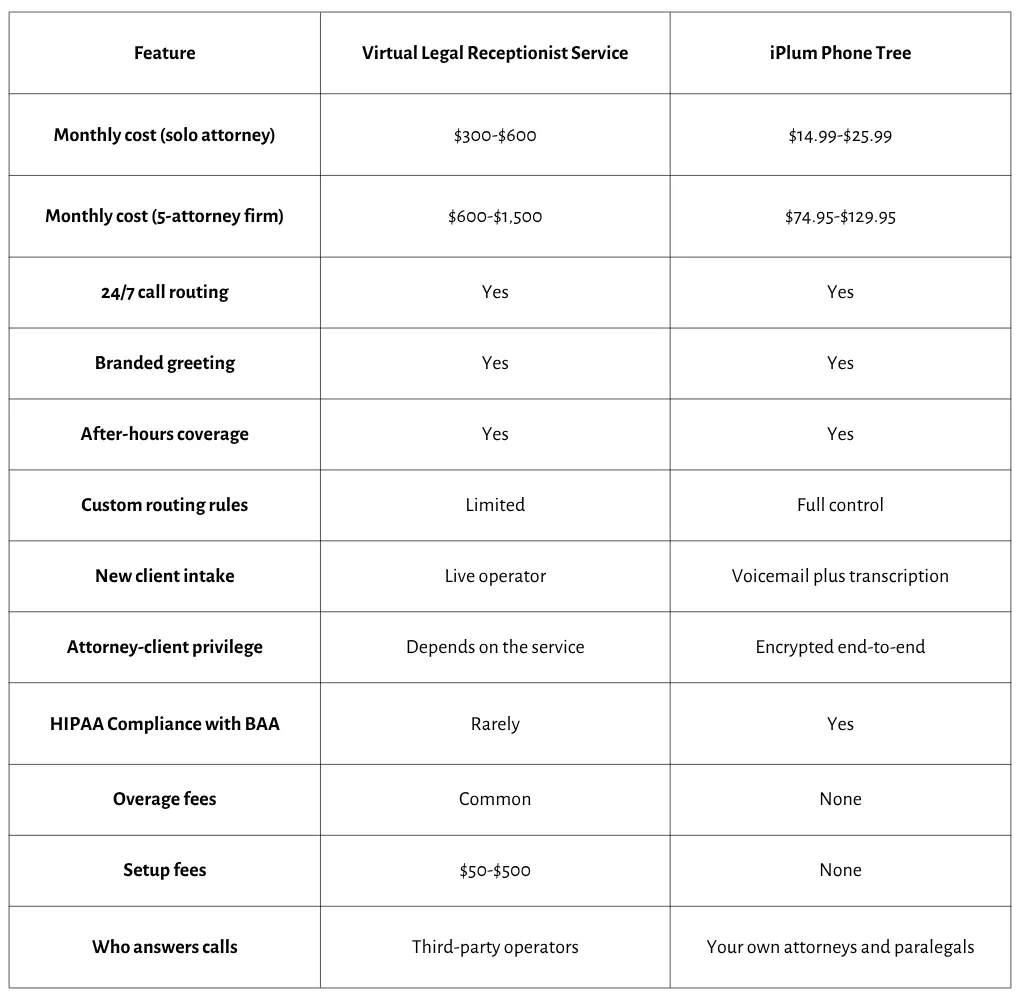
Virtual legal receptionist service vs iPlum phone tree at a glance
Here's how the two options compare on the features that matter most to solo attorneys and small firms.
Setting up iPlum's phone tree for your law firm
Swapping a virtual legal receptionist service for iPlum takes under 30 minutes for a solo attorney and under an hour for a small firm.
Five steps, and the phone tree runs live. Here’s how it works:
- Buy your primary iPlum phone number at my.iplum.com, or port your existing firm number.
- Add users for each attorney and paralegal from Dashboard > Users > Add User.
- Go to Organization > Phone Tree & Extensions and click Setup Phone Tree.
- Record your greeting, then add extensions for attorneys, directory, directions, billing, new client intake, and after-hours coverage.
- Click Save Configuration and toggle the Enable switch to green.
The bottom line
A virtual legal receptionist service costs $3,600 to $18,000 per year for a small firm.
iPlum's Professional plan, on the other hand, costs $179.88 per attorney per year. For the price of two months of a legal answering service, a solo attorney gets an entire year of iPlum with end-to-end encrypted texting, a signed Business Associate Agreement, voicemail transcription, unlimited extensions, and zero overage bills.
Ready to protect your billable hours and client satisfaction without paying a virtual receptionist service every month?
Click the link below to sign up for an affordable virtual legal receptionist replacement with iPlum and build your phone tree in under 30 minutes.

