


%20(1).avif)
.avif)

Your phone, in all likelihood, plays a central role in your private practice.
You use it to call patients, send appointment reminders, check voicemail, and share important updates.
However, convenience comes with a serious responsibility.
Patient names, health details, and appointment notes can end up in personal call logs, text threads, lock-screen notifications, and voicemail inboxes. And if those details reach the wrong person, your practice could face a HIPAA violation.
You already know that.
So, the question is: how do you communicate from a mobile device while protecting patient privacy?
We'll answer that question with a five-point checklist for HIPAA-compliant mobile communication.
You'll learn what to check before choosing a service, how to protect patient conversations, and how to manage staff access.
We'll also explain how iPlum meets these requirements for private practices.
Table of Contents
1. What makes mobile communication HIPAA compliant?
2. The 5-point HIPAA-compliant mobile communication checklist
3. How iPlum addresses the five-point checklist
5. Protect patient communication with iPlum
What makes mobile communication HIPAA compliant?
Let's start with the basics.
Protected health information (PHI) is any detail linking a patient to their health status, treatment, or payment history. Once you store or send it electronically, it becomes ePHI.
A call about test results contains ePHI. So does a text confirming a therapy appointment, a voicemail mentioning a prescription, or a photo of a treatment plan.
HIPAA requires you to protect ePHI with three types of safeguards:
- Administrative safeguards — policies, staff training, and access decisions
- Physical safeguards — device security, like passcodes and screen locks
- Technical safeguards — encryption, authentication, and audit controls
That said, here's where most private practices make a mistake: they use native calling and texting apps.
The problem is that native calling and texting apps aren't HIPAA-compliant.
And, even with a HIPAA-compliant app, you still need to configure it correctly, decide who can access patient information, train staff, review your communication process, and sign a Business Associate Agreement when required.
The 5-point HIPAA-compliant mobile communication checklist
You now know what HIPAA expects regarding mobile communication. The next step is checking whether your current setup meets those expectations.
Below are five questions to help review your mobile communication process or to assess phone platforms before committing to one.
1. Are work and personal communications properly separated?
A personal phone can still serve as a business device. However, patient calls, texts, contacts, and voicemails shouldn't appear in the phone's personal apps.
Why?
Because personal apps can copy information to consumer cloud backups, paired computers, smartwatches, or other devices. They can also leave patient names and message previews mixed with private conversations.
Then there's number ownership.
If a clinician contacts patients through their personal number, the practice doesn't own the conversation. And, when an employee resigns, they walk away with patient conversations, and you have no way to revoke access.
A dedicated business number solves this. It separates patient communication from personal activity.
With one, staff can call and text through an approved business app. Meanwhile, the practice retains ownership of the number and related records.
However, separation shouldn’t stop at calls and texts. It should also apply to:
- Voicemail
- Contact lists
- Photos
- Fax records
- Call recordings
- Message attachments
Administrators should also be able to add users, assign permissions, revoke access, and reassign the business number when staff roles change.
- So, ask questions yourself:
- Does the practice own the phone number?
- Can staff use the business number on their existing phones?
- Can an administrator revoke access from a lost or stolen device?
- Do communication records remain available after an employee leaves?
- Are patient calls and messages separated from personal apps?
If you answered no to any of these, work-personal separation belongs at the top of your to-do list.
2. Is ePHI protected during transmission and storage?
Encryption turns patient information into unreadable code for unauthorized users.
However, you need encryption at two stages.
First, data needs protection while moving between the sender, service provider, and recipient. HIPAA refers to this stage as data in transit.
Second, the service needs to encrypt stored data. Data at rest can appear in message archives, voicemail files, call recordings, attachments, and backups.
Both stages are important.
A service could encrypt a message during transmission but store a readable copy afterward. Likewise, it could secure stored records but expose them during delivery.
Therefore, review all communication types, including:
- Voice calls
- Text messages
- Voicemail
- Photos
- Documents
- Call recordings
- Message attachments
Regular SMS creates another concern.
You can't manage access once the message reaches the recipient's native texting app. And copies can appear on linked devices, in cloud backups, and in lock-screen notifications.
Secure patient messaging should hide sensitive details in basic notifications. In addition, the patient should verify their identity before opening the full message.
So, before choosing a service, ask the vendor to explain its encryption methods. Look for specific details about encryption during transmission, storage, and backup.
Then ask:
- Does the service encrypt calls, texts, and voicemail?
- Are stored messages and recordings encrypted?
- Can lock-screen notifications hide PHI?
- Are attachments protected?
- Can patients read secure messages through a protected portal?
- What happens to stored data after account closure?
3. Can the practice control who accesses patient communication?
Shared passwords compromise accountability.
When five staff members log in with the same credentials, you can't tell who read a message or returned a call.
Thus, give each staff member a unique account instead. Then assign permissions based on job duties.
For example, a receptionist might need appointment calls and texts. A billing employee might need access to the fax machine. Meanwhile, only the practice owner might need call recordings or archived voicemail.
Simply, staff should only access the patient information required for their role. HIPAA refers to this as the minimum necessary standard.
Personal devices also need basic security settings, such as:
- Passcodes
- Biometric authentication
- Automatic screen locking
- App authentication
- Hidden notification previews
- Current operating system updates
That said, phones also get lost, stolen, and replaced. Your platform should, therefore, let an administrator revoke a device's access remotely, so a missing phone doesn't turn into a reportable breach.
If your practice runs a shared number — a main line several staff members answer — administrator controls become even more important. You must decide who joins the line, what they can see, and when their access ends.
Look for granular permissions too. A good platform allows you to set separate access levels for calls, texts, faxes, contacts, and voicemail.
Finally, schedule a recurring review. Once a quarter, pull up the list of active users and confirm two things: everyone on it still works for you, and their access level still matches their role.
On this one, ask yourself:
- Does every user receive a separate login?
- Can administrators assign permissions according to job duties?
- Can the practice revoke account access remotely?
- Does the app require authentication after a period of inactivity?
- Can administrators review active users and their permissions?
- Can staff access only the communication features required for their roles?
4. Can the practice trace and retain communication records?
Imagine a patient disputes what your office told them about medication. Or a regulator asks how your practice communicated during a specific week.
Could you produce the records?
A private practice should be able to reconstruct a patient conversation when a question, complaint, or security incident arises.
Audit logs answer the question of who did what.
A solid audit trail should show:
- The user involved
- The patient's number
- The date and time
- The action taken
- The delivery status
- Any changes made
- Log in and access activity
Meanwhile, archives answer the question of what was said.
- A secure communication archive preserves:
- Calls
- Texts
- Voicemail beyond the device itself
That way, you can retrieve records during internal reviews, patient disputes, or regulatory inquiries.
HIPAA doesn't prescribe one universal retention period for all patient messages. Federal laws, state requirements, payer contracts, and the type of medical record can set different periods.
So, your practice needs a written retention schedule. And, the communication platform should allow you to store records according to that schedule.
Archiving also protects business records from routine deletion on individual phones. When you archive data, deleting a message from one device doesn't erase the practice's official history.
For this checklist, ask yourself:
- Does the service create detailed audit logs?
- Can the log identify the staff user behind an action?
- Can administrators search communication records?
- Can the practice set retention periods?
- Are archived records protected from ordinary deletion?
- Can administrators export records when required?
5. Has the vendor signed a BAA, and has the practice documented its process?
A Business Associate Agreement (BAA) is a contract that makes your vendor legally responsible for protecting the PHI it handles. It spells out the vendor's obligations, including breach reporting and security incident duties.
The BAA explains:
- How the vendor can use PHI
- How it protects PHI
- When it must report security incidents
- How subcontractors must protect patient information
- What happens to PHI after the contract ends
Worth noting, encryption doesn't replace BAA.
A vendor can encrypt data and still leave you exposed if there is no BAA. And that’s because HIPAA holds your practice accountable for vendors operating without a BAA in place.
When does a vendor need one?
The HHS states that cloud vendors that create, receive, maintain, or transmit ePHI on behalf of a regulated practice generally qualify as business associates and need a BAA.
Your phone platform stores patient calls, texts, and voicemail, so it qualifies.
If a vendor refuses to sign, walk away. Consumer phone services and free messaging apps almost never offer one, which rules them out for patient communication.
That said, the agreement is half the job. The other half is documentation.
Your practice needs a written mobile communication policy. The policy should address:
- Personal device use
- Patient identity verification
- Minimum necessary information
- Lost or stolen phones
- Messages sent to the wrong recipient
- Suspicious links
- Employee departures
- Security incident reporting
While at it, train staff during onboarding and provide periodic refresher sessions. Also, document access decisions, app settings, policy changes, and security reviews.
Finally, test your incident response plan. Staff should know who to contact and what to do after losing a phone, exposing patient information, or sending a message to the wrong recipient.
Here you need to ask:
- Will the vendor sign a BAA?
- Does the agreement address incident reporting?
- Has the practice written a mobile communication policy?
- Have staff received training?
- Does the practice document access and configuration decisions?
- Is there a written response plan for security incidents?
If an auditor ever asks, this paper trail proves your practice took compliance seriously, before anyone came asking.
How iPlum addresses the five-point checklist
You now know what to check when reviewing a mobile communication platform.
So, where does iPlum come in?
Here's how the platform compares against the five checks:
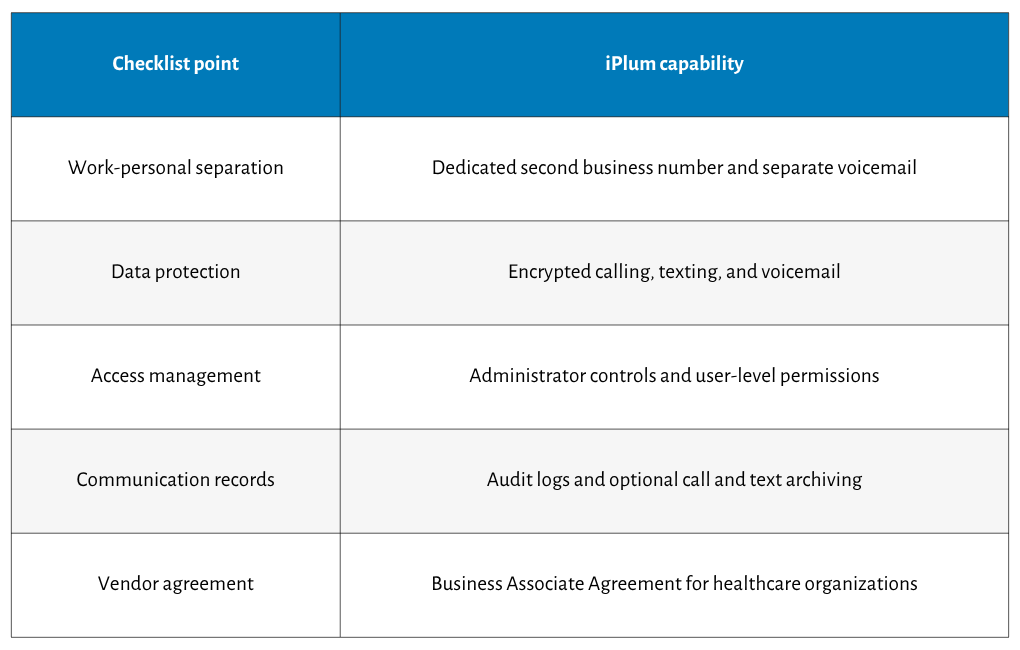
Let's unpack that.
It gives providers a separate work number
iPlum adds a second business number to a clinician’s existing phone.
Patients call or text the iPlum number. Meanwhile, the clinician's personal number, call history, texts, and voicemail remain separate.
The practice also owns the business number. If an employee leaves, an administrator can revoke their account access and assign the number to another authorized user.
So, patient conversations don't walk out the door with a former employee.
It encrypts calls, texts, and voicemail
iPlum uses AES-256 encryption and PKI cryptography to protect communication inside its system.
The encryption applies to calls, text messages, voicemail, and stored communication records.
Patients don't have to install iPlum to receive a secure message either. They can open the message through an encrypted browser portal and respond from there.
Consequently, your practice can avoid placing sensitive details inside regular SMS threads.
It lets administrators manage staff access
The platform allows administrators to manage users and communication services from the iPlum web portal.
You can add or remove users and decide who gets access to calls, texts, fax, contacts, and voicemail.
For example, a receptionist could receive calls and texts. A billing employee could access the fax. Meanwhile, the practice owner could retain access to voicemail and archived records.
Those permissions limit access to patient information based on job duties.
It records communication activity
iPlum creates an audit trail for business communication.
For shared text messaging, the record identifies which user sent a reply. So, if a patient questions a message, the practice can check who responded and when.
Optional archiving also stores call and text records in accordance with the practice's retention settings.
Therefore, deleting an item from a personal device doesn't have to erase the official communication history.
It provides a Business Associate Agreement
iPlum provides a signed BAA for healthcare organizations. The agreement defines its responsibility for protecting PHI processed through the platform.
The platform also maintains SOC 2 Type II certification for data security, availability, and confidentiality controls.
However, your practice still has responsibilities.
You must configure the account correctly, assign user permissions, train staff, document communication policies, and regularly review access.
Once those measures are ready, you can use iPlum for HIPAA-compliant patient calls, texts, voicemail, and fax communication.
The good news is that iPlum provides reliable technical support when needed.
Frequently asked questions
Can private practices use personal phones for HIPAA-compliant communication?
Yes. Staff can use personal phones if the practice installs a HIPAA-compliant business app, applies device security settings, separates patient communication, controls access, and documents its mobile communication policy properly.
Is regular SMS HIPAA compliant?
No. Standard SMS lacks encryption, access controls, and audit trails. Messages travel through carrier networks in readable form, and copies can appear in backups, linked devices, and lock-screen notifications.
Does HIPAA require mobile message encryption?
HIPAA treats encryption as an addressable safeguard under the current Security Rule. Practices must assess their circumstances and document why encryption or an equivalent safeguard protects ePHI appropriately during communication
What is a Business Associate Agreement?
A BAA is a contract making your vendor legally responsible for protecting the PHI it stores or transmits. It defines security duties, breach-reporting rules, and obligations upon contract termination.
Does using iPlum automatically make a private practice HIPAA compliant?
No platform does. iPlum provides the technical safeguards — encryption, access controls, audit logs, and a BAA. Your practice must add written policies, staff training, and regular process reviews.
Protect patient communication with iPlum
HIPAA-compliant mobile communication comes down to five checks: separation, encryption, access permissions, communication records, and a signed BAA.
Your practice also needs written policies, trained staff, secure devices, and regular account reviews. iPlum brings those safeguards to the phones your staff already carry.
Sign up for iPlum today and give your private practice a dedicated business number for secure patient calls, texts, voicemail, and fax from existing mobile devices.

