


%20(1).avif)
.avif)

Yes, you can get a Google Voice number in Canada. However, there are several limitations that can affect your experience.
First, Google built Voice primarily for the U.S. market. Therefore, Canadian users have to deal with feature gaps, workarounds, and limits.
Below, we’ll zero in on how to get a paid Google Voice account in Canada, what you can or cannot do with your line.
More importantly, we’ll tell you why iPlum is a good Google Voice alternative in Canada and how to get started.
Let’s start by answering the all-important question.
Table of Contents
1. Can I get a free Google Voice number in Canada?
2. How to get a Google Voice number in Canada?
3. 7 limitations of Google Voice in Canada
4. Google Voice in Canada—Frequently asked questions (FAQs)
5. Is there an alternative to Google Voice in Canada?
6. iPlum— get a Canada mobile number built for business
Can I get a free Google Voice number in Canada?
No, you cannot get a free Google Voice number in Canada. Google limits free numbers to U.S. customers. A free account requires a U.S. phone number and a U.S. IP address during verification. And because Google checks both, it’s impossible to pass verification from Canada.
That said, the Canadian market can access Google Voice through a paid Google Workspace subscription. With a paid account, you can get a phone number and calling features.
How to get a Google Voice number in Canada?
You need a paid Google Workspace subscription and an admin login to get a Google Voice number in Canada.
Here is a step-by-step walkthrough.
- Step 1: Create or sign in to a Google Workspace account: Go to the Google Workspace and sign up for a business plan if you do not have one yet. Make sure that you set the billing address and organization to Canada.
- Step 2: Open the Google Admin console: Sign in at admin.google.com using your administrator email. You cannot activate Voice using regular Google accounts.
- Step 3: Add a Google Voice subscription: In the Admin console, go to Billing → Buy or upgrade. Under Categories, select Google Voice, pick a Voice plan available in Canada (Starter, Standard, or Premier), and click Get started. Follow the prompts to complete checkout.
- Step 4: Set up locations and service addresses: After you activate the subscription, go to Apps → Google Workspace → Google Voice. Add at least one Canadian location or service address. Google requires this address for licensing and regulatory reasons.
- Step 5: Assign Google Voice licenses to users: Next, open Directory → Users in the Admin console. Select each user who needs Voice, click Assign licenses, and assign the Google Voice license you purchased.
- Step 6: Assign Canadian phone numbers: Go back to Apps → Google Workspace → Google Voice → Users. For each licensed user, click Assign number. Choose Canada as the country, pick an available local Canadian number, and confirm the assignment.
That’s it. You can now sign in to Voice and start using the number
To use the service, visit voice.google.com or open the Google Voice app on mobile.
Then, sign in with the same Google Workspace account, accept the terms, and you can start making and receiving calls on your new Canadian number.
7 limitations of Google Voice in Canada
While you can use Google Voice in Canada, it isn’t without serious drawbacks. These limits determine call quality, messaging options, and how far the system can scale.
Below are the most notable Google Voice limitations in Canada for business communication.
1. No SMS
You cannot send or receive SMS in Canada using Google Voice. You can only make calls, which limits how you communicate with contacts who prefer quick text updates.
In fact, the Google Voice website explicitly states that texting features apply to U.S. numbers only.
And, with stats showing that Canadians text twice as much as they call, that can be a significant drawback.
So if your business is SMS-heavy, you’ll have to look for another service for two-way text messages.
2. No toll-free numbers
Google Voice doesn't offer toll-free numbers in Canada.
As explained in the setup process, Canadian users can only access local geographic numbers during signup. Toll-free options such as 800, 833, or 888 are not part of the Canadian Voice lineup.
If you want a number that can help you create a nationwide presence or an easy-to-remember inbound line, you must choose another virtual phone number provider.
3. Limited collaboration features
Google Voice in Canada doesn’t provide the best functionality for day-to-day collaboration inside your business. Sure, the platform offers basic call routing and simple ring groups.
However, it doesn't provide advanced call management features such as shared numbers, multi-user call assignment, unified voicemail access, and broadcast texting.
As a result, your internal communication becomes disjointed when several staff members need to manage customer conversations together.
4. No caller ID
You cannot set up a branded caller ID name for outbound calls in Canada.
For starters, the caller ID display comes from external carrier databases. And, Google Voice doesn’t allow you to register or verify your chosen CNAM.
Thus, your calls may show up as an unrecognized number or a generic label, which can reduce answer rates in sales, healthcare, or service-based work.
5. No dual calling reliability
You cannot switch between carrier voice and data calling with Google Voice.
Phone calls route through a data (VoIP) connection, so audio quality depends on your Wi-Fi or mobile signal. If your Wi-Fi or mobile data is unstable, your call quality drops.
And because Voice has no built-in toggle to route calls through your carrier voice network, you can’t stabilize audio quality in low-signal areas or busy public networks.
6. Limited business-grade features
You cannot build a business-ready workflow around a Canadian Google Voice plan.
The platform doesn’t offer compliance-ready texting, long-term archiving rules, granular recording options, and structured user management for regulated industries.
Furthermore, the IVR system is significantly basic compared to a Google Voice competitor such as iPlum.
7. Limited remote-work support
You cannot use Google Voice in Canada for remote work.
At the moment, Google Voice offers international calling to a select list of countries. It is therefore difficult for Canadian businesses to support a remote workforce in regions where Google Voice doesn’t work.
A remote phone system should give every staff member a business number regardless of where they live, and Google Voice doesn’t offer that level of reach for Canadian users.
Google Voice in Canada—Frequently asked questions (FAQs)
Can I use Google Voice to text a Canada number?
No, you cannot use Google Voice to text a Canadian number.
Google limits texting features to U.S. numbers, so Canadian users only get calling. You’re better off with another service to use SMS in Canada.
Does Google Voice exist in Canada?
Yes, Google Voice exists in Canada, but only through a paid Google Workspace plan.
In addition, you must activate your account through the admin console and assign a Canadian number. The free version is only available for a US phone number.
Why is Google Voice not working in Canada?
Google Voice may not work in Canada for several reasons, such as regional restrictions, blocked SMS, or activation issues in the admin console.
That said, be sure to get a paid Workspace setup with correct licensing and configuration for the best service.
Is there an alternative to Google Voice in Canada?
Yes, there’s an alternative to Google Voice in Canada.
iPlum is a top Google Voice competitor in Canada if you’re looking for a virtual phone system that can help close the gaps that limit call quality, texting, remote work, and international communication.
iPlum gives you a Canada mobile number, reliable call routing, encrypted texting, voicemail tools, and a business phone tree in its expansive collection of 50+ features.
Below is a table summarizing how iPlum compares to Google Voice for Canadian users.
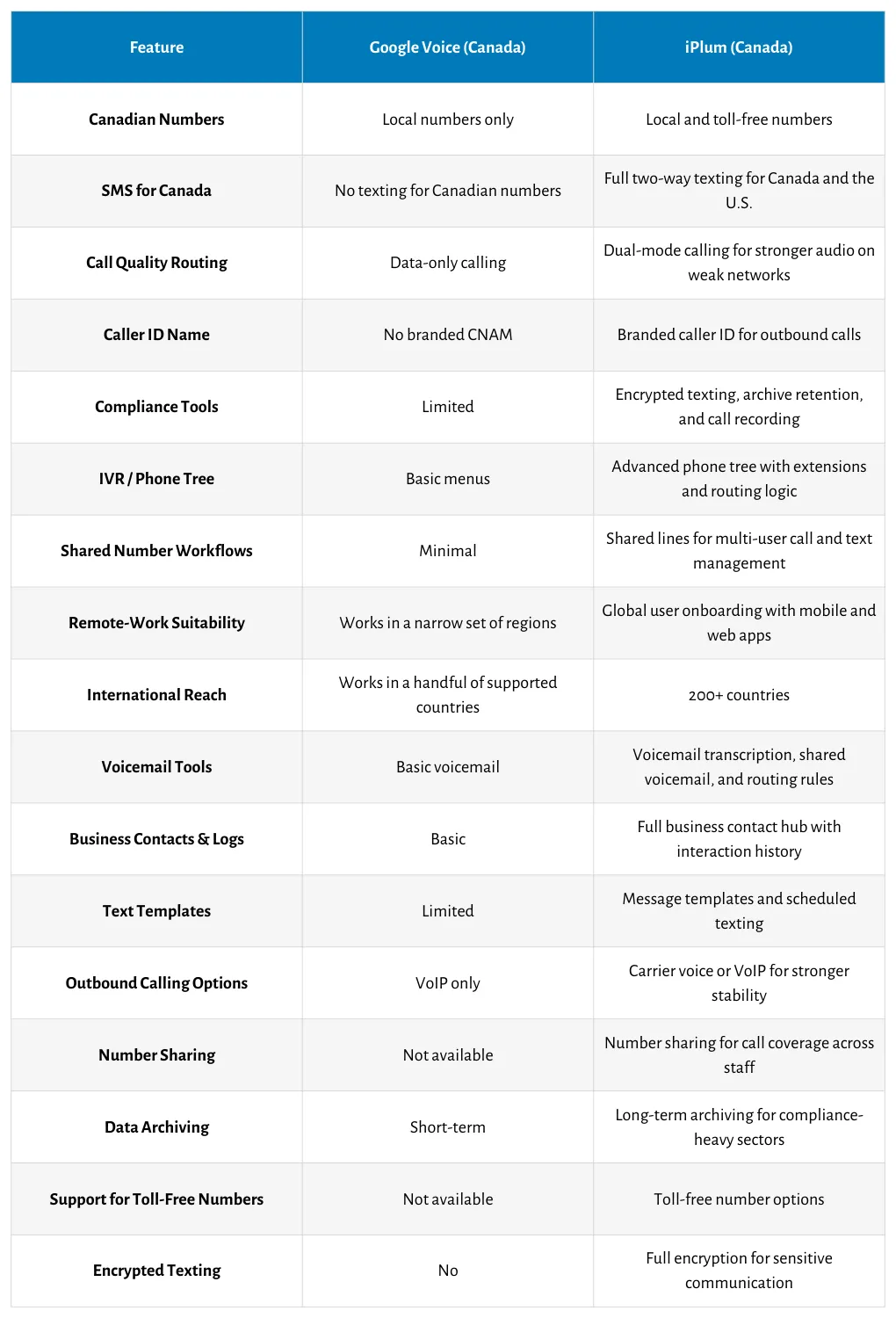
Also, iPlum support offers easy number porting from Google Voice. Watch the video below for a step-by-step walkthrough.
Port Your Number Out of Google Voice
iPlum— get a Canada mobile number built for business
Indeed, you can use Google Voice in Canada for calling.
But there are many downsides to using the service. Voice doesn’t provide two-way text messages, a toll-free number, a caller ID, not to mention the almost non-existent collaboration tool and limited international reach.
Luckily, you have options.
iPlum is the best Google Voice alternative in Canada for robust, effective communication. First, the service allows you to bypass Voice’s limitations in Canada.
In addition, it boasts powerful technology and a collection of robust business communication features ranging from auto attendants to voicemail transcription, call forwarding, business hours, and more.
Ready to experience the iPlum difference?
Click the link below to get a local number for Canada.
Disclaimer: This article is intended for general informational purposes and may not reflect the most current features or capabilities of the products or companies mentioned. For the most accurate and up-to-date information, please refer to the official sources of each company.

