


%20(1).avif)
.avif)

Your practice signs up for a new phone service, EHR, or billing company.
Then the vendor provides a Business Associate Agreement, either as a document for execution or an account-specific agreement through its portal. Or worse, it provides nothing.
Now you're staring at pages of legal language, trying to decide whether the agreement meets HIPAA requirements.
You sign vendor paperwork all the time. But do you know what a complete BAA must contain?
If you don't understand the terms, you can leave breach reporting, subcontractor duties, patient record requests, and data disposal unresolved. And when something goes wrong, your practice can face the consequences.
So, what should you check before accepting a BAA or sending PHI through the service?
We'll answer with a seven-point checklist for business associate agreements.
You'll also learn what to do when a vendor refuses to enter into a BAA and how iPlum provides account-specific healthcare BAAs through its client portal.
Table of Contents
1. What is a Business Associate Agreement, and who needs one?
2. The 7-point Business Associate Agreement checklist
3. How iPlum manages BAAs for healthcare organizations
4. Business associate agreement checklist: frequently asked questions
5. Sign your next vendor agreement with confidence
What is a Business Associate Agreement, and who needs one?
A Business Associate Agreement is a contract that makes your vendor legally responsible for protecting the PHI it handles.
Who counts as a business associate?
The HHS states that vendors who create, receive, maintain, or transmit ePHI on behalf of a covered practice generally qualify as business associates.
For a private practice, that list usually contains:
- Phone and messaging platforms
- EHR and practice management software
- Billing and claims services
- Cloud storage and backup providers
- Transcription services
- IT support with access to systems holding PHI
Some vendors don't need one, though.
For instance, postal and courier services can fall under HIPAA's conduit exception because they merely transport information. Vendors that never create, receive, maintain, or transmit PHI don't need a BAA either.
Here's the part most practice owners get wrong, though.
Encryption, security certifications, and "HIPAA-compliant" marketing claims don't replace the agreement. HIPAA holds your practice accountable for vendors that operate without a BAA in place.
A complete phone BAA should:
- Define what the vendor can do with PHI
- Establish incident and breach duties
- Explain what happens to PHI when the contract ends
The checklist below shows the seven components that produce those outcomes.
The 7-point Business Associate Agreement checklist
Before signing, review the contract against the following seven points below.
Begin by analyzing the language controlling how the vendor can use and disclose your patients’ health information.
Let’s break down a BAA checklist.
1. Permitted uses and disclosures of PHI
Start with the most fundamental question: what can the vendor do with your patient information?
A BAA should connect permitted uses to the service you’re buying.
For example, a billing company can use PHI to prepare and submit claims. A phone provider can process calls, texts, voicemail, and communication records as required to provide the service.
Anything beyond the purchased service should pique your curiosity.
Watch for broad phrases such as:
- “As needed for business purposes”
- “To improve our services”
- “For analytics”
- “For product development”
Such language isn't automatically prohibited. However, the vendor should explain which activities it permits, what PHI is involved, and why the activity is necessary.
Read de-identification clauses carefully, too.
Information properly de-identified under HIPAA is no longer PHI. Still, the agreement should state whether the vendor can de-identify information and what it can do with the resulting data.
In addition, carefully review marketing, advertising, data sales, and AI training. The BAA shouldn't authorize the vendor to use PHI for activities your practice couldn't lawfully perform under the Privacy Rule.
Finally, compare the BAA with the main service agreement. The service agreement shouldn't sneak in broader data rights.
Here's what you need to answer at the end of this step:
- Does the BAA name the purchased service?
- Are permitted uses and disclosures specific?
- Does it prohibit unapproved uses?
- Can the vendor de-identify PHI?
- Does it mention marketing, analytics, or AI training?
- Do the BAA and service agreement match?
2. Safeguard requirements
The agreement should require the vendor to protect ePHI using the administrative, physical, and technical safeguards required by the HIPAA Security Rule.
However, don't settle for one sentence promising "appropriate safeguards."
A good BAA should describe what protection looks like in practice. Look for commitments around:
- Encryption for data in transit and at rest
- Access controls and unique user authentication
- Workforce training on PHI protection
- Security incident procedures
- Regular security reviews or assessments
Then ask the vendor to back the promises with evidence.
An independent audit report, such as SOC 2 Type II, verifies the vendor's security controls through a third party. Security documentation, encryption specifications, and hosting details add further proof.
A vendor confident in its safeguards will share the details.
One more consideration: the safeguards should apply to every service touching PHI. If the vendor stores voicemail, records calls, or backs up messages, those functions need the same protection as the main service.
Here's what you need to answer at the end of this step:
- Does the BAA require Security Rule safeguards?
- Are encryption commitments stated in writing?
- Does the vendor train its workforce on PHI protection?
- Can the vendor provide independent verification, like SOC 2?
- Do safeguards apply to every function touching PHI?
3. Breach notification duties and timelines
Sooner or later, a vendor will experience a security incident. The BAA determines whether you find out in time to respond.
The agreement must require the vendor to notify your practice after discovering a breach of unsecured PHI. It should also require reports of security incidents, even those that fall below the breach threshold.
Now, the detail everyone misses: the timeline.
HIPAA gives business associates up to 60 days to report a breach. Your agreement can demand sooner, and it should.
Why?
Because your practice carries its own notification duties. You must inform affected patients, and larger breaches require reports to HHS and, in some cases, to the media. A vendor reporting on day 59 leaves you scrambling to meet your own deadlines.
As a rule of thumb, negotiate a shorter window. In fact, many practices require notice within 5 to 15 days of discovery.
Reporting periods vary according to the agreement.
For example, iPlum's BAA requires written notice of a security incident or non-permitted use or disclosure no later than three business days after iPlum becomes aware of it.
If the investigation identifies a reportable breach of unsecured PHI, iPlum must provide a written report no later than 30 calendar days after discovery.
The agreement should require the vendor to identify:
- The individuals affected
- The types of PHI involved
- What happened and when
- Mitigation steps taken
- A contact for follow-up questions
To top it all off, confirm the agreement addresses cooperation. The vendor should assist your practice with the investigation and any regulatory response.
Here's what you need to answer at the end of this step:
- Does the BAA require breach notification to your practice?
- Is the reporting window shorter than 60 days?
- Must the vendor report security incidents below the breach threshold?
- Does the notice requirement list affected individuals and PHI types?
- Must the vendor cooperate with your investigation?
4. Subcontractor obligations
Your vendor also has vendors they're dealing with.
For instance, a phone platform hosts data with a cloud provider. A billing company might use offshore staff. Meanwhile, a transcription service could route audio through a third-party engine.
Under HIPAA, these subcontractors qualify as business associates too. And your BAA should address them.
The agreement must require the vendor to bind every subcontractor touching PHI to the same protections the vendor agreed to. In legal terms, the obligations flow downstream.
Don't stop at the clause, though. Ask the vendor a few plain questions:
- Which subcontractors receive, store, or process PHI?
- Where do the subcontractors operate?
- Does the vendor sign each BAA?
- What happens if a subcontractor causes a breach?
The answers help you determine how seriously the vendor takes its downstream responsibilities. In fact, a vendor who can't name its subcontractors probably hasn't bound them to anything.
Pay attention to the data location as well. Some practices prefer PHI stored within the United States, and some state rules or payer contracts require it. Therefore, if location is important to your practice, put it in writing.
Here's what you need to answer at the end of this step:
- Does the BAA require subcontractors to follow the same protections?
- Can the vendor name the subcontractors touching PHI?
- Does the vendor sign BAAs with its subcontractors?
- Does the agreement address breaches caused by subcontractors?
- Do you know where PHI is stored and processed?
5. Patient rights provisions
HIPAA gives patients rights over their information. They can request copies of their records, ask for corrections, and receive an accounting of disclosures.
Your practice answers those requests. But when the vendor holds the data, you need its cooperation to respond.
So, the BAA should require the vendor to assist with:
- Access requests — producing PHI when a patient asks for their records
- Amendments — correcting information that the patient disputes
- Accounting of disclosures — listing who received the patient's PHI and when
Here's how it plays out.
A patient requests every message your practice exchanged with them last year. The communication records live on your phone platform's servers. If the BAA never addressed access requests, you're now negotiating with the vendor while HIPAA's 30-day clock runs.
The point is, the vendor should respond to your requests promptly so your practice can meet its deadlines.
Data storage format is important, too. The vendor should produce records in a readable, usable form.
Here's what you need to answer at the end of this step:
- Does the BAA require assistance with patient access requests?
- Can the vendor amend PHI when your practice requires it?
- Will the vendor provide disclosure records for accounting?
- Are vendor response timelines defined?
- Will the records arrive in a usable format?
6. Termination and PHI return or destruction
Sure, contracts end. However, patient data shouldn't disappear with them or, worse, linger on a former vendor's servers indefinitely.
A good BAA should, therefore, state what happens to PHI at termination. At the very least, it should stipulate that the vendor return the information, destroy it, or do both, as directed by your practice.
Sometimes return or destruction isn't feasible. In such cases, the agreement should require the vendor to extend the BAA's protections to the retained PHI and to limit any further use of it.
Your practice can also ask whether the vendor provides written confirmation upon destruction of PHI. HIPAA does not require every BAA to contain a destruction-certificate clause, so review the exact agreement rather than assuming it provides one.
iPlum's BAA requires iPlum to return or destroy the PHI it still maintains after termination or expiration. If return or destruction is infeasible, iPlum must continue protecting the retained PHI and limit further uses and disclosures.
And there's the termination rights bit.
The agreement should allow your practice to terminate the contract if the vendor breaches a material term of the BAA.
Pro tip: Request a data export before the contract ends, not after.
Here's what you need to answer at the end of this step:
- Does the BAA state what happens to PHI at termination?
- Can your practice choose return, destruction, or both?
- Do protections continue for PHI that the vendor can't delete?
- Will the vendor certify destruction in writing?
- Can your practice terminate the contract after a material breach of the BAA?
7. HHS access and compliance documentation
The BAA must require the vendor to make its internal practices, books, and records available to HHS during a compliance investigation. HIPAA requires the clause, so its absence signals a poorly drafted agreement.
Now, flip the checklist toward your own practice, because the agreement is half the job. Documentation is the other half.
Store every applicable BAA in your vendor records, including account-specific agreements issued electronically through a client portal, and track:
- The effective date
- The services the agreement addresses
- Renewal or review dates
- Changes in the vendor's services since the agreement took effect
Review each agreement when the relationship changes. For instance, a vendor adding call recording, AI features, or new storage arrangements might process PHI in new forms that the original agreement never anticipated.
Also, document your vendor review process.
Maintain notes showing how you evaluated the vendor, obtained its BAA, and examined its safeguards. Such records demonstrate due diligence if a regulator asks.
And what if a vendor refuses to enter into or provide a BAA?
Walk away. A qualifying business associate that refuses to accept the agreement will not assume its contractual duties regarding your patient information.
Here's what you need to answer at the end of this step:
- Does the BAA grant HHS access to the vendor's records?
- Are all applicable BAAs stored in your vendor records?
- Do you track review and renewal dates?
- Do you re-review agreements when vendor services change?
- Is your vendor review process documented?
- Will you reject vendors that refuse to enter into a BAA?
How iPlum manages BAAs for healthcare organizations
You now know what a complete BAA should contain.
So, how does iPlum measure up as a HIPAA-compliant calling and texting vendor?
Let’s find out. But first, here's a quick breakdown:
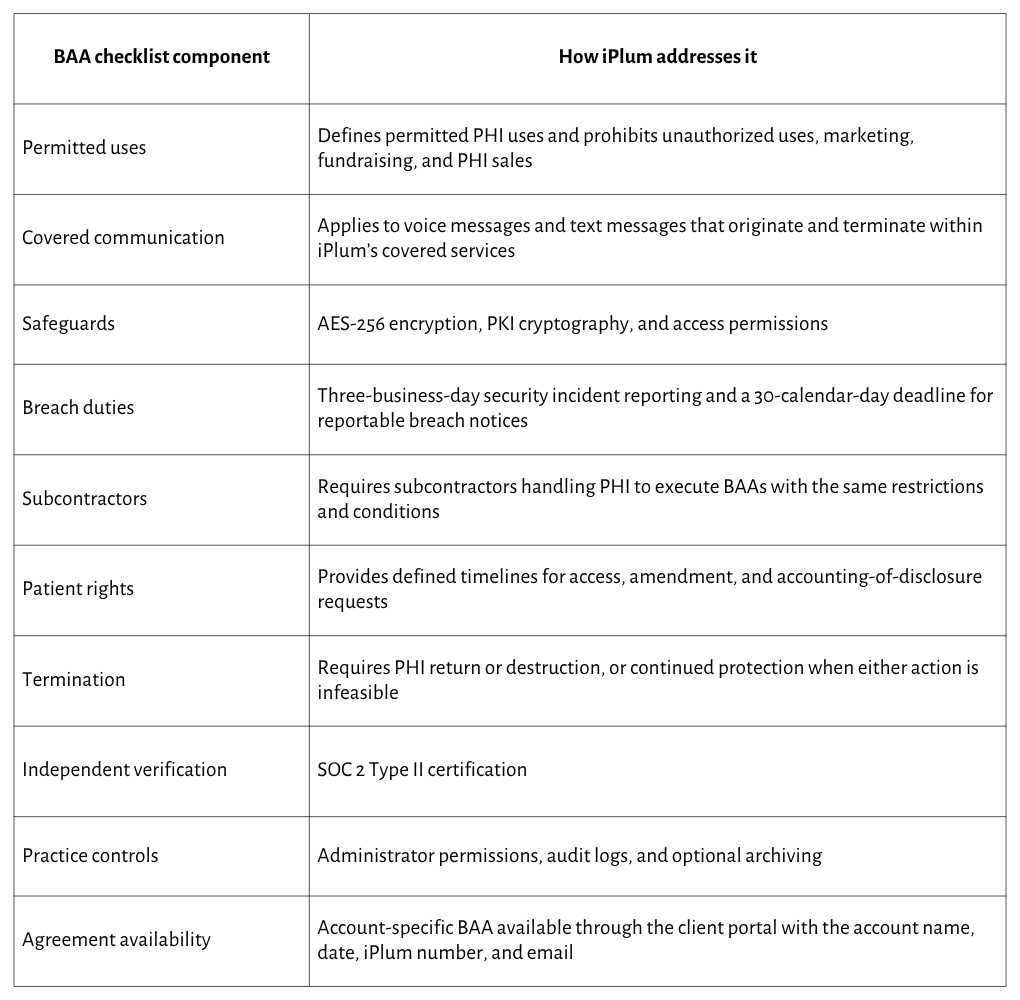
It provides an account-specific BAA through the client portal
iPlum does not manually exchange signed BAA copies with every healthcare client. Instead, it makes an account-specific BAA available from the iPlum side of the client portal.
The portal agreement identifies the client as the Covered Entity and iPlum as the Business Associate. It also displays the client's account name, effective date, iPlum phone number, and account email.
Those details connect the agreement to the specific iPlum account and document its HIPAA coverage under the stated terms.
An administrator can access the agreement from the web portal by going to:
- Dashboard
- Users
- iPlum login ID
- Compliance
- HIPAA Compliance
Open and review the agreement before sending patient information through the platform.
Pay particular attention to permitted PHI uses, incident reporting duties, subcontractors, patient record requests, and termination terms.
Here’s how to download the BAA from your iPlum account portal.
iPlum's BAA applies to voice messages and text messages between users when the communication originates and terminates within iPlum's covered products and services.
The agreement does not extend the same coverage to SMS or other messaging that originates or terminates outside iPlum's service platform.
Healthcare staff should therefore use iPlum's covered communication channels for conversations containing PHI rather than sending such information via standard external messaging.
It backs the agreement with technical safeguards
A Business Associate Agreement must operate alongside technical safeguards.
iPlum uses AES-256 encryption and PKI cryptography to protect calls, text messages, voicemail, and stored communication records.
Patients can also open secure messages through an encrypted browser portal. They don't need to install iPlum before responding.
In addition, healthcare staff receive a separate business number on their existing phones. Patient calls and messages remain separate from personal communication.
For BAA coverage, text conversations containing PHI must originate and terminate within iPlum's covered platform.
It sets written incident and breach deadlines
iPlum must report a security incident or non-permitted use or disclosure in writing no later than three business days after becoming aware of it.
The company must then investigate the event and determine whether it qualifies as a reportable breach of unsecured PHI.
When a reportable breach occurs, iPlum must send the Covered Entity a written report no later than 30 calendar days after discovery. The agreement also requires iPlum to cooperate with the clinic in meeting its breach-notification obligations.
It assists with patient information requests
When iPlum maintains PHI in a designated record set, its BAA requires access to or amendment of the information within 15 days of the Covered Entity's request.
For an accounting of disclosures, iPlum must provide the required information within 30 days. It must also notify the Covered Entity within 15 days after receiving a request from an individual or another requesting party.
Electronic records must be provided in the requested format when they can be readily reproduced in that form. Otherwise, iPlum and the Covered Entity must agree on another format.
It extends BAA duties to subcontractors
Any iPlum subcontractor that creates, receives, maintains, or transmits PHI must execute its own BAA.
The subcontractor agreement must impose the same restrictions, conditions, and PHI requirements that apply to iPlum under its agreement with the Covered Entity.
It addresses PHI after account termination
After the BAA expires or terminates, iPlum must return or destroy all remaining PHI it received or created for the Covered Entity and retain no copies, when feasible.
When return or destruction is infeasible, iPlum may retain only the PHI required for its legal or administrative duties. The BAA protections continue for as long as iPlum retains that information.
The agreement also permits the Covered Entity to terminate the BAA following a material breach. Depending on the circumstances, iPlum receives up to ten business days to correct a curable breach
A quick reminder about your responsibilities
The BAA addresses the vendor's side. Your practice must still configure the account, assign user permissions, train staff, and write its communication policies.
HIPAA coverage depends on both sides meeting their duties. Your practice must also use the communication services that fall within the BAA’s defined scope.
Business associate agreement checklist: frequently asked questions
What is a Business Associate Agreement?
A Business Associate Agreement is a contract requiring a vendor to protect PHI, limit its use, report incidents, bind subcontractors, assist with patient rights, and properly address data after termination.
Is a BAA required by law?
Yes. HIPAA generally requires a regulated healthcare organization to enter into a BAA with any vendor that creates, receives, maintains, or transmits PHI on its behalf before sharing patient information with that vendor.
What happens if a vendor refuses to sign a BAA?
If a qualifying vendor refuses to enter into or provide a BAA, don't send PHI through its service. Select a provider that accepts the required contractual duties under HIPAA.
Does a BAA expire or need renewal?
BAAs don't automatically expire unless their terms set an end date. Review them when services, PHI uses, subcontractors, ownership, security practices, or the main vendor agreement changes during the relationship.
Does iPlum provide a BAA for private practices?
Yes. iPlum makes an account-specific BAA available through its client portal. The agreement identifies the covered account by company name, effective date, iPlum number, and account email for HIPAA coverage.
Sign your next vendor agreement with confidence
A complete BAA answers seven questions: permitted uses, safeguards, breach duties, subcontractors, patient rights, termination, and HHS access.
Check each area before accepting an agreement, retain the BAA with your vendor records, and reject qualifying vendors that refuse to provide one.
Your phone platform is a good place to start. Sign up for iPlum and access your account-specific BAA through the client portal before sending patient information through the service.

