


%20(1).avif)
.avif)
.webp)
iPlum is the best FINRA-compliant texting app for financial firms if you’re looking for a cost-effective solution with up to 10 years of archiving, WORM message retention, and automated audit trails for regulatory reviews.
Other options, though not as feature-rich, include ArchiveMyTexts, MyRepChat, and TeleMessage.
In this post, we’ll break down:
- What makes a texting app FINRA-compliant
- Top FINRA-compliant messaging apps for financial professionals
- Factors to consider when choosing a texting app for financial advisors and more.
We’ll also show you why iPlum leads the pack in security, usability, and regulatory readiness. On top of that, we’ll answer a few questions regarding FINRA-compliant texting.
Table of Contents
2. Best FINRA-compliant texting apps for financial firms
3. What should financial firms consider when choosing a texting app?
4. How can you implement a FINRA-compliant texting solution in your firm?
5. FINRA-compliant texting apps for financial firms FAQs
6. Achieve FINRA-compliant texting with iPlum
TL;DR
Here’s a comparison table for a quick overview.
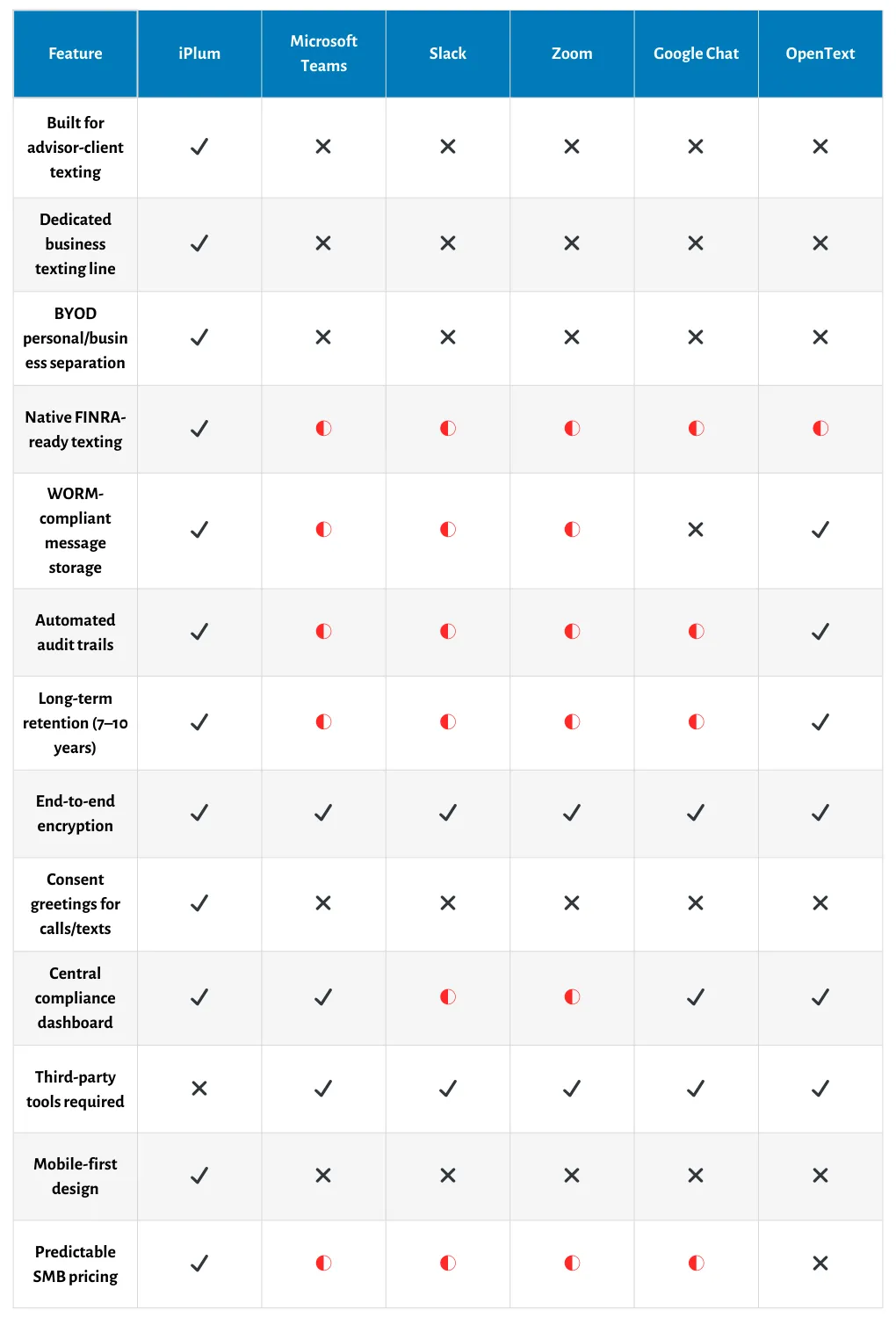
Best FINRA-compliant texting apps for financial firms
There are several apps for FINRA-compliant messaging available on the market. However, how they handle compliance varies by application.
We’ve zeroed in on six of these apps.
In the sections below, we’ll tell you what to expect from each so you can decide which one best suits your needs from a point of information.
1. iPlum
iPlum is the most comprehensive FINRA-compliant texting solution for financial professionals in this roundup. It offers robust compliance features, is easy to use, and competitively priced.
iPlum creates a secure, siloed environment for client communications on your existing mobile phone, enabling firms to meet strict FINRA regulations and SEC rules with no additional hardware required.
In addition, it supports WORM message retention, automated audit trails, and up to 10 years of text message archiving.
In addition, iPlum offers a centralized dashboard that helps compliance teams monitor, manage, and maintain records with ease.
Meanwhile, iPlum’s financial compliance line lets you separate personal and business communications, ideal for BYOD environments.
It also supports secure communication with end-to-end encryption, customizable consent greetings, and administrator-controlled user activity policies, among other capabilities.
Key features
- WORM-compliant text archiving: Meets regulatory compliance for SEC Rule 17a-4 and FINRA Rule 4511
- Dual-line BYOD setup: Keeps personal devices separate from regulated communication platforms
- Automated audit trails: Ensures accurate record-keeping and exam-ready audit logs
- Secure communication: Built-in data encryption, end-to-end encryption, and customizable consent greetings
- Central compliance console: Allows compliance officers to manage users and pull firm-wide reports
- Up to 10 years of text archiving: Offers long-term message retention to satisfy FINRA compliance, SEC obligations, and state-level regulatory requirements
Pros
- Easy to use
- Highly secure
- Robust FINRA compliance tools
- Mobile-first design
- Long-term archiving
Cons
You must be on the Enterprise. (However, iPlum is the most affordable financial compliance line on the market)
iPlum pricing
iPlum’s financial compliance line is included with the Enterprise Plan, priced at $25.99 per user per month.
In addition to FINRA compliance, the line includes over 50 features, including voicemail, call routing, team accounts, business hours, and more.
iPlum also supports number porting, so you can keep your existing business number without disrupting ongoing client communications.

2. Microsoft Teams
Microsoft Teams is a workplace collaboration and internal messaging platform built for internal chat, meetings, and file sharing.
Microsoft Teams can be FINRA-compliant. However, you need to pair it with Microsoft Purview, Microsoft’s compliance and data governance suite. Purview enables administrators to configure retention rules, communication supervision, and eDiscovery workflows that support FINRA and SEC compliance.
That said, Microsoft Teams works best if you’re already using the Microsoft 365 ecosystem.
In addition, the platform doesn’t provide a dedicated business line or separate mobile channel for advisor-client texting. It’s a workplace collaboration tool first and not a texting app purpose-built for financial communication compliance.
Key Features
- eDiscovery and legal hold: Allows system administrators to preserve message history, safe from deletion by users.
- Regulatory policy detection: Purview scans messages for potential FINRA or SEC violations.
- Content search: Supports rich filtering across chat, channels, and calls.
- Audit logs: Provides a detailed user activity and message history for internal reviews.
Pros
- Integrates directly with Microsoft 365
- Powerful search and legal hold capabilities
- Centralized admin controls via Microsoft Purview
Cons
- No native texting archiving without configuration
- Not built for advisor-client mobile messaging
- No BYOD business line separation
Microsoft Teams pricing
Microsoft Teams is part of Microsoft's 365 Business and Enterprise plans.
Pricing starts at $6 per user per month (Microsoft 365 Business Basic) and increases to $22 per user per month (Microsoft 365 E5), which includes Microsoft Purview compliance features such as eDiscovery and data retention.
Note: Advanced compliance features such as legal hold, supervision, and communication retention policies require Microsoft Purview add-ons or Microsoft 365 E5 licensing.

3. Slack
Slack is a team collaboration tool for internal messaging, file sharing, and workflow automation.
Like Microsoft Teams, Slack can support FINRA compliance. However, you must use it alongside third-party archiving tools such as Global Relay, Smarsh, or Archive360.
These integrations allow you to capture messages and files in a WORM format, in line with the SEC Rule 17a-4 and FINRA Rule 4511.
Slack is ideal for large organizations looking for an easy-to-use intercompany communication platform that can be configured to meet regulatory requirements.
Although Slack is great for team collaboration, it doesn’t offer a dedicated texting line. You can’t, therefore, use it as a compliant advisor-to-client messaging solution out of the box.
In addition, it doesn’t support BYOD separation for financial advisors communicating with clients.
Key Features
- Third-party archiving support: Allows you to capture and retain messages through integrated partners
- Unified compliance dashboards: Allows you to view Slack and non-Slack content (e.g., email, social, mobile) in one console
- Advanced search: Use AI and keyword filters to identify risks across communication threads
- Granular retention policies: Set channel-specific archiving durations via external compliance tools
Pros
- Modern, user-friendly interface
- Integrates with compliance vendors
- Centralized supervision via external dashboards
Cons
- No separate texting line or BYOD support
- Requires third-party archiving setup
Slack pricing
Slack pricing is structured in three plans as follows:
- Pro: $7.25 per user/month
- Business+: $12.50 per user/month
- Enterprise Grid: Custom pricing (required for regulated industries)
Note: FINRA-compliant archiving requires a separate contract with a compliance archiving vendor (e.g., Global Relay or Smarsh), which may significantly increase total costs.

4. Zoom
Zoom is best known for video meetings, but it also offers in-meeting chat and team messaging through Zoom Team Chat.
To support compliance needs, Zoom offers Zoom Compliance Manager (ZCM), a compliance archiving solution powered by Theta Lake.
ZCM captures chat, video, audio, screen shares, and AI-generated meeting summaries. This makes it useful for financial firms that conduct frequent virtual meetings and need to retain communications for FINRA compliance.
However, Zoom doesn’t allow you to spin up a separate mobile number for compliant texting. It’s primarily built for team collaboration, not one-to-one advisor-client conversations over SMS or mobile channels.
Key features
- Full meeting capture: Archives video, audio, screen share, and in-meeting chat
- Automated risk detection: Flags phrases or behavior that may violate regulatory policies
- Searchable archives: Quickly retrieve meeting content and chat transcripts for audits
- Metadata logging: Includes timestamps, participant data, and user activity
Pros
- Ideal for firms using Zoom for meetings
- Supports multi-channel compliance capture
Cons
- No business texting or separate mobile line
- Compliance features require ZCM and third-party tools
Zoom pricing
Zoom Team Chat is included with Zoom One subscriptions, starting at $15.99 per user per month (Pro) and $19.99 per user per month (Business).
Zoom Compliance Manager is a paid add-on powered by Theta Lake. Pricing depends on volume and configuration and requires a separate contract.

5. Google Chat
Google Chat is a team messaging platform included with Google Workspace. It supports internal collaboration across messages, files, and tasks.
Like Microsoft Teams and Slack, Google Chat doesn't provide FINRA-compliant messaging on its own. However, you can use it with Google Vault to enable compliance workflows like message retention, content search, and legal holds.
Vault lets you define retention rules and search message history across Chat, Gmail, and Drive, which is crucial for firms needing regulatory oversight.
Still, this setup lacks a dedicated advisor-client texting line and doesn’t provide BYOD separation. It’s not designed for frontline financial communication or long-term archival in WORM format without third-party integrations.
Key Features
- Retention rules via Vault: Define how long messages are stored across Chat and Gmail
- Search and export: Locate communications quickly for legal discovery or audits
- Legal holds: Preserve data even when users delete messages
- Access management: Control which admins can retrieve or audit records
Pros
- Built into Google Workspace
- Easy message search and legal hold setup
- Centralized archiving for multiple channels
Cons
- No WORM storage without external tools
- Not designed for client-facing communication
Google Chat + Vault pricing
Google Vault is included with Google Workspace Business Plus ($18 per user per month) and Enterprise plans (custom pricing).
Note: For FINRA-grade archiving, you may need to integrate with Google Chat with third-party tools such as AODocs or Smarsh, which can increase total compliance costs.

6. OpenText
OpenText Core is an enterprise-grade archiving solution for highly regulated industries.
It captures and stores messages from sources such as Slack, Microsoft Teams, Salesforce, and other business communication platforms in a centralized, compliance-ready archive.
OpenText scans communication content in real-time for policy violations based on custom lexicons, flags risky behavior, and enforces immutable (WORM) storage to meet FINRA and SEC standards.
However, OpenText is not a texting app per se. It doesn't offer direct client messaging or a separate business line for mobile use. It’s an archiving backend, not a front-end communication tool.
Key features
- Multi-channel ingestion: Captures messages across Slack, Teams, email, mobile, and more
- Immutable WORM storage: Ensures records are tamper-proof and meet SEC Rule 17a‑4
- Custom lexicon scanning: Flags violations based on industry-specific keywords
- Centralized compliance dashboard: Enables supervision, policy enforcement, and audit readiness
- Flexible retention policies: Set channel-specific data lifecycle controls
Pros
- Built for large-scale regulatory compliance
- Supports multiple communication sources
Cons
- No BYOD support or texting separation
- Requires separate communication platforms
OpenText pricing
OpenText does not publicly list pricing. Firms must request a custom quote based on volume, data sources, storage duration, and compliance configurations.
What should financial firms consider when choosing a texting app?
Before you choose a specific texting app that claims to offer FINRA-compliant messaging, ensure it offers the following:
Compliance readiness
Verify that the app supports WORM-compliant storage, message retention for at least six years, audit trails, and end-to-end encryption.
The best FINRA-compliant texting app must meet regulatory requirements without requiring custom configurations, manual archiving, or separate tools to manage records.
The last thing you want is a platform without built-in compliance features.
Native vs. third-party archiving
Check whether the app stores messages natively or depends on third-party apps. Native archiving reduces integration failures and simplifies oversight.
It also ensures your firm retains full control over client data. Third-party add-ons can create compliance gaps, especially if records are lost between platforms or retention settings are misaligned.
Admin control and supervision tools
Ensure the app provides compliance officers with full visibility into client conversations.
The platform should also include a centralized admin console to monitor messaging activity, apply communication policies, enforce retention settings, and generate audit logs for regulatory reviews.
Manual tracking is too slow and unreliable for regulatory compliance.
BYOD and device separation
For firms that allow personal devices, the app must create a clear barrier between personal and business messages. Look for dual-line functionality or sandboxed apps that isolate business communications. This setup helps protect sensitive data and safeguard employee privacy.
Usability and user adoption
Choose an app with a clean, intuitive interface. You don't want an app that interrupts your workflows or feels overly technical. Poor usability leads to non-compliance, as advisors might revert to default texting apps.
Integration and scalability
Ensure the app integrates with your CRM, compliance workflows, and authentication protocols, such as two-factor authentication. It should scale with your firm and adapt to future regulatory requirements without reengineering your stack.
How can you implement a FINRA-compliant texting solution in your firm?
There's more to implementing FINRA-compliant texting than just downloading an app. You need to align the tool with your compliance strategy, internal policies, and employee workflows.
Here's how to do it:
1. Choose the right app based on regulatory needs
Start by selecting a texting solution that actually meets FINRA and SEC rules.
Ensure it offers WORM-compliant storage, long-term archiving, audit logs, encryption, and admin controls. A solution like iPlum's financial compliance line provides all-in-one compliance features out of the box.
2. Set clear usage policies and train your team
Create written policies that outline how, when, and with whom financial professionals may communicate via text.
In addition, educate employees on compliance risks and proper usage. Also, ensure they know how to use the app and understand the firm's supervision expectations.
3. Configure admin settings and supervision controls
Set up admin dashboards to monitor usage. While at it, enable automated alerts, enforce retention policies, and restrict unsanctioned features.
In addition, compliance officers should periodically review settings and test archive accessibility.
4. Separate personal and business messaging
If your firm allows employees to use personal phones, choose a texting app that creates a separate business line or workspace on the same device.
This setup keeps all business text messages archived and compliant while preventing personal conversations from mixing with client communications.
5. Test the system for audit readiness
Simulate a real regulatory review to test your system.
Ask yourself: Can I retrieve records instantly? Are the audit trails complete and tamper-proof? Confirm that your texting app meets compliance standards before regulators audit your firm and request documentation.
6. Monitor, update, and stay informed
Monitor FINRA guidance and keep an eye on updates from your texting app provider.
Regularly review your configuration to ensure it aligns with the latest regulatory expectations and technology changes. Proactively adjust settings to maintain ongoing compliance.
FINRA-compliant texting apps for financial firms FAQs
Are financial advisors allowed to text clients?
Yes, financial advisors may text clients, provided they comply with FINRA and SEC regulations.
This means using compliant messaging apps that archive messages, prevent tampering, and enable compliance officers to supervise them. Native texting apps do not meet these requirements.
What is the most secure texting app?
The most secure texting apps offer end-to-end encryption, WORM-compliant storage, audit logs, and admin-level supervision.
iPlum, for example, encrypts messages in transit and at rest, and separates personal and business communication to protect client data on BYOD devices.
What is the best software for financial advisors?
The best software depends on your firm’s size, compliance needs, and communication workflows.
For FINRA-compliant texting, iPlum offers a mobile-first solution with long-term archiving, centralized supervision, and secure BYOD support, all at a competitive price.
Achieve FINRA-compliant texting with iPlum
You don’t need multiple tools or complex setups to comply with FINRA texting regulations.
iPlum gives you everything in one platform—secure messaging, WORM-compliant archiving, automated audit trails, and centralized supervision.
In addition, iPlum helps you separate business communication, protect client data, and be audit-ready when regulators come knocking.
Ready to simplify compliance and streamline your communication workflows?
iPlum financial compliance line has got you covered.
Click the link below to get started.
Get the iPlum financial compliance line
Disclaimer: This article is intended for general informational purposes and may not reflect the most current features or capabilities of the products or companies mentioned. For the most accurate and up-to-date information, please refer to the official sources of each company.

